AdvancedPython Programming · Lesson 29 of 30 · Updated ·
Threads, Processes and the GIL in Python — Concurrency Made Simple
A program that downloads 50 result PDFs one after another spends almost all its time waiting for the network. A program that resizes 50 photos spends its time calculating. Running work "at the same time" helps both, but in different ways. This lesson explains threads, processes and the famous GIL (Global Interpreter Lock), which is one of the most common Python interview questions.
1. Words you need
| Term | Meaning |
|---|---|
| Process | A running program with its own memory. Two processes do not share variables. |
| Thread | A path of execution inside a process. All threads of a process share its memory. |
| Concurrency | Making progress on several tasks by switching between them. |
| Parallelism | Literally running several tasks at the same instant on different CPU cores. |
| I/O-bound | The task mostly waits: network, disk, database, user input. |
| CPU-bound | The task mostly calculates: maths, image processing, sorting huge data. |
2. Your first threads
The threading module starts functions in new threads. start() begins the thread and join() waits for it to finish.
import threading
import time

def download(name, results):
    time.sleep(1)                     # pretend to wait for the network
    results[name] = f"{name}.pdf done"

results = {}
start = time.perf_counter()
threads = [threading.Thread(target=download, args=(n, results)) for n in ["sem1", "sem2", "sem3"]]
for t in threads:
    t.start()
for t in threads:
    t.join()
elapsed = time.perf_counter() - start

print(sorted(results.values()))
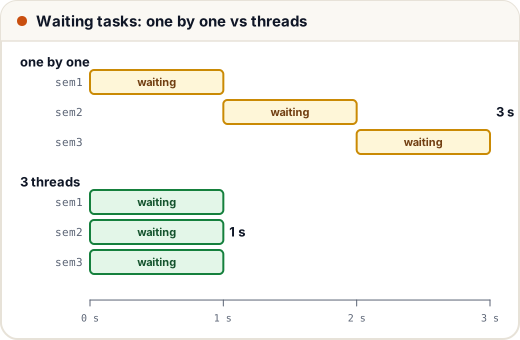
print("faster than one by one (3 s):", elapsed < 2)
['sem1.pdf done', 'sem2.pdf done', 'sem3.pdf done']
faster than one by one (3 s): True
Three waits of 1 second finished in about 1 second in total, not 3, because the threads waited together. We print a True/False check instead of the exact time, because the exact time changes slightly on every run.
3. ThreadPoolExecutor: the easier way
Creating and joining threads by hand gets repetitive. concurrent.futures.ThreadPoolExecutor keeps a pool of worker threads and hands them tasks. Its map returns results in the same order as the inputs, even if tasks finish in a different order.
from concurrent.futures import ThreadPoolExecutor
import time

def fetch_marks(roll):
    time.sleep(0.2)                   # pretend this is a slow web request
    return roll, 60 + roll % 40

rolls = [101, 102, 103, 104, 105]
with ThreadPoolExecutor(max_workers=5) as pool:
    for roll, marks in pool.map(fetch_marks, rolls):
        print(roll, marks)
101 81
102 82
103 83
104 84
105 85
The five requests run at the same time, so the whole block takes about 0.2 seconds instead of 1 second. The with block waits for all tasks before it ends, so you do not call join() yourself.
4. The GIL
CPython (the standard Python you download from python.org) has a Global Interpreter Lock. It is a lock that allows only one thread to run Python code at a time inside one process. It exists mainly because CPython's memory management (reference counting) is not safe if two threads change it at once.
What this means in practice:
- I/O-bound work: threads help. A thread that waits for the network or disk releases the GIL, so another thread can run during the wait. That is why the downloads above overlapped.
- CPU-bound work: threads do not speed it up. Only one thread can calculate at a time, so four threads doing maths take about as long as one thread doing all of it.
- For CPU-bound work, use processes. Each process has its own interpreter and its own GIL, so several processes can use several CPU cores truly in parallel.
Note: Python 3.13 added an optional, experimental "free-threaded" build without the GIL. The normal build still has the GIL, so the rules above are what you should expect today.
5. Race conditions and Lock
Threads share memory. When two threads read and update the same variable, one update can overwrite the other. This bug is a race condition: the result depends on the timing of the threads.
Real race conditions appear only now and then, which makes them hard to find. The program below forces the bad timing with a Barrier, an object that makes each thread wait until all 5 threads have reached it. So every thread reads the balance before any thread writes:
import threading

balance = 0
all_have_read = threading.Barrier(5)

def deposit():
    global balance
    current = balance            # 1. read
    all_have_read.wait()         # 2. wait until all 5 threads have read
    balance = current + 100      # 3. write

threads = [threading.Thread(target=deposit) for _ in range(5)]
for t in threads: t.start()
for t in threads: t.join()
print("expected 500, got", balance)
expected 500, got 100
All five threads read 0 before any of them wrote, so four deposits were lost.
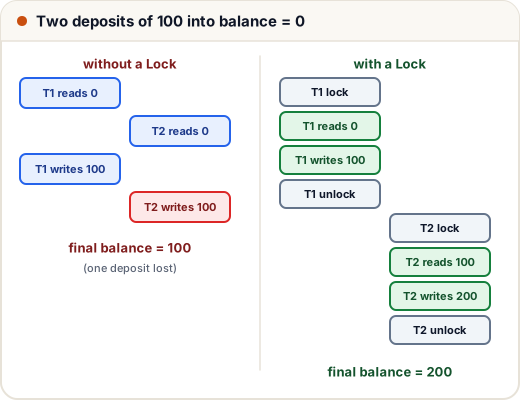
A threading.Lock lets only one thread at a time into a block of code. The with lock: form releases the lock even if an error happens.
import threading
import time

balance = 0
lock = threading.Lock()

def deposit():
    global balance
    with lock:                   # only one thread inside at a time
        current = balance
        time.sleep(0.01)
        balance = current + 100

threads = [threading.Thread(target=deposit) for _ in range(5)]
for t in threads: t.start()
for t in threads: t.join()
print("expected 500, got", balance)
expected 500, got 500
The GIL does not protect you here. It only stops two threads from running bytecode at the same instant; a thread can still be paused between the read and the write. Use a Lock (or a thread-safe queue.Queue) for shared data.
6. Processes for CPU-bound work
ProcessPoolExecutor has the same interface as the thread pool but runs tasks in separate processes. On Windows and macOS, new processes start by re-importing your file, so the starting code must be inside if __name__ == "__main__":.
from concurrent.futures import ProcessPoolExecutor

def count_primes(limit):
    count = 0
    for n in range(2, limit):
        if all(n % d for d in range(2, int(n ** 0.5) + 1)):
            count += 1
    return count

if __name__ == "__main__":
    limits = [10_000, 20_000, 30_000, 40_000]
    with ProcessPoolExecutor() as pool:
        print(list(pool.map(count_primes, limits)))
[1229, 2262, 3245, 4203]
Processes cost more to start than threads, and data sent between them must be copied (pickled). Use them when each task does a lot of calculation.
7. A first look at asyncio
asyncio runs many I/O tasks in one thread. A function defined with async def is a coroutine. At every await, it pauses and lets another coroutine run while it waits.
import asyncio

async def send_sms(name, delay):
    await asyncio.sleep(delay)        # waiting, so other tasks can run
    print("sent to", name)
    return name

async def main():
    done = await asyncio.gather(send_sms("Asha", 0.3), send_sms("Ravi", 0.1), send_sms("Neha", 0.2))
    print(done)

asyncio.run(main())
sent to Ravi
sent to Neha
sent to Asha
['Asha', 'Ravi', 'Neha']
The messages finish in order of their delays, but gather returns the results in the order the tasks were given. asyncio is used by web frameworks such as FastAPI, where one server handles thousands of waiting connections.
8. Which one should I use?
| Work | Best tool | Why |
|---|---|---|
| Many network or file waits | ThreadPoolExecutor | simple; waiting threads release the GIL |
| Thousands of network connections | asyncio | one thread, very low cost per task |
| Heavy calculation | ProcessPoolExecutor | real parallel use of CPU cores |
| Very large number crunching | NumPy and similar libraries | their C code often releases the GIL |
Common mistakes
- Using threads to speed up pure-Python calculation and seeing no gain because of the GIL.
- Forgetting
join()(or awithexecutor block), so the program uses results before they are ready. - Changing shared variables from several threads without a Lock.
- Thinking the GIL makes your code thread-safe. It does not.
- Starting processes without
if __name__ == "__main__":on Windows.
Quick recap
- A process has its own memory; threads inside it share memory.
- The GIL lets one thread run Python code at a time; waiting (I/O) releases it.
- Threads and asyncio help I/O-bound work; processes help CPU-bound work.
- Shared data needs a
Lock; race conditions lose updates silently. ThreadPoolExecutor.mapandProcessPoolExecutor.mapreturn results in input order.