Python Programming · Lesson 1 of 15 · Updated ·
Introduction to Python — Install, First Program and How It Runs
Python is a programming language that reads almost like English. It is the first language at many colleges, and companies use it for websites, data analysis, AI, automation and testing.
Why beginners love it:
- Short code. A task that needs 10 lines in Java often needs 3 in Python.
- Easy to read. Indentation (spaces) shows the structure — no curly braces.
- Huge library. Ready-made code for almost anything:
math,datetime, web, AI.
1. How Python runs your code
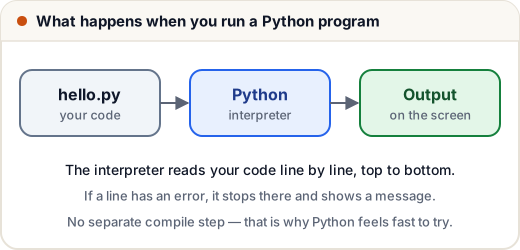
Python is interpreted: the Python program reads your file top to bottom, one line at a time, and runs it. If a line has an error, it stops at that line and prints an error message telling you the line number.
2. Install Python (Windows)
- Go to python.org → Downloads and download the latest Python 3.
- Run the installer and tick "Add python.exe to PATH" (very important).
- Open Command Prompt and type
python --version. You should see something likePython 3.12.1.
You can also practise without installing anything: Skills101's coding problems run Python in the browser.
3. Your first program
Create a file hello.py with this line, then run python hello.py in the terminal:
print("Hello, Skills101!")
Hello, Skills101!
print() shows whatever you put inside the brackets. Text must be inside quotes (single '…' or double "…", both work).
Printing several things
print("Name:", "Asha")
print("Marks:", 92)
print(10 + 5)
Name: Asha
Marks: 92
15
print puts a space between items separated by commas, and moves to a new line at the end.
4. Comments
Lines starting with # are comments — Python ignores them. Use them to explain why your code does something.
# Calculate the total price with 18% GST
price = 500
total = price * 1.18   # GST added
print(total)
590.0
5. Indentation matters
Python uses 4 spaces at the start of a line to show that it belongs to a block (you will see this with if, loops and functions). Wrong indentation is an error:
if 5 > 3:
    print("Five is bigger")
Five is bigger
If you forget the spaces before print, Python stops with an IndentationError.
6. Reading error messages
Errors are normal — every programmer sees them daily. Read the last line first: it says what went wrong (NameError, SyntaxError, IndentationError), and the line above it shows where.
Common mistakes
- Not ticking Add to PATH during installation, so
pythonis "not recognized". - Forgetting quotes around text:
print(Hello)→ NameError. - Mixing tabs and spaces for indentation. Use 4 spaces.
Quick recap
- Python runs your file top to bottom, line by line.
print()shows output; text goes in quotes.#starts a comment.- Indentation (4 spaces) defines blocks.
- Read the last line of an error message first.