Python Programming · Lesson 5 of 15 · Updated ·
Loops in Python — for, while, range, break and continue
A loop repeats code. Instead of writing print 100 times, you write it once inside a loop.
1. The for loop and range()
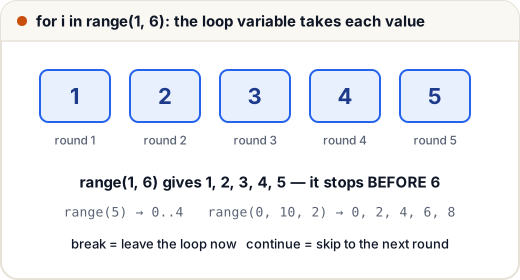
for i in range(1, 6):
    print(i, end=" ")
1 2 3 4 5
range(start, stop, step):
range(5)→ 0, 1, 2, 3, 4 (starts at 0)range(2, 8)→ 2 … 7 (stop is not included)range(10, 0, -2)→ 10, 8, 6, 4, 2 (counting down)
(end=" " keeps printing on the same line instead of a new line.)
Example: sum of 1 to 100
total = 0
for n in range(1, 101):
    total += n
print(total)
5050
2. Looping over a list or string
fruits = ["apple", "mango", "banana"]
for fruit in fruits:
    print(fruit.upper())

for ch in "abc":
    print(ch * 3)
APPLE
MANGO
BANANA
aaa
bbb
ccc
Need the index too? Use enumerate:
for i, fruit in enumerate(["apple", "mango"], start=1):
    print(i, fruit)
1 apple
2 mango
3. The while loop
while repeats as long as a condition is True. Use it when you don't know the number of rounds in advance.
n = 1234
digits = 0
while n > 0:
    n //= 10
    digits += 1
print(digits)
4
Make sure something inside the loop changes the condition, or the loop runs forever (an infinite loop). Press Ctrl + C to stop one.
4. break and continue
break— leave the loop immediately.continue— skip the rest of this round and go to the next.
for n in range(1, 10):
    if n == 6:
        break
    if n % 2 == 0:
        continue
    print(n)
1
3
5
5. Loop else
A loop's else runs only if the loop finished without break. Perfect for "search" loops:
n = 29
for d in range(2, int(n ** 0.5) + 1):
    if n % d == 0:
        print(n, "is not prime")
        break
else:
    print(n, "is prime")
29 is prime
6. Nested loops and patterns
A loop inside a loop: the inner loop runs fully for each round of the outer loop.
for row in range(1, 5):
    print("*" * row)
*
**
***
****
for i in range(1, 4):
    for j in range(1, 4):
        print(i * j, end="\t")
    print()
1	2	3
2	4	6
3	6	9
Common mistakes
- Expecting
range(1, 10)to include 10. - Infinite while loops (forgetting to update the variable).
- Changing a list while looping over it — loop over a copy instead (
for x in items[:]).
Quick recap
for x in range(a, b, step)— b is excluded.- Loop directly over lists and strings;
enumeratefor index + item. whilefor unknown counts; always update the condition.breakleaves;continueskips; loop-elseruns if no break.