Python Programming · Lesson 9 of 15 · Updated ·
Dictionaries in Python — Keys, Values and Real Programs
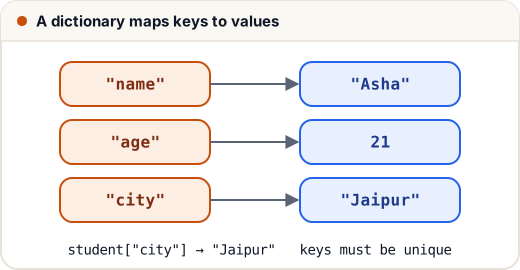
A dictionary (dict) stores key → value pairs. Instead of remembering "marks are at index 2", you write student["marks"].
1. Create and read
student = {"name": "Asha", "age": 21, "city": "Jaipur"}
print(student["name"])
print(student.get("cgpa"))           # None instead of an error
print(student.get("cgpa", "N/A"))    # with a default
print(len(student), "age" in student)
Asha
None
N/A
3 True
student["cgpa"]would raise a KeyError because the key doesn't exist. Use.get()when a key might be missing.
2. Add, change and delete
student = {"name": "Asha", "age": 21}
student["age"] = 22              # change
student["skills"] = ["python"]   # add
student.update({"city": "Pune", "age": 23})
del student["city"]
removed = student.pop("skills")
print(student, removed)
{'name': 'Asha', 'age': 23} ['python']
Keys must be unique and immutable (strings, numbers, tuples). Values can be anything.
3. Looping
prices = {"pen": 10, "notebook": 45, "bag": 600}
for item, price in prices.items():
    print(f"{item}: ₹{price}")
print(list(prices.keys()))
print(sum(prices.values()))
pen: ₹10
notebook: ₹45
bag: ₹600
['pen', 'notebook', 'bag']
655
4. Counting with a dictionary (very common)
text = "the cat and the hat and the bat"
counts = {}
for word in text.split():
    counts[word] = counts.get(word, 0) + 1
print(counts)
{'the': 3, 'cat': 1, 'and': 2, 'hat': 1, 'bat': 1}
counts.get(word, 0) + 1 means "current count (or 0 if new) plus one".
Sort a dictionary by value
counts = {"the": 3, "cat": 1, "and": 2}
top = sorted(counts.items(), key=lambda kv: kv[1], reverse=True)
print(top)
[('the', 3), ('and', 2), ('cat', 1)]
5. Dictionary comprehension
squares = {n: n * n for n in range(1, 5)}
print(squares)
{1: 1, 2: 4, 3: 9, 4: 16}
6. Nested dictionaries (like JSON)
college = {
    "name": "Skills101 Institute",
    "students": [
        {"name": "Asha", "marks": {"maths": 92, "dsa": 88}},
        {"name": "Ravi", "marks": {"maths": 74, "dsa": 81}},
    ],
}
for s in college["students"]:
    print(s["name"], s["marks"]["dsa"])
Asha 88
Ravi 81
This is exactly the shape of data you get from web APIs (JSON).
Common mistakes
- Using
d[key]for a key that may not exist → KeyError. Useget. - Trying to use a list as a key (lists are mutable → TypeError).
- Changing a dictionary's size while looping over it.
Quick recap
{key: value}; read withd[key]ord.get(key, default).- Add/change with
d[key] = value; delete withdelorpop. - Loop with
.items(),.keys(),.values(). - Count with
d.get(k, 0) + 1; sort items withkey=.