Python Programming · Lesson 14 of 15 · Updated ·
Modules, pip and Useful Python Libraries
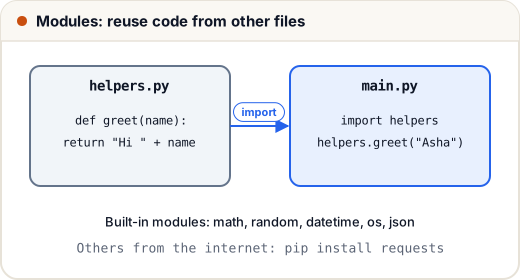
A module is just a .py file. Python comes with hundreds of ready modules (the standard library), and you can install thousands more with pip.
1. Import styles
import math
print(math.sqrt(144), math.pi)

from math import factorial, gcd
print(factorial(5), gcd(48, 18))

import datetime as dt
print(dt.date(2026, 1, 26).strftime("%A"))
12.0 3.141592653589793
120 6
Monday
import math→ usemath.sqrtfrom math import sqrt→ usesqrtdirectlyimport x as y→ a short alias
Avoid from module import * — it makes it unclear where names come from.
2. Your own module
If helpers.py contains:
def greet(name):
    return "Hi " + name

if __name__ == "__main__":
    print(greet("test"))   # runs only when you run helpers.py directly
then main.py in the same folder can do import helpers and call helpers.greet("Asha").
if __name__ == "__main__":means "only run this when the file is run directly, not when it is imported". Every serious Python file uses it.
3. Standard library highlights
random
import random
random.seed(1)          # same "random" numbers every run (good for testing)
print(random.randint(1, 6), random.choice(["red", "green", "blue"]))
nums = [1, 2, 3, 4, 5]
random.shuffle(nums)
print(nums)
2 blue
[4, 2, 5, 3, 1]
(With random.seed(1) you get exactly these values every time. Remove the seed line and the results change on each run.)
datetime
from datetime import date, timedelta
exam = date(2026, 12, 15)
start = date(2026, 11, 8)
print((exam - start).days, "days left")
print(start + timedelta(days=30))
37 days left
2026-12-08
collections
from collections import Counter, defaultdict, deque

print(Counter("mississippi").most_common(2))

groups = defaultdict(list)
for name, city in [("Asha", "Jaipur"), ("Ravi", "Pune"), ("Neha", "Jaipur")]:
    groups[city].append(name)
print(dict(groups))

q = deque([1, 2, 3])
q.appendleft(0)
q.pop()
print(list(q))
[('i', 4), ('s', 4)]
{'Jaipur': ['Asha', 'Neha'], 'Pune': ['Ravi']}
[0, 1, 2]
Other must-know modules: os and pathlib (files and folders), json, csv, re (regular expressions), itertools, time.
4. pip and virtual environments
pip installs packages from the internet (PyPI):
python -m venv .venv          # create an isolated environment for this project
.venv\Scripts\activate        # Windows (Mac/Linux: source .venv/bin/activate)
pip install requests pandas   # install packages into it
pip freeze > requirements.txt # save the exact versions
pip install -r requirements.txt  # recreate on another machine
Use a virtual environment per project, so one project's packages never break another's.
Popular libraries by field
| Field | Libraries |
|---|---|
| Web | Django, Flask, FastAPI |
| Data | pandas, NumPy, Matplotlib |
| AI / ML | scikit-learn, PyTorch, TensorFlow |
| Automation | requests, BeautifulSoup, Selenium |
| Testing | pytest |
Common mistakes
- Naming your own file
random.pyormath.py— it hides the real module. - Installing packages globally instead of in a virtual environment.
- Forgetting
if __name__ == "__main__":, so test code runs on import.
Quick recap
- A module is a .py file;
import,from … import,as. if __name__ == "__main__":for code that runs only directly.- Learn: math, random, datetime, collections, os/pathlib, json.
python -m venv,pip install,requirements.txt.