Python Programming · Lesson 13 of 15 · Updated ·
Exceptions and File Handling in Python — try/except and open()
Real programs face bad input, missing files and network problems. Instead of crashing, a good program handles these errors. This lesson also covers reading and writing files, where errors are common.
Part A — Exceptions
def safe_divide(a, b):
    try:
        result = a / b
    except ZeroDivisionError:
        return "Cannot divide by zero"
    else:
        return result
    finally:
        print("checked", a, b)

print(safe_divide(10, 2))
print(safe_divide(5, 0))
checked 10 2
5.0
checked 5 0
Cannot divide by zero
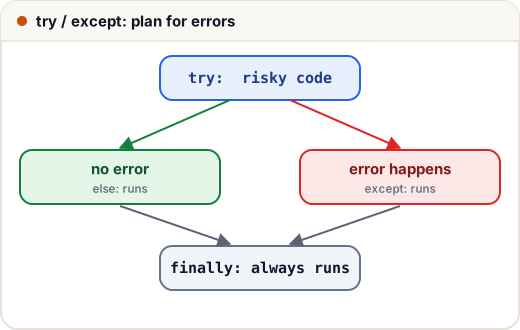
try— the code that might failexcept SomeError— runs if that error happenselse— runs if no error happenedfinally— always runs (good for cleanup)
Common exceptions
| Exception | When |
|---|---|
ValueError | right type, wrong value: int("abc") |
TypeError | wrong type: "5" + 5 |
ZeroDivisionError | dividing by zero |
IndexError | list index out of range |
KeyError | missing dictionary key |
FileNotFoundError | file doesn't exist |
Handling bad input
# Input: abc
# Input: 21
while True:
    try:
        age = int(input())
        break
    except ValueError:
        print("Please enter a number")
print("Age:", age)
Please enter a number
Age: 21
Raising your own errors
def set_marks(m):
    if not 0 <= m <= 100:
        raise ValueError("marks must be between 0 and 100")
    return m

try:
    set_marks(120)
except ValueError as e:
    print("Error:", e)
Error: marks must be between 0 and 100
Catch specific exceptions. A bare
except:hides real bugs.
Part B — Files
Always open files with with — it closes the file automatically, even if an error happens.
| Mode | Meaning |
|---|---|
"r" | read (default); error if missing |
"w" | write; erases the file first |
"a" | append to the end |
Write and read a text file
with open("notes.txt", "w", encoding="utf-8") as f:
    f.write("Learn Python\n")
    f.write("Practise daily\n")

with open("notes.txt", encoding="utf-8") as f:
    for line in f:
        print(line.strip())
Learn Python
Practise daily
CSV files
import csv

rows = [["name", "marks"], ["Asha", 92], ["Ravi", 74]]
with open("marks.csv", "w", newline="", encoding="utf-8") as f:
    csv.writer(f).writerows(rows)

with open("marks.csv", encoding="utf-8") as f:
    for row in csv.DictReader(f):
        print(row["name"], int(row["marks"]) + 5)
Asha 97
Ravi 79
JSON files
import json

data = {"name": "Asha", "skills": ["python", "sql"]}
with open("profile.json", "w", encoding="utf-8") as f:
    json.dump(data, f)

with open("profile.json", encoding="utf-8") as f:
    loaded = json.load(f)
print(loaded["skills"][1])
sql
Common mistakes
- Opening with
"w"when you meant"a"— it wipes the file. - Forgetting
encoding="utf-8"and getting errors with ₹ or Hindi text on Windows. - Catching every exception with a bare
except:.
Quick recap
- try / except / else / finally; catch specific exceptions;
raiseyour own. with open(path, mode, encoding="utf-8") as f:— always.- "r" read, "w" overwrite, "a" append.
csvandjsonmodules handle structured files.