Python Programming · Lesson 7 of 15 · Updated ·
Lists in Python — Create, Change, Sort and Slice
A list holds many values in order, in square brackets. Lists can grow, shrink and change — they are mutable.
marks = [78, 92, 65, 88]
print(marks[0], marks[-1], len(marks))
78 88 4
1. Changing a list
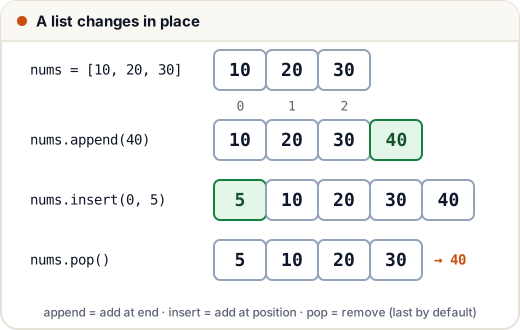
nums = [10, 20, 30]
nums.append(40)        # add at the end
nums.insert(0, 5)      # add at index 0
nums.remove(20)        # remove the first 20
last = nums.pop()      # remove and return the last item
nums[1] = 15           # replace by index
print(nums, last)
[5, 15, 30] 40
Other useful methods: extend(other_list), index(x), count(x), clear(), reverse().
2. Slicing (same as strings)
nums = [0, 1, 2, 3, 4, 5, 6]
print(nums[2:5], nums[:3], nums[-2:], nums[::-1])
[2, 3, 4] [0, 1, 2] [5, 6] [6, 5, 4, 3, 2, 1, 0]
3. Sorting
lst.sort()sorts the list in place (returnsNone).sorted(lst)returns a new sorted list.
scores = [70, 95, 82, 60]
print(sorted(scores))
print(sorted(scores, reverse=True))
names = ["ravi", "Asha", "neha"]
print(sorted(names, key=str.lower))
students = [("Asha", 92), ("Ravi", 74), ("Neha", 85)]
print(sorted(students, key=lambda s: s[1], reverse=True))
[60, 70, 82, 95]
[95, 82, 70, 60]
['Asha', 'neha', 'ravi']
[('Asha', 92), ('Neha', 85), ('Ravi', 74)]
4. Useful built-ins
nums = [4, 8, 15, 16, 23, 42]
print(sum(nums), min(nums), max(nums))
print(sum(nums) / len(nums))
print(15 in nums, 99 in nums)
108 4 42
18.0
True False
5. Copying a list (a classic trap)
b = a does not copy — both names point to the same list (remember the name-tag picture).
a = [1, 2, 3]
b = a          # same list
c = a.copy()   # a real copy (also: a[:] or list(a))
a.append(4)
print(b)
print(c)
[1, 2, 3, 4]
[1, 2, 3]
6. Lists of lists (2D)
grid = [[1, 2, 3],
        [4, 5, 6]]
print(grid[1][2])
for row in grid:
    print(sum(row))
6
6
15
7. Common list programs
Second largest (without sorting)
nums = [12, 45, 7, 45, 30]
first = second = float("-inf")
for n in nums:
    if n > first:
        first, second = n, first
    elif first > n > second:
        second = n
print(second)
30
Remove duplicates but keep order
items = [3, 1, 3, 2, 1]
seen, unique = set(), []
for x in items:
    if x not in seen:
        seen.add(x)
        unique.append(x)
print(unique)
[3, 1, 2]
Common mistakes
x = lst.sort()→ x isNone. Usesorted(lst)if you need the result.- Thinking
b = acopies a list. - Index out of range: the last index is
len(lst) - 1.
Quick recap
- Lists are ordered and mutable: append, insert, remove, pop, index assignment.
- Slicing works like strings.
sort()in place vssorted()new list;key=andreverse=.- Copy with
.copy(),[:]orlist().