Python Programming · Lesson 2 of 15 · Updated ·
Variables and Data Types in Python — int, float, str, bool and More
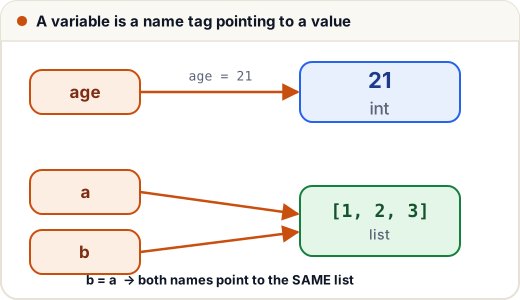
A variable stores a value so you can use it later. In Python, think of a variable as a name tag stuck on a value.
1. Creating variables
Just write name = value. No need to declare a type — Python works it out.
name = "Asha"
age = 21
cgpa = 8.7
is_placed = False

print(name, age, cgpa, is_placed)
Asha 21 8.7 False
You can change a variable any time — even to a different type:
x = 10
x = x + 5
print(x)
x = "now I am text"
print(x)
15
now I am text
Naming rules
- Letters, digits and
_only; cannot start with a digit (2marks✗,marks2✓). - Case-sensitive:
Ageandageare different. - Can't use keywords like
if,for,class. - Style: use snake_case for variables:
total_marks,student_name.
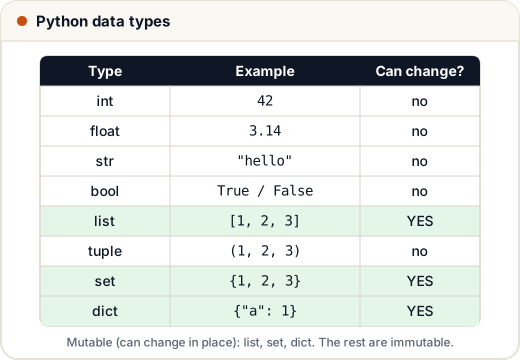
2. The main data types
| Type | What it holds | Example |
|---|---|---|
int | whole numbers (any size) | 42, -7, 10**20 |
float | decimal numbers | 3.14, 2.0 |
str | text | "hello", 'Jaipur' |
bool | True or False | 5 > 3 |
list | ordered, changeable collection | [1, 2, 3] |
tuple | ordered, fixed collection | (1, 2, 3) |
set | unique items, no order | {1, 2, 3} |
dict | key → value pairs | {"name": "Asha"} |
NoneType | "nothing" | None |
Check a type with type()
print(type(42))
print(type(3.5))
print(type("hi"))
print(type(True))
<class 'int'>
<class 'float'>
<class 'str'>
<class 'bool'>
3. Type conversion
Use int(), float(), str() and bool() to convert.
marks = "85"            # text from input or a file
print(int(marks) + 5)   # convert to a number first
print(str(100) + "%")   # convert number to text to join
print(int(9.99))        # int() cuts off the decimal part
print(float(7))
90
100%
9
7.0
"85" + 5gives a TypeError — you can't add text and a number. Convert first.
Truthy and falsy
bool() of 0, 0.0, "" (empty text), [], {} and None is False. Almost everything else is True.
print(bool(0), bool(""), bool([]), bool("0"), bool(5))
False False False True True
("0" is a non-empty string, so it's True!)
4. Multiple assignment and swapping
a, b, c = 1, 2, 3
a, b = b, a      # swap in one line
print(a, b, c)
2 1 3
Common mistakes
- Adding text and numbers without converting (
"Age: " + 21✗ →"Age: " + str(21)✓, or use a comma in print). - Starting variable names with digits.
- Forgetting that
int()cuts decimals rather than rounding (int(9.99)is 9). Useround()to round.
Quick recap
name = valuecreates a variable; the type comes from the value.- Main types: int, float, str, bool, list, tuple, set, dict, None.
type(x)shows the type;int(),float(),str()convert.- 0, empty things and None are falsy.