Python Programming · Lesson 3 of 15 · Updated ·
Operators, Input and f-Strings in Python
Operators do calculations and comparisons. Together with input() and f-strings, they let you write your first useful programs.
1. Arithmetic operators
| Operator | Meaning | Example | Result |
|---|---|---|---|
+ - * | add, subtract, multiply | 7 * 3 | 21 |
/ | divide (always a float) | 7 / 2 | 3.5 |
// | floor division (whole part) | 7 // 2 | 3 |
% | remainder (modulo) | 7 % 2 | 1 |
** | power | 2 ** 10 | 1024 |
print(17 / 5, 17 // 5, 17 % 5, 2 ** 5)
3.4 3 2 32
%is very useful:n % 2 == 0checks if n is even;n % 10gives the last digit.
2. Comparison and logical operators
Comparisons give True or False: == (equal), != (not equal), >, <, >=, <=.
Logical operators combine them: and (both true), or (at least one), not (flip).
age = 20
has_id = True
print(age >= 18 and has_id)
print(age < 18 or not has_id)
print(10 == 10.0, "a" != "A")
True
False
True True
3. Assignment shortcuts
x += 5 means x = x + 5. Also -=, *=, /=, //=, %=.
score = 10
score += 5
score *= 2
print(score)
30
4. Precedence (which runs first)
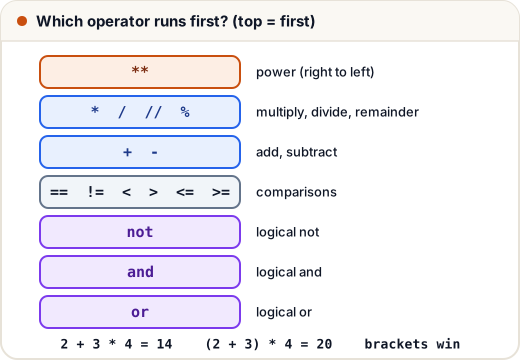
From highest to lowest: ** → * / // % → + - → comparisons → not → and → or. Use brackets when in doubt.
print(2 + 3 * 4, (2 + 3) * 4, 2 ** 3 ** 2)
14 20 512
(** works right to left: 2 ** (3 ** 2) = 2⁹ = 512.)
5. Taking input
input() waits for the user to type something and always returns a string. Convert it for maths.
# Input: Asha
# Input: 20
name = input()
age = int(input())
print("Hello", name)
print("Next year you will be", age + 1)
Hello Asha
Next year you will be 21
(When you run it yourself, you type Asha and 20. You can also show a prompt: input("Enter your name: ").)
Reading two numbers on one line:
# Input: 12 30
a, b = map(int, input().split())
print(a + b)
42
input().split() splits the line at spaces; map(int, …) converts each part to an int.
6. f-strings: clean output
Put f before the quotes and write variables inside { }.
name = "Ravi"
marks = 87.456
print(f"{name} scored {marks:.2f} marks")
print(f"{'Item':<8}{'Price':>8}")
print(f"{'Pen':<8}{10:>8}")
Ravi scored 87.46 marks
Item       Price
Pen           10
:.2f→ 2 decimal places:<8→ left-align in 8 characters,:>8→ right-align
Common mistakes
- Forgetting that
input()gives a string:input() + 1is a TypeError. - Using
/when you need a whole number — use//. - Using
=(assignment) instead of==(comparison) in conditions.
Quick recap
/gives a float;//floor division;%remainder;**power.and,or,notcombine conditions.input()returns a string — convert withint()/float().- f-strings:
f"{value:.2f}"for neat output.