AdvancedPython Programming · Lesson 30 of 30 · Updated ·
Testing Python Code — assert, unittest, pytest and doctest
Most students test a program by running it, typing a few inputs and looking at the output. That works once. But after every change you must repeat it, and you will forget some cases. An automated test is a small piece of code that calls your function with a known input and checks the answer by itself. You can run hundreds of them in a second, after every change. Companies expect freshers to know at least the basics, and test cases are a common topic in coding rounds ("what inputs would you test this with?").
1. The assert statement
assert condition, message does nothing if the condition is true and raises AssertionError with the message if it is false.
def percentage(obtained, total):
    return round(obtained / total * 100, 2)

assert percentage(45, 50) == 90.0
assert percentage(1, 3) == 33.33

try:
    assert percentage(30, 40) == 70, "30 out of 40 should be 70%"
except AssertionError as e:
    print("Test failed:", e, "| got", percentage(30, 40))
Test failed: 30 out of 40 should be 70% | got 75.0
The first two checks passed silently. The third one was wrong on purpose (30/40 is 75%), and the message tells you exactly what was expected.
Do not use assert to check user input in real programs. Python skips all assert statements when it runs with the -O (optimise) option, so the check would disappear. Use if and raise ValueError for input checks, and assert for tests and "this should never happen" checks.
2. unittest: the built-in test framework
unittest comes with Python. You group tests in a class that inherits from unittest.TestCase. Every method whose name starts with test is one test.
| Method | Checks |
|---|---|
assertEqual(a, b) | a == b |
assertTrue(x) / assertFalse(x) | x is true / false |
assertIn(a, b) | a in b |
assertAlmostEqual(a, b) | floats are equal to 7 decimal places |
assertRaises(Error) | the code inside raises that error |
import io
import unittest

def grade(marks):
    if not 0 <= marks <= 100:
        raise ValueError("marks must be 0 to 100")
    if marks >= 75:
        return "Distinction"
    if marks >= 60:
        return "First class"
    if marks >= 40:
        return "Pass"
    return "Fail"

class TestGrade(unittest.TestCase):
    def test_distinction(self):
        self.assertEqual(grade(92), "Distinction")

    def test_pass(self):
        self.assertEqual(grade(45), "Pass")

    def test_invalid_marks(self):
        with self.assertRaises(ValueError):
            grade(105)

suite = unittest.TestLoader().loadTestsFromTestCase(TestGrade)
result = unittest.TextTestRunner(stream=io.StringIO()).run(suite)
print("tests run:", result.testsRun)
print("failures:", len(result.failures), "errors:", len(result.errors))
print("all passed:", result.wasSuccessful())
tests run: 3
failures: 0 errors: 0
all passed: True
In a real project you put the tests in a file such as test_grades.py, end it with unittest.main() (inside if __name__ == "__main__":), and run it from the terminal with python -m unittest. It prints a dot for every passing test and a summary at the end. Here we run the tests from code and print our own summary, so you can see the exact output.
setUp runs before every test, so each test starts with fresh data and tests cannot affect each other:
import io
import unittest

class Cart:
    def __init__(self):
        self.items = {}
    def add(self, name, price):
        self.items[name] = price
    def total(self):
        return sum(self.items.values())

class TestCart(unittest.TestCase):
    def setUp(self):
        self.cart = Cart()            # a new, empty cart for each test
        self.cart.add("pen", 20)

    def test_total(self):
        self.cart.add("notebook", 60)
        self.assertEqual(self.cart.total(), 80)

    def test_still_fresh(self):
        self.assertEqual(self.cart.total(), 20)   # notebook from the other test is not here

result = unittest.TextTestRunner(stream=io.StringIO()).run(
    unittest.TestLoader().loadTestsFromTestCase(TestCart))
print(result.testsRun, "tests, success:", result.wasSuccessful())
2 tests, success: True
3. A failing test finds a bug
Here a developer wrote the grade function with a small mistake at the boundary. Tests at exactly 40, 60 and 75 catch it.
import io
import unittest

def grade(marks):
    if marks > 75:                    # bug: should be >= 75
        return "Distinction"
    if marks >= 60:
        return "First class"
    if marks >= 40:
        return "Pass"
    return "Fail"

class TestBoundaries(unittest.TestCase):
    def test_40(self):
        self.assertEqual(grade(40), "Pass")
    def test_60(self):
        self.assertEqual(grade(60), "First class")
    def test_75(self):
        self.assertEqual(grade(75), "Distinction")

result = unittest.TextTestRunner(stream=io.StringIO()).run(
    unittest.TestLoader().loadTestsFromTestCase(TestBoundaries))
for test, details in result.failures:
    print("FAILED:", test.id().split(".")[-1])
    print([line for line in details.splitlines() if line.startswith("AssertionError")][0])
FAILED: test_75
AssertionError: 'First class' != 'Distinction'
The failing test names the input (75) and shows both the actual and the expected value. You know where to look before reading any code.
4. Choosing good test cases
A test only helps if it uses inputs that can break the code. Use these groups:
| Kind of case | Examples for grade(marks) |
|---|---|
| Normal values | 52, 68, 90 |
| Boundary values (at and around each cutoff) | 39, 40, 59, 60, 74, 75 |
| Extremes | 0, 100 |
| Invalid input | -5, 101, "abc" |
| Empty or special | an empty list, an empty string, None (for other functions) |
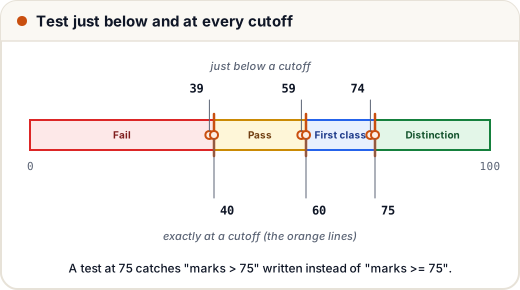
Most bugs hide at boundaries: > written instead of >=, a loop that runs one time too many (an "off-by-one" error), or an empty list that was never considered. Testing the values just below, at and just above each cutoff is called boundary value analysis.
5. pytest: shorter tests
pytest is a popular third-party tool (install it with pip install pytest). Tests are plain functions with plain assert statements, and pytest shows a detailed report when one fails. Save this as test_grades.py:
import pytest
from grades import grade          # your own module

def test_distinction():
    assert grade(92) == "Distinction"

@pytest.mark.parametrize("marks, expected", [
    (39, "Fail"), (40, "Pass"), (60, "First class"), (75, "Distinction"),
])
def test_boundaries(marks, expected):
    assert grade(marks) == expected

def test_invalid():
    with pytest.raises(ValueError):
        grade(105)
Then run pytest in that folder. It finds every file named test_*.py and every function named test_* automatically. parametrize runs the same test once for each pair of values, so four boundary checks need only one function. pytest can also run old unittest tests, so many teams use it as their test runner.
6. doctest: examples in the docstring
doctest runs the examples written in a function's docstring and checks that the output matches. It keeps your documentation correct.
import doctest

def simple_interest(p, r, t):
    """Return simple interest.

    >>> simple_interest(10000, 8, 2)
    1600.0
    >>> simple_interest(5000, 10, 1)
    500.0
    """
    return p * r * t / 100

print(doctest.testmod())
TestResults(failed=0, attempted=2)
attempted=2 means both examples ran, and failed=0 means both matched.
7. Test-driven development (TDD)
In TDD you write the test before the code, in a short cycle:
- Red: write a test for a new feature. It fails, because the feature does not exist yet.
- Green: write the simplest code that makes the test pass.
- Refactor: clean up the code; the tests tell you if you broke anything.
Even if you do not follow TDD strictly, writing a test whenever you fix a bug makes sure the same bug never comes back. Such a test is called a regression test.
Common mistakes
- Test method names that do not start with
test, so the framework silently skips them. - Tests that depend on each other or on the order they run in. Use
setUpto give each test fresh data. - Testing only "happy" inputs and never the boundaries, extremes or invalid values.
- Comparing floats with
==; useassertAlmostEqualorpytest.approx. - Using
assertfor checking user input in real programs; it is removed withpython -O.
Quick recap
assertraisesAssertionErrorwhen a condition is false; use it in tests.unittest: aTestCaseclass,test_methods,assertEqual/assertRaises, andsetUpfor fresh data.pytest: plain functions and plainassert;parametrizerepeats a test over many inputs.doctestchecks the examples in docstrings.- Pick normal, boundary, extreme and invalid inputs. Most bugs are at the boundaries.