AdvancedPython Programming · Lesson 20 of 30 · Updated ·
Context Managers and the with Statement in Python
Many resources must be given back after use: an open file must be closed, a database connection released, a lock unlocked. If your program forgets, or crashes halfway, you get locked files, lost data or a server that runs out of connections. The with statement solves this problem neatly. Any object that works with with is called a context manager.
1. The problem: clean-up that gets skipped
f = open("notes.txt", "w")
f.write("Unit 1: Python basics\n")
# ... imagine an error happens here ...
f.close()       # this line would never run
If an exception is raised before close(), the file stays open, and text you wrote may not be saved to disk. The safe version uses try/finally, because a finally block always runs:
f = open("notes.txt", "w")
try:
    f.write("Unit 1: Python basics\n")
finally:
    f.close()
print(f.closed)
True
This is correct, but it is easy to forget, and it gets messy with several resources.
2. The with statement
with does the same job in fewer lines:
with open("notes.txt", "w") as f:
    f.write("Unit 1: Python basics\n")
    f.write("Unit 2: Loops\n")
print("closed?", f.closed)

with open("notes.txt") as f:
    print(f.read(), end="")
closed? True
Unit 1: Python basics
Unit 2: Loops
When the indented block ends — normally, through return or break, or because of an exception — Python closes the file for you. You can open several things in one with:
with open("marks.txt", "w") as out:
    out.write("Asha 92\nRavi 74\n")

with open("marks.txt") as src, open("copy.txt", "w") as dst:
    dst.write(src.read().upper())

with open("copy.txt") as f:
    print(f.read(), end="")
ASHA 92
RAVI 74
3. How with works: enter and exit
A context manager is any object with two special methods:
__enter__(self)runs at the start of the block. Whatever it returns is stored in the name afteras.__exit__(self, exc_type, exc_value, traceback)runs at the end of the block, always. If the block raised an exception, the three arguments describe it; otherwise all three areNone.
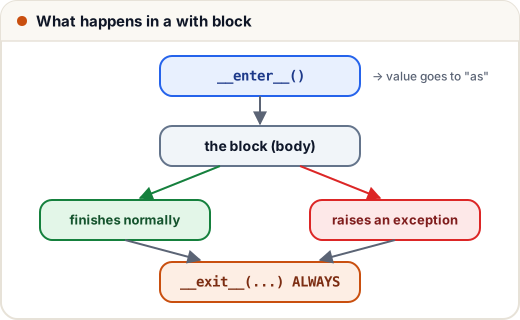
Here is a small context manager that marks the start and end of an exam session:
class ExamHall:
    def __init__(self, subject):
        self.subject = subject

    def __enter__(self):
        print(f"Doors open for {self.subject}")
        return self

    def __exit__(self, exc_type, exc_value, tb):
        print(f"Doors closed for {self.subject}")
        if exc_type is not None:
            print("Problem during exam:", exc_value)
        return False          # False: do not hide the exception

with ExamHall("Maths") as hall:
    print("Writing the", hall.subject, "paper")

try:
    with ExamHall("Physics"):
        raise RuntimeError("power cut")
except RuntimeError:
    print("The error still reached the caller")
Doors open for Maths
Writing the Maths paper
Doors closed for Maths
Doors open for Physics
Doors closed for Physics
Problem during exam: power cut
The error still reached the caller
Look at the second block: even though an exception happened, "Doors closed" was printed. That is the guarantee with gives you.
The return value of __exit__ matters. If it returns True, Python swallows the exception and continues after the with block. Returning False (or None) lets the exception continue. Hiding errors is rarely what you want, so return False unless you have a clear reason.
4. The easy way: contextlib.contextmanager
Writing a class is often more than you need. The contextlib module lets you write a context manager as a generator with a single yield:
- Code before
yieldacts as__enter__. - The yielded value goes to the
asname. - Code after
yieldacts as__exit__. Put it infinallyso it runs even after an error.
from contextlib import contextmanager

@contextmanager
def section(title):
    print(f"--- {title} ---")
    try:
        yield title.upper()
    finally:
        print(f"--- end of {title} ---")

with section("results") as heading:
    print("Heading is", heading)
    print("Asha: pass")
--- results ---
Heading is RESULTS
Asha: pass
--- end of results ---
A practical example: temporarily changing a setting and always putting it back.
from contextlib import contextmanager

settings = {"currency": "INR"}

@contextmanager
def temporary(key, value):
    old = settings[key]
    settings[key] = value
    try:
        yield
    finally:
        settings[key] = old

with temporary("currency", "USD"):
    print("inside:", settings["currency"])
print("after:", settings["currency"])
inside: USD
after: INR
5. Built-in context managers worth knowing
| Context manager | What it does |
|---|---|
open(...) | closes the file |
contextlib.suppress(Error) | ignores that exception type inside the block |
threading.Lock() | locks on enter, unlocks on exit |
decimal.localcontext() | changes decimal precision only inside the block |
tempfile.TemporaryDirectory() | creates a folder and deletes it afterwards |
sqlite3 connection | commits on success, rolls back on error (it does not close) |
suppress replaces a try/except/pass that you would otherwise write:
import os
from contextlib import suppress

with suppress(FileNotFoundError):
    os.remove("old_report.txt")      # fine even if the file does not exist
print("carried on")
carried on
And localcontext shows how a setting is restored automatically:
from decimal import Decimal, localcontext

with localcontext() as ctx:
    ctx.prec = 4
    print(Decimal(1) / Decimal(3))
print(Decimal(1) / Decimal(3))
0.3333
0.3333333333333333333333333333
Common mistakes
- Opening files without
withand forgetting to close them. - Using the file object after the
withblock has ended (it is already closed, so reading raisesValueError). - Returning
Truefrom__exit__by accident, which silently hides real errors. - In a
@contextmanagergenerator, forgettingtry/finally, so the clean-up is skipped when the block raises an exception. - Yielding more than once in a
@contextmanagerfunction. It must yield exactly once.
Quick recap
withguarantees clean-up, even when an exception is raised.- A context manager has
__enter__(start; result goes toas) and__exit__(end; always runs). __exit__returningTrueswallows the exception; normally returnFalse.@contextlib.contextmanager: code beforeyield= setup, afteryield(infinally) = clean-up.- Useful built-ins:
open,suppress, locks,localcontext,TemporaryDirectory.