AdvancedPython Programming · Lesson 27 of 30 · Updated ·
Regular Expressions in Python — the re Module, Patterns, Groups and Validation
Suppose you have a long text of student enquiries and you want every 10-digit mobile number in it, or you must check that a roll number looks like 22BCA045. String methods like find() and split() cannot describe "10 digits" or "2 digits, then 3 capital letters, then 3 digits". A regular expression (regex) is a small pattern language that can. Python supports it through the built-in re module.
1. Your first pattern
import re

text = "Call Asha on 9876543210 or the office on 9123456780."
print(re.findall(r"\d{10}", text))
['9876543210', '9123456780']
\d means "one digit" and {10} means "exactly 10 times". The r before the string makes it a raw string, so the backslash reaches the regex engine unchanged. Always write patterns as raw strings; without r, some sequences such as \b are turned into other characters by Python before re sees them.
2. The building blocks
| Pattern | Matches | Example |
|---|---|---|
. | any one character except a newline | c.t matches cat, cot |
\d / \D | a digit / not a digit | \d\d matches 42 |
\w / \W | a word character (letter, digit, _) / not one | \w+ matches roll_no1 |
\s / \S | whitespace (space, tab, newline) / not whitespace | |
[abc] | one of a, b, c | [aeiou] matches a vowel |
[a-z], [A-Z0-9] | a range | |
[^0-9] | anything except a digit | |
^ / $ | start / end of the string | ^Hi |
\b | a word boundary | \bcat\b does not match "concat" |
| `a | b` | a or b |
Quantifiers say how many times the item before them repeats:
| Quantifier | Meaning |
|---|---|
* | 0 or more |
+ | 1 or more |
? | 0 or 1 (optional) |
{n} | exactly n |
{m,n} | from m to n |
To match a special character such as ., + or ( literally, put a backslash before it: \. matches a real dot.
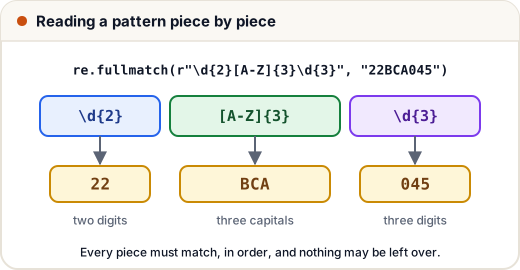
3. search, match and fullmatch
These three check one place in the text and return a match object, or None if nothing matched.
| Function | Looks where? |
|---|---|
re.search(p, s) | anywhere in s; first match |
re.match(p, s) | only at the start of s |
re.fullmatch(p, s) | the whole of s must match |
import re

for s in ["22BCA045", "ID 22BCA045", "22BCA045X"]:
    print(s, "|",
          bool(re.search(r"\d{2}[A-Z]{3}\d{3}", s)),
          bool(re.match(r"\d{2}[A-Z]{3}\d{3}", s)),
          bool(re.fullmatch(r"\d{2}[A-Z]{3}\d{3}", s)))
22BCA045 | True True True
ID 22BCA045 | True False False
22BCA045X | True True False
For validation (is this input correct?), use fullmatch. With search or match, extra characters before or after would be accepted by mistake, as the last row shows.
A match object tells you what matched and where:
import re

m = re.search(r"\d+", "Room 204, Block C")
print(m.group(), m.start(), m.end(), m.span())
204 5 8 (5, 8)
4. findall, finditer, sub and split
import re

marks_text = "Maths 78, Physics 91, Chemistry 66"
print(re.findall(r"\d+", marks_text))

for m in re.finditer(r"[A-Z][a-z]+", marks_text):
    print(m.group(), "at", m.start())

print(re.sub(r"\s+", " ", "too    many   spaces"))
print(re.split(r"[,;|]\s*", "Pune, Delhi;Agra|Goa"))
['78', '91', '66']
Maths at 0
Physics at 10
Chemistry at 22
too many spaces
['Pune', 'Delhi', 'Agra', 'Goa']
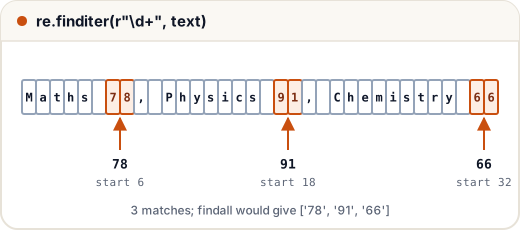
findallreturns a list of strings.finditerreturns match objects one by one, which is useful when you also need positions.sub(pattern, replacement, text)replaces every match.splitsplits wherever the pattern matches, so it handles several separators at once.
5. Groups: pulling out parts
Round brackets ( ) make a group. Each group captures its own part of the match.
import re

line = "2026-11-21 Asha scored 88"
m = re.fullmatch(r"(\d{4})-(\d{2})-(\d{2}) (\w+) scored (\d+)", line)
print(m.groups())
year, month, day, name, score = m.groups()
print(name, int(score) + 2)
('2026', '11', '21', 'Asha', '88')
Asha 90
Named groups (?P<name>...) are easier to read:
import re

m = re.search(r"(?P<user>[\w.]+)@(?P<domain>[\w.]+)", "Mail: ravi.k@college.edu")
print(m.group("user"), m.group("domain"))
print(m.groupdict())
ravi.k college.edu
{'user': 'ravi.k', 'domain': 'college.edu'}
If a pattern has groups, findall returns the groups instead of the whole match. With one group you get a list of strings; with several, a list of tuples:
import re

text = "Asha:91, Ravi:78, Neha:88"
print(re.findall(r"(\w+):(\d+)", text))
print(dict(re.findall(r"(\w+):(\d+)", text)))
[('Asha', '91'), ('Ravi', '78'), ('Neha', '88')]
{'Asha': '91', 'Ravi': '78', 'Neha': '88'}
In sub, you can use groups in the replacement with \1, \2. This turns dates from YYYY-MM-DD into DD/MM/YYYY:
import re

print(re.sub(r"(\d{4})-(\d{2})-(\d{2})", r"\3/\2/\1", "Exam on 2026-12-05"))
Exam on 05/12/2026
6. Greedy and lazy matching
Quantifiers are greedy: they take as much text as they can. Adding ? after a quantifier makes it lazy: it takes as little as possible.
import re

html = "<b>Asha</b> and <b>Ravi</b>"
print(re.findall(r"<b>.*</b>", html))
print(re.findall(r"<b>.*?</b>", html))
print(re.findall(r"<b>(.*?)</b>", html))
['<b>Asha</b> and <b>Ravi</b>']
['<b>Asha</b>', '<b>Ravi</b>']
['Asha', 'Ravi']
The greedy .* ran all the way to the last </b>, giving one long match. The lazy .*? stops at the first </b>.
7. Flags and compiling
Flags change how matching works. The common ones are re.IGNORECASE (re.I) and re.MULTILINE (re.M, where ^ and $ match at every line).
If you use the same pattern many times, re.compile creates a pattern object once. It also gives the pattern a clear name.
import re

MOBILE = re.compile(r"[6-9]\d{9}")

for number in ["9876543210", "1234567890", "98765"]:
    print(number, bool(MOBILE.fullmatch(number)))

print(re.findall(r"python", "Python, PYTHON and python", flags=re.I))
9876543210 True
1234567890 False
98765 False
['Python', 'PYTHON', 'python']
Indian mobile numbers start with 6, 7, 8 or 9, which is why the pattern begins with [6-9].
A simple email check, good enough for a form (real email rules are much more complex, so do not try to match every valid address with one regex):
import re

EMAIL = re.compile(r"[\w.+-]+@[\w-]+(\.[\w-]+)+")
for e in ["asha@gmail.com", "ravi.k@college.ac.in", "neha@com", "imran@@mail.com"]:
    print(e, bool(EMAIL.fullmatch(e)))
asha@gmail.com True
ravi.k@college.ac.in True
neha@com False
imran@@mail.com False
Common mistakes
- Forgetting the
rprefix, so backslashes are changed beforeresees them. - Using
searchormatchfor validation; extra characters slip through. Usefullmatch. - Not escaping a dot:
.matches any character,\.matches a real dot. - Expecting
findallto return whole matches when the pattern has groups. - Using greedy
.*where a lazy.*?was needed. - Calling
.group()onNonewhen nothing matched. Check the result first:if m:.
Quick recap
\d,\w,\s,[...]and.match single characters;*,+,?,{m,n}repeat them.searchlooks anywhere,matchonly at the start,fullmatchneeds the whole string.findall,finditer,subandsplitwork on every match.( )captures groups;(?P<name>...)names them;\1reuses them insub.- Add
?after a quantifier for lazy matching; usere.compilefor patterns you reuse.