AdvancedPython Programming · Lesson 17 of 30 · Updated ·
Scope, Closures and Advanced Function Arguments in Python
In the functions lesson you saw that variables made inside a function are local. This lesson goes one level deeper. You will learn exactly how Python decides which variable a name refers to, how an inner function can remember values (a closure), and the extra ways to define and pass arguments. Closures are also the base for decorators, which come in a later lesson.
1. The LEGB rule: where Python looks for a name
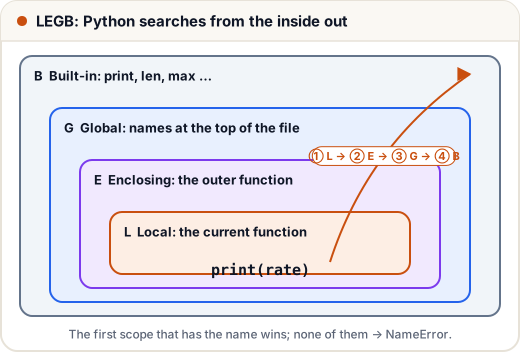
When your code uses a name like rate, Python searches four places in order and stops at the first match:
| Letter | Scope | What it holds |
|---|---|---|
| L | Local | names created inside the current function |
| E | Enclosing | names in any outer function that this function is inside |
| G | Global | names created at the top level of the file (module) |
| B | Built-in | names Python always has: print, len, max, … |
rate = "global rate"

def outer():
    rate = "enclosing rate"
    def inner():
        rate = "local rate"
        print(rate)
    inner()
    print(rate)

outer()
print(rate)
print(len("abc"))      # len is found in the built-in scope
local rate
enclosing rate
global rate
3
Each rate is a different variable. Assigning to a name inside a function creates a local variable, unless you say otherwise.
A side effect of this rule: if you create a variable called list or max, it hides the built-in one until you delete it. Avoid using built-in names for your own variables.
2. global and nonlocal
Reading an outer variable is always allowed. Assigning to it needs a declaration:
global name— assign to the module-level variable.nonlocal name— assign to the variable of the nearest enclosing function.
visits = 0

def visit():
    global visits
    visits += 1

def make_counter():
    count = 0
    def increase():
        nonlocal count      # without this line: UnboundLocalError
        count += 1
        return count
    return increase

visit(); visit()
print("visits:", visits)
c = make_counter()
print(c(), c(), c())
visits: 2
1 2 3
Why the error without nonlocal? count += 1 assigns to count, so Python treats count as local in the whole of increase. Then it tries to read a local count that has no value yet.
Use global rarely. Code that passes values in and returns results is easier to test.
3. Closures: functions that remember
A closure is an inner function that remembers variables from the enclosing function, even after the enclosing function has finished running. make_counter above already made one. Here is another example: a shop that applies different discounts.
def make_discount(percent):
    def apply(price):
        return price - price * percent / 100
    return apply

festival = make_discount(20)
student = make_discount(10)
print(festival(500), student(500))
print(festival.__closure__[0].cell_contents)
400.0 450.0
20
festival and student are two separate functions. Each one keeps its own percent in a small storage area called a cell. You can see it through __closure__, though you will rarely need to.
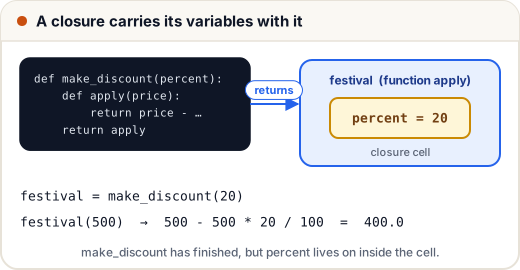
Closures are useful when you want a small function with some settings "built in", without writing a full class.
4. The late-binding trap in loops
A closure remembers the variable, not the value it had at the time. Python looks up the value when the inner function runs. This is called late binding.
funcs = []
for i in range(3):
    funcs.append(lambda: i)
print([f() for f in funcs])

fixed = []
for i in range(3):
    fixed.append(lambda i=i: i)   # default value is saved NOW
print([f() for f in fixed])
[2, 2, 2]
[0, 1, 2]
All three lambdas in the first loop see the same i, which is 2 when they are finally called. A default argument value is evaluated when the function is defined, so i=i saves the current value.
5. Keyword-only and positional-only parameters
Two special markers in a parameter list control how arguments may be passed:
- Parameters after
*must be passed by keyword. - Parameters before
/must be passed by position (Python 3.8+).
def book_ticket(name, /, seats, *, ac=False):
    return f"{name}: {seats} seat(s), AC={ac}"

print(book_ticket("Asha", 2))
print(book_ticket("Ravi", seats=1, ac=True))
try:
    book_ticket("Neha", 1, True)
except TypeError as e:
    print("Error:", e)
Asha: 2 seat(s), AC=False
Ravi: 1 seat(s), AC=True
Error: book_ticket() takes 2 positional arguments but 3 were given
Why use them? Keyword-only arguments make calls readable: ac=True is clearer than a bare True. Positional-only parameters let you rename a parameter later without breaking anyone's code, which is why many built-ins such as len(obj, /) use them.
6. Unpacking arguments with * and **
In a call, * spreads a list or tuple into positional arguments, and ** spreads a dictionary into keyword arguments. It is the reverse of *args and **kwargs in a definition.
def result(name, maths, science):
    return f"{name}: total {maths + science}"

row = ["Asha", 88, 92]
info = {"name": "Ravi", "maths": 70, "science": 81}
print(result(*row))
print(result(**info))

first, *middle, last = [10, 20, 30, 40, 50]
print(first, middle, last)
Asha: total 180
Ravi: total 151
10 [20, 30, 40] 50
The last example is extended unpacking: *middle collects all the items that are left over into a list.
Common mistakes
- Assigning to an outer variable without
global/nonlocaland gettingUnboundLocalError. - Using
globaleverywhere instead of returning values. - Naming a variable
list,strorsum, which hides the built-in. - Creating lambdas in a loop and expecting each one to remember its own loop value.
- Forgetting that after a bare
*in a definition, the remaining parameters must be passed by keyword.
Quick recap
- Name lookup order: Local → Enclosing → Global → Built-in.
globalassigns to a module variable;nonlocalto the nearest enclosing function's variable.- A closure is an inner function that keeps the enclosing variables alive.
- Closures look values up when called (late binding); use
x=xto freeze a value. *in a definition → keyword-only after it;/→ positional-only before it.- In calls,
*seqand**dictunpack arguments.