AdvancedPython Programming · Lesson 18 of 30 · Updated ·
Iterators and Generators in Python — iter, next and yield
You have used for loops on lists, strings, dictionaries and files. How can one loop work on so many different types? The answer is the iterator protocol. Once you understand it, you can write generators: functions that produce values one at a time, using almost no memory. Generators are a popular interview topic.
1. Iterable and iterator
Two words that sound alike but mean different things:
- An iterable is anything you can loop over: a list, string, tuple, dict, set, file,
range. It can give you an iterator when asked. - An iterator is the object that actually walks through the values. It remembers where it is, and gives the next value each time you ask.
Two built-in functions connect them:
iter(iterable)returns a new iterator.next(iterator)returns the next value, or raisesStopIterationwhen there are no values left.
marks = [72, 85, 90]
it = iter(marks)
print(next(it))
print(next(it))
print(next(it))
try:
    next(it)
except StopIteration:
    print("no more values")
72
85
90
no more values
2. What a for loop really does
The loop for m in marks: is roughly this code:
marks = [72, 85, 90]
it = iter(marks)
while True:
    try:
        m = next(it)
    except StopIteration:
        break
    print(m)
72
85
90
So any object that supports iter() and next() works in a for loop, in sum(), list(), max(), in and unpacking.
An iterator is used up after one pass. A list is not — each for loop over a list asks for a fresh iterator.
it = iter([1, 2, 3])
print(list(it))
print(list(it))     # already used up
[1, 2, 3]
[]
3. Writing your own iterator class
A class becomes an iterator when it has two methods:
__iter__(self)— returns the iterator (here, the object itself).__next__(self)— returns the next value or raisesStopIteration.
class Countdown:
    def __init__(self, start):
        self.current = start

    def __iter__(self):
        return self

    def __next__(self):
        if self.current <= 0:
            raise StopIteration
        value = self.current
        self.current -= 1
        return value

for n in Countdown(3):
    print(n, end=" ")
print("Lift off!")
3 2 1 Lift off!
This works, but it is a lot of code for a simple idea. Generators make it much shorter.
4. Generator functions and yield
A function that contains the keyword yield is a generator function. Calling it does not run the body. It returns a generator object, which is an iterator. Each next() runs the body until the next yield, hands out that value, and then pauses with all local variables saved.
def countdown(start):
    print("starting")
    while start > 0:
        yield start
        start -= 1
    print("finished")

g = countdown(3)
print(type(g).__name__)
print(next(g))
print(next(g))
print(list(g))      # takes the remaining values
generator
starting
3
2
finished
[1]
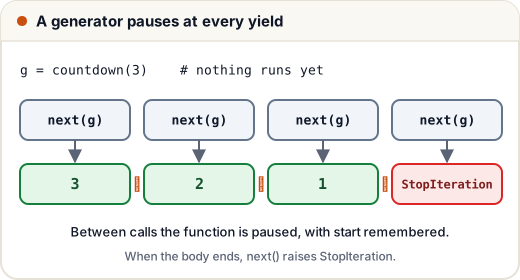
Notice: "starting" is printed only at the first next(), not when countdown(3) was called. When the function ends, the generator raises StopIteration for you.
return | yield | |
|---|---|---|
| Gives back | one value, once | many values, one at a time |
| After it | function is finished | function pauses, can resume |
| Calling the function gives | the value | a generator object |
5. Generator expressions and memory
A generator expression looks like a list comprehension, but with round brackets. It produces values lazily: only when they are asked for.
squares_list = [n * n for n in range(5)]
squares_gen = (n * n for n in range(5))
print(squares_list)
print(squares_gen.__class__.__name__)
print(sum(n * n for n in range(1, 1_000_001)))
[0, 1, 4, 9, 16]
generator
333333833333500000
The list comprehension builds all values in memory at once. The generator holds only the current value. For a million numbers, sum(n * n for n in ...) never stores a million-item list. When a generator expression is the only argument, you can drop the extra brackets, as shown.
This laziness also lets you work with sequences that never end:
def ticket_numbers(start):
    n = start
    while True:          # infinite, but safe: values are made on demand
        yield f"T{n}"
        n += 1

gen = ticket_numbers(101)
for _ in range(3):
    print(next(gen))
T101
T102
T103
6. Pipelines and yield from
Generators can feed each other, like stages in a factory. Each stage handles one item at a time.
def read_lines():
    yield from ["Asha,92", "Ravi,38", "Neha,75", "Imran,29"]

def parse(lines):
    for line in lines:
        name, mark = line.split(",")
        yield name, int(mark)

def failed(records):
    for name, mark in records:
        if mark < 40:
            yield name

print(list(failed(parse(read_lines()))))
['Ravi', 'Imran']
yield from iterable hands out every value of another iterable, one by one. It is shorter than a for loop with yield inside. In a real program read_lines could read a huge log file line by line, and the pipeline would still use very little memory.
Common mistakes
- Expecting a generator to run when you call the function. It only runs when you iterate.
- Looping over the same generator twice and getting nothing the second time.
- Calling
len()on a generator. Generators have no length; convert to a list first if you really need one. - Using
[...]when you only need to loop once over a very large result. Use(...)instead. - Putting
return valuein a generator and expecting the loop to receive it. A loop only sees yielded values.
Quick recap
- Iterable: can be looped over. Iterator: remembers its position and has
__next__. iter()makes an iterator;next()gets a value;StopIterationends the loop.- A function with
yieldreturns a generator, which pauses at each yield. - Generator expressions
(x for x in ...)are lazy and save memory. - Generators are single-use; chain them into pipelines;
yield fromdelegates.