AdvancedPython Programming · Lesson 19 of 30 · Updated ·
Decorators in Python — Wrap a Function to Add Behaviour
A decorator is a function that takes another function and returns a new version of it with some extra behaviour, such as printing a log line, counting calls, checking a login or caching results. You add it with one line, @name, above a function. Frameworks like Flask, Django and FastAPI use decorators everywhere, and interviewers often ask you to write one.
To understand decorators you need two ideas from earlier lessons: functions are objects, and closures (an inner function that remembers outer variables).
1. Functions are objects
A function can be stored in a variable, passed to another function, and returned from a function, just like a number or a list.
def shout(text):
    return text.upper() + "!"

speak = shout              # no brackets: the function itself, not a call
print(speak("hello"))

def apply_twice(func, value):
    return func(func(value))

print(apply_twice(shout, "hi"))
HELLO!
HI!!
2. A decorator by hand
Suppose you want to print a message every time some function is called, without editing that function. Write a function that wraps it:
def log_calls(func):
    def wrapper(*args, **kwargs):
        print(f"calling {func.__name__} with {args}")
        result = func(*args, **kwargs)
        print(f"{func.__name__} returned {result}")
        return result
    return wrapper

def add(a, b):
    return a + b

add = log_calls(add)       # replace add with the wrapped version
print(add(2, 3))
calling add with (2, 3)
add returned 5
5
Step by step:
log_calls(add)creates a new functionwrapperthat remembersfunc(a closure).- We store
wrapperunder the nameadd. - Calling
add(2, 3)now runswrapper, which prints, calls the originaladd, prints again and returns the result.
*args, **kwargs lets the wrapper accept any arguments and pass them through unchanged, so the same decorator works for every function.
3. The @ syntax
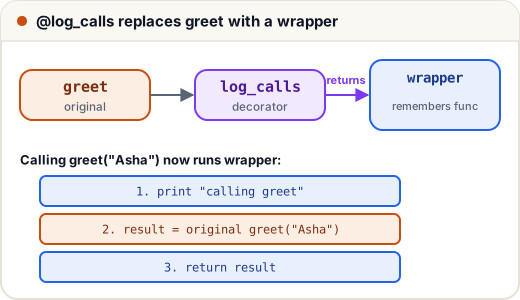
Writing add = log_calls(add) after every function is clumsy. Python gives a shortcut: put @log_calls on the line above def. It means exactly the same thing.
def log_calls(func):
    def wrapper(*args, **kwargs):
        print(f"calling {func.__name__}")
        return func(*args, **kwargs)
    return wrapper

@log_calls                 # same as: greet = log_calls(greet)
def greet(name):
    return f"Hello, {name}"

print(greet("Asha"))
calling greet
Hello, Asha
4. Keep the function's name: functools.wraps
There is one problem. After decoration, the name greet points to wrapper, so its name and docstring are lost. This confuses debugging tools and documentation. The fix is the functools.wraps decorator, which copies them across.
import functools

def plain(func):
    def wrapper(*args, **kwargs):
        return func(*args, **kwargs)
    return wrapper

def careful(func):
    @functools.wraps(func)
    def wrapper(*args, **kwargs):
        return func(*args, **kwargs)
    return wrapper

@plain
def area(r):
    """Area of a circle."""
    return 3.14 * r * r

@careful
def perimeter(r):
    """Perimeter of a circle."""
    return 2 * 3.14 * r

print(area.__name__, area.__doc__)
print(perimeter.__name__, perimeter.__doc__)
wrapper None
perimeter Perimeter of a circle.
Always use @functools.wraps(func) in your decorators. It is a habit interviewers look for.
5. Useful decorators you can write
Counting calls
import functools

def count_calls(func):
    @functools.wraps(func)
    def wrapper(*args, **kwargs):
        wrapper.calls += 1
        return func(*args, **kwargs)
    wrapper.calls = 0
    return wrapper

@count_calls
def fib(n):
    return n if n < 2 else fib(n - 1) + fib(n - 2)

print(fib(15), "calls:", fib.calls)
610 calls: 1973
Nearly two thousand calls for fib(15): the plain recursive version repeats work. The standard library's @functools.lru_cache decorator fixes that by remembering results:
import functools

@functools.lru_cache(maxsize=None)
def fib(n):
    return n if n < 2 else fib(n - 1) + fib(n - 2)

print(fib(15), fib.cache_info())
610 CacheInfo(hits=13, misses=16, maxsize=None, currsize=16)
Only 16 real computations (misses); every repeated value comes from the cache (hits).
Checking a condition before running
import functools

def require_login(func):
    @functools.wraps(func)
    def wrapper(user, *args, **kwargs):
        if not user.get("logged_in"):
            return "Please log in first"
        return func(user, *args, **kwargs)
    return wrapper

@require_login
def view_marks(user):
    return f"{user['name']}: 88/100"

print(view_marks({"name": "Ravi", "logged_in": True}))
print(view_marks({"name": "Guest", "logged_in": False}))
Ravi: 88/100
Please log in first
Web frameworks use exactly this pattern for pages that need a login.
6. Decorators that take arguments
@repeat(3) needs one more layer: repeat(3) must return a decorator. So there are three nested functions: the settings, the decorator, and the wrapper.
import functools

def repeat(times):
    def decorator(func):
        @functools.wraps(func)
        def wrapper(*args, **kwargs):
            for _ in range(times):
                result = func(*args, **kwargs)
            return result
        return wrapper
    return decorator

@repeat(3)                 # same as: cheer = repeat(3)(cheer)
def cheer(team):
    print(f"Go {team}!")

cheer("India")
Go India!
Go India!
Go India!
7. Stacking decorators
You can put several decorators on one function. They are applied bottom-up (the one nearest def wraps first), so when you call the function, the top one runs first.
def bold(func):
    return lambda: "<b>" + func() + "</b>"

def italic(func):
    return lambda: "<i>" + func() + "</i>"

@bold
@italic                    # same as: title = bold(italic(title))
def title():
    return "Results"

print(title())
<b><i>Results</i></b>
Common mistakes
- Writing
@log_calls()with brackets for a decorator that takes no arguments, or forgetting the brackets for one that does (@repeatinstead of@repeat(3)). - Forgetting
return resultin the wrapper, so the decorated function always returnsNone. - Writing
wrapper(a, b)instead ofwrapper(*args, **kwargs), so the decorator works for only one shape of function. - Leaving out
functools.wraps, so every decorated function is namedwrapper. - Mixing up stacking order: the decorator nearest
defis applied first.
Quick recap
- A decorator takes a function and returns a new function:
f = deco(f). @decoabovedefis a shortcut for that line.- The wrapper uses
*args, **kwargsand must return the result. - Use
@functools.wraps(func)to keep the name and docstring. - A decorator with arguments is a function that returns a decorator.
- Stacked decorators apply bottom-up and run top-down.