AdvancedPython Programming · Lesson 26 of 30 · Updated ·
Sorting in Depth, heapq and bisect — Keys, Stable Sort, Heaps and Binary Search
In the lists lesson you used sort() and sorted(). Real programs ask harder questions: "sort students by marks, highest first, and by name when marks are equal", "always give me the most urgent task next", or "where does this score fit in a sorted list?". This lesson covers three tools for these jobs: key functions for sorting, the heapq module for heaps, and the bisect module for binary search. All three appear often in coding tests.
1. Sorting by more than one key
The key= argument takes a function. Python calls it once for every item and sorts by the values it returns. If the key returns a tuple, Python compares the first parts, and only when they are equal does it look at the second part, and so on.
students = [("Ravi", 82), ("Asha", 91), ("Neha", 82), ("Imran", 91), ("Kiran", 75)]

# marks high to low, then name A to Z
ranked = sorted(students, key=lambda s: (-s[1], s[0]))
for name, marks in ranked:
    print(name, marks)
Asha 91
Imran 91
Neha 82
Ravi 82
Kiran 75
The minus sign on the marks is a common trick: sorting -marks in ascending order is the same as sorting marks in descending order. It works for numbers only. For strings you cannot write -name, so you use the next idea.
2. Stable sorting
Python's sort is stable. This means: when two items have equal keys, they stay in the same order they had before sorting. Stability lets you sort in several passes, starting with the least important key.
students = [("Ravi", 82), ("Asha", 91), ("Neha", 82), ("Imran", 91), ("Kiran", 75)]

students.sort(key=lambda s: s[0], reverse=True)   # pass 1: name Z to A
students.sort(key=lambda s: s[1], reverse=True)   # pass 2: marks high to low
print(students)
[('Imran', 91), ('Asha', 91), ('Ravi', 82), ('Neha', 82), ('Kiran', 75)]
After pass 2, students with equal marks keep their pass-1 order (name Z to A). reverse=True also keeps equal items in their original order; it does not simply reverse the whole result.
You can also sort objects with operator.attrgetter or operator.itemgetter, which are faster and shorter than a lambda:
from operator import itemgetter

rows = [{"name": "Asha", "city": "Pune"}, {"name": "Ravi", "city": "Agra"}, {"name": "Neha", "city": "Pune"}]
print([r["name"] for r in sorted(rows, key=itemgetter("city", "name"))])
['Ravi', 'Asha', 'Neha']
3. What a heap is
A heap is a list arranged so that every parent is less than or equal to its children. The parent of position i has children at positions 2*i + 1 and 2*i + 2. The result is that the smallest item is always at index 0, but the rest of the list is not fully sorted. This is called a min-heap.
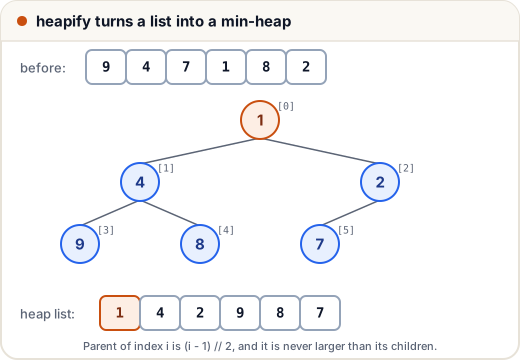
Why not just sort? Sorting costs O(n log n) every time the data changes. A heap adds or removes one item in O(log n) and always knows the smallest. That is exactly what a priority queue needs: a queue where the most important item leaves first.
4. The heapq module
heapq works on a normal Python list.
| Function | What it does | Time |
|---|---|---|
heapify(lst) | rearrange a list into a heap, in place | O(n) |
heappush(heap, x) | add x | O(log n) |
heappop(heap) | remove and return the smallest | O(log n) |
heap[0] | look at the smallest without removing | O(1) |
nlargest(k, items) / nsmallest(k, items) | the k largest / smallest | O(n log k) |
import heapq

marks = [9, 4, 7, 1, 8, 2]
heapq.heapify(marks)
print(marks)
print(marks[0])

heapq.heappush(marks, 3)
print([heapq.heappop(marks) for _ in range(3)])
print(marks)
[1, 4, 2, 9, 8, 7]
1
[1, 2, 3]
[4, 8, 7, 9]
Notice that the heap list [1, 4, 2, 9, 8, 7] is not sorted. Only heappop gives items in sorted order, one at a time.
Max-heap: heapq only has a min-heap. To get the largest first, push the negative of each number and negate again when you pop.
import heapq

prices = [250, 990, 120, 640]
heap = [-p for p in prices]
heapq.heapify(heap)
print(-heapq.heappop(heap), -heapq.heappop(heap))
990 640
5. A priority queue with tuples
Push tuples of (priority, item). The heap compares the first part first, so the lowest priority number comes out first. Add a counter as the second part so that two tasks with the same priority never compare their third parts (which may not be comparable) and so that they leave in the order they arrived.
import heapq
from itertools import count

tasks = []
order = count()
heapq.heappush(tasks, (2, next(order), "reply to email"))
heapq.heappush(tasks, (1, next(order), "fix login bug"))
heapq.heappush(tasks, (3, next(order), "update notes"))
heapq.heappush(tasks, (1, next(order), "call client"))

while tasks:
    priority, _, task = heapq.heappop(tasks)
    print(priority, task)
1 fix login bug
1 call client
2 reply to email
3 update notes
For top-k questions, such as "the 3 highest scores out of a lakh", use nlargest. It is shorter and faster than sorting everything when k is small.
import heapq

scores = {"Asha": 91, "Ravi": 78, "Neha": 88, "Imran": 95, "Kiran": 69}
print(heapq.nlargest(3, scores, key=scores.get))
print(heapq.nsmallest(2, scores.values()))
['Imran', 'Asha', 'Neha']
[69, 78]
6. bisect: binary search on a sorted list
Binary search finds a position in a sorted list by repeatedly halving the range, so it needs only O(log n) comparisons. The bisect module does this for you.
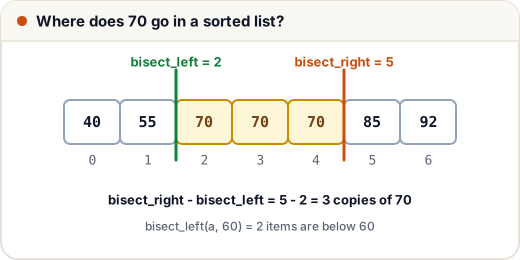
bisect_left(a, x)gives the first position where x could be inserted (before any equal items).bisect_right(a, x)(also calledbisect) gives the position after any equal items.insort(a, x)inserts x and keeps the list sorted.
from bisect import bisect_left, bisect_right, insort

marks = [40, 55, 70, 70, 70, 85, 92]
print(bisect_left(marks, 70), bisect_right(marks, 70))
print("count of 70:", bisect_right(marks, 70) - bisect_left(marks, 70))
print("scored below 60:", bisect_left(marks, 60))

insort(marks, 60)
print(marks)
2 5
count of 70: 3
scored below 60: 2
[40, 55, 60, 70, 70, 70, 85, 92]
A classic use is turning marks into grades without a long if/elif chain:
from bisect import bisect_right

cutoffs = [40, 50, 60, 75, 90]
grades = "FDCBAS"

for m in [35, 40, 67, 90, 100]:
    print(m, grades[bisect_right(cutoffs, m)])
35 F
40 D
67 B
90 S
100 S
bisect_right returns how many cutoffs are less than or equal to the mark, which is exactly the index of the grade.
To check if a value is present, test the position you get:
from bisect import bisect_left

def contains(a, x):
    i = bisect_left(a, x)
    return i < len(a) and a[i] == x

roll_numbers = [101, 104, 108, 115, 120]
print(contains(roll_numbers, 108), contains(roll_numbers, 110))
True False
7. Which tool when?
| Need | Use |
|---|---|
| Sort once, show everything | sorted() with a key |
| Repeatedly take the smallest or largest while adding items | heapq |
| Only the top k items | heapq.nlargest / nsmallest |
| Search or insert in a list that is already sorted | bisect |
| Check membership many times, order not needed | a set |
Common mistakes
- Expecting a heap list to be sorted. Only
heap[0]is guaranteed to be the smallest. - Forgetting that
heapqis a min-heap; use negative numbers for a max-heap. - Pushing
(priority, dict)tuples without a counter: two equal priorities then compare the dicts and raiseTypeError. - Using
bisecton an unsorted list. It gives wrong answers without any error. - Writing
-s[0]for a string key. Use a stable second pass withreverse=Trueinstead.
Quick recap
key=with a tuple sorts by several keys; negate numbers for descending order.- Python's sort is stable, so multi-pass sorting works (least important key first).
- A heap keeps the smallest item at index 0; push and pop are O(log n).
- Use
(priority, counter, item)tuples for a priority queue. bisect_left/bisect_rightgive insertion points in O(log n);insortinserts in order.