AdvancedPython Programming · Lesson 16 of 30 · Updated ·
Names, References and Copying in Python — is vs ==, Shallow and Deep Copy
A very common surprise for new Python programmers: you change one list and another list changes too. This is not a bug in Python. It happens because of how Python variables work. Once you understand it, a whole group of interview questions becomes easy.
1. Names point to objects
In Python, a variable is a name that points to an object (a value stored in memory). Writing b = a does not copy anything. It makes a second name point to the same object.
a = [90, 75, 60]
b = a              # b is another name for the SAME list
b.append(45)
print(a)
print(b)
print(a is b)
[90, 75, 60, 45]
[90, 75, 60, 45]
True
Two operators compare things, and they ask different questions:
| Operator | Question it asks | Example use |
|---|---|---|
== | Do the two objects have the same value? | comparing marks, names, lists |
is | Are the two names pointing to the same object? | checking for None |
x = [1, 2, 3]
y = [1, 2, 3]       # a different list with the same values
z = x
print(x == y, x is y)
print(x == z, x is z)
True False
True True
The built-in id(obj) gives a number that is unique to an object while it exists. a is b is the same as id(a) == id(b).
Rule: use == to compare values. Use is only for None (if result is None:), because there is exactly one None object.
2. Mutable and immutable objects
- Immutable objects cannot be changed after they are made:
int,float,str,tuple,bool. - Mutable objects can be changed in place:
list,dict,set, and most objects of your own classes.
With an immutable value, an operation like += builds a new object and moves the name to it. Other names are not affected.
score = 50
old = score
score += 10        # makes a new int 60; old still points to 50
print(score, old)

marks = [50]
saved = marks
marks += [10]      # a list is changed IN PLACE
print(marks, saved)
60 50
[50, 10] [50, 10]
The same += gives different results because int is immutable and list is mutable.
3. Passing objects to functions
Python passes the reference (the arrow), not a copy. This is often called call by object reference.
- If the function changes a mutable argument (append, update), the caller sees the change.
- If the function reassigns the parameter (
items = [...]), only the local name moves; the caller sees nothing.
def add_bonus(marks):
    marks.append(5)          # changes the caller's list

def reset(marks):
    marks = []               # only the local name moves

result = [80, 70]
add_bonus(result)
print(result)
reset(result)
print(result)
[80, 70, 5]
[80, 70, 5]
If a function should not touch the caller's data, make a copy inside it first.
4. Shallow copy: a new outer object
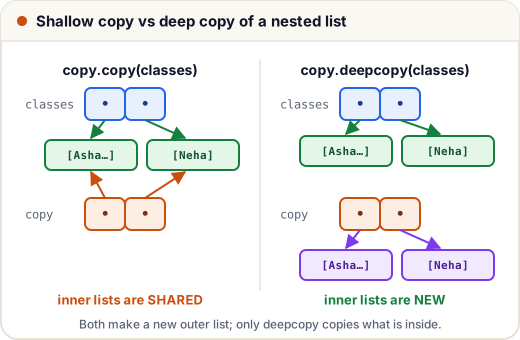
A shallow copy creates a new outer container, but the items inside are the same objects as before. All of these make a shallow copy of a list:
new = old.copy()new = old[:]new = list(old)import copy; new = copy.copy(old)
For a flat list of numbers or strings, a shallow copy is all you need. For a list that contains lists, it is not enough:
import copy

classes = [["Asha", "Ravi"], ["Neha"]]
shallow = copy.copy(classes)
shallow.append(["Kiran"])        # changes only the new outer list
shallow[0].append("Imran")       # changes an INNER list that both share
print(classes)
print(shallow)
[['Asha', 'Ravi', 'Imran'], ['Neha']]
[['Asha', 'Ravi', 'Imran'], ['Neha'], ['Kiran']]
5. Deep copy: copy everything inside too
copy.deepcopy() copies the outer object and every object inside it, all the way down. After a deep copy, nothing is shared.
import copy

classes = [["Asha", "Ravi"], ["Neha"]]
deep = copy.deepcopy(classes)
deep[0].append("Imran")
print(classes)
print(deep)
print(classes[0] is deep[0])
[['Asha', 'Ravi'], ['Neha']]
[['Asha', 'Ravi', 'Imran'], ['Neha']]
False
| Outer object | Inner objects | Speed | |
|---|---|---|---|
b = a | shared | shared | instant |
| shallow copy | new | shared | fast |
deepcopy | new | new | slower (copies everything) |
6. The [[0] * 3] * 3 trap
Making a grid (2D list) with * repeats the reference to the same row three times:
bad = [[0] * 3] * 3
bad[0][0] = 1
print(bad)

good = [[0] * 3 for _ in range(3)]
good[0][0] = 1
print(good)
[[1, 0, 0], [1, 0, 0], [1, 0, 0]]
[[1, 0, 0], [0, 0, 0], [0, 0, 0]]
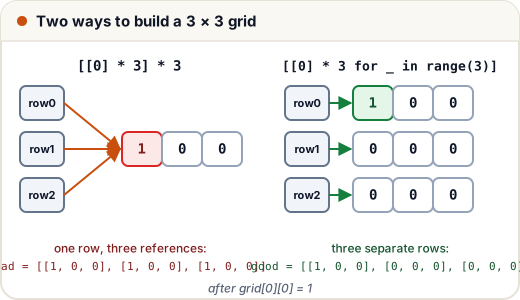
The comprehension runs [0] * 3 once for each row, so each row is a separate list. ([0] * 3 itself is fine, because the items are immutable numbers.)
Common mistakes
- Writing
b = aand expecting a copy. It only adds a second name. - Using
isto compare numbers or strings. It may seem to work for small values, but that is an internal detail. Use==. - Using a shallow copy for nested lists or dicts, then wondering why the original changed.
- Building a 2D list with
[[0] * n] * m. - Changing a list that was passed into a function when the caller did not expect it.
Quick recap
- A variable is a name pointing to an object;
b = ashares the object. ==compares values;iscompares identity. UseisforNone.- Immutable: int, float, str, tuple. Mutable: list, dict, set.
- Functions receive references: changing a mutable argument is visible outside.
- Shallow copy = new outer object, shared inner objects.
deepcopy= nothing shared. - Make grids with a comprehension:
[[0] * n for _ in range(m)].