AdvancedPython Programming · Lesson 23 of 30 · Updated ·
Type Hints and Dataclasses in Python
Modern Python code, in company projects and in libraries like FastAPI and Pydantic, is full of type hints (name: str) and dataclasses (@dataclass). Both make code easier to read and help tools find mistakes early. This lesson explains what they do, and just as importantly, what they do not do.
1. Type hints: labels, not rules
A type hint tells the reader (and tools) which type a variable, parameter or return value is meant to have. Hints were added in Python 3.5 and have improved in almost every version since.
def fee_after_discount(fee: float, percent: int = 10) -> float:
    return fee - fee * percent / 100

city: str = "Pune"
print(fee_after_discount(5000))
print(fee_after_discount.__annotations__)
4500.0
{'fee': <class 'float'>, 'percent': <class 'int'>, 'return': <class 'float'>}
fee: float— the parameter should be a float.-> float— the function returns a float.__annotations__shows that Python simply stores the hints.
The most important fact: Python does not check hints when the program runs. This still works:
def double(n: int) -> int:
    return n * 2

print(double("ab"))      # wrong type, but Python runs it anyway
abab
So why use them? Because separate tools do check them before you run anything:
- Type checkers such as
mypyorpyrightread your code and report errors like "Argument 1 to double has incompatible type str; expected int". - Editors (VS Code, PyCharm) use hints to suggest methods and underline mistakes as you type.
- Readers understand a function without reading its body.
2. Common type hints
| Hint | Meaning |
|---|---|
int, float, str, bool | basic types |
list[int] | a list of ints |
dict[str, float] | dict with str keys and float values |
tuple[str, int] | a tuple of exactly a str and an int |
tuple[int, ...] | a tuple of any number of ints |
set[str] | a set of strings |
int | None | an int or None (Python 3.10+) |
Optional[int] | the same, older spelling (from typing import Optional) |
Callable[[int], str] | a function taking an int, returning a str |
Any | anything; switches checking off |
The forms list[int] and dict[str, float] work from Python 3.9. Older code writes List[int] and Dict[str, float] imported from typing. You will see both.
from typing import Callable

def average(marks: list[int]) -> float:
    return sum(marks) / len(marks)

def find_roll(names: dict[str, int], name: str) -> int | None:
    return names.get(name)          # None when the name is missing

def apply_all(values: list[int], rule: Callable[[int], int]) -> list[int]:
    return [rule(v) for v in values]

print(average([70, 80, 93]))
print(find_roll({"Asha": 1}, "Ravi"))
print(apply_all([1, 2, 3], lambda v: v * 10))
81.0
None
[10, 20, 30]
int | None is very common for functions that may find nothing. It reminds the caller to handle the None case.
3. Dataclasses: classes for holding data
Many classes exist only to hold a few fields. Writing __init__, __repr__ and __eq__ by hand for each one is boring and easy to get wrong. The @dataclass decorator writes them for you from the type-hinted fields.
from dataclasses import dataclass

@dataclass
class Student:
    name: str
    roll: int
    cgpa: float = 0.0          # a default value

a = Student("Asha", 12, 8.7)
b = Student("Asha", 12, 8.7)
print(a)
print(a == b)
print(Student("Ravi", 13))
Student(name='Asha', roll=12, cgpa=8.7)
True
Student(name='Ravi', roll=13, cgpa=0.0)
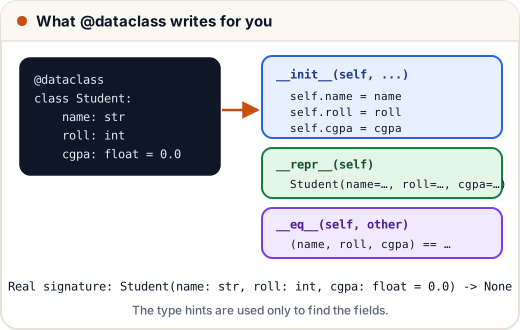
Fields with defaults must come after fields without defaults, just like function parameters. Note that dataclasses use the hints only to find the fields; they do not check types either.
4. Mutable defaults: field(default_factory=...)
You cannot write subjects: list[str] = [] in a dataclass. As you saw in the functions lesson, one shared list would be reused by every object, so dataclasses refuse it with a ValueError. Use field(default_factory=list) to make a new list for each object.
from dataclasses import dataclass, field

@dataclass
class Batch:
    name: str
    students: list[str] = field(default_factory=list)

b1 = Batch("Java-Jan")
b2 = Batch("Python-Feb")
b1.students.append("Neha")
print(b1)
print(b2)
Batch(name='Java-Jan', students=['Neha'])
Batch(name='Python-Feb', students=[])
5. frozen and order
Two useful options:
frozen=Truemakes objects read-only. Assigning to a field raises an error. Frozen dataclasses can also be used as dict keys and in sets, because they get a__hash__.order=Truegenerates<,<=,>,>=, comparing fields in the order they are written, like tuples.
from dataclasses import dataclass, FrozenInstanceError

@dataclass(frozen=True, order=True)
class Rank:
    score: int
    name: str

ranks = [Rank(78, "Ravi"), Rank(92, "Asha"), Rank(78, "Imran")]
print(sorted(ranks, reverse=True))
print({Rank(92, "Asha"): "topper"})
try:
    ranks[0].score = 100
except FrozenInstanceError as e:
    print("Error:", e)
[Rank(score=92, name='Asha'), Rank(score=78, name='Ravi'), Rank(score=78, name='Imran')]
{Rank(score=92, name='Asha'): 'topper'}
Error: cannot assign to field 'score'
Ties on score were broken by name, because name is the next field.
6. post_init: checks and computed fields
The generated __init__ calls __post_init__ at the end, if you define it. Use it to validate values or compute extra fields.
from dataclasses import dataclass, field, asdict

@dataclass
class Order:
    item: str
    price: float
    qty: int = 1
    total: float = field(init=False)     # not an __init__ parameter

    def __post_init__(self):
        if self.qty < 1:
            raise ValueError("qty must be at least 1")
        self.total = self.price * self.qty

o = Order("Notebook", 45.0, 4)
print(o)
print(asdict(o))
try:
    Order("Pen", 10.0, 0)
except ValueError as e:
    print("Error:", e)
Order(item='Notebook', price=45.0, qty=4, total=180.0)
{'item': 'Notebook', 'price': 45.0, 'qty': 4, 'total': 180.0}
Error: qty must be at least 1
asdict() converts a dataclass to a plain dictionary, which is handy before saving it as JSON.
7. Dataclass, namedtuple or normal class?
| Need | Use |
|---|---|
| A few fields, readable, maybe defaults and methods | @dataclass |
| Read-only and hashable record | @dataclass(frozen=True) or namedtuple |
Complex behaviour, custom __init__ logic | normal class |
| Must check types of incoming data at runtime (APIs, forms) | a validation library such as Pydantic |
Common mistakes
- Believing type hints are enforced when the program runs. They are not; use a type checker.
- Writing
list = []style mutable defaults in a dataclass instead offield(default_factory=list). - Putting a field without a default after one with a default (
TypeErrorwhen the class is created). - Forgetting the type annotation:
x = 5inside a dataclass is a class attribute, not a field. - Using
order=Truewithout thinking about field order, which decides how objects sort.
Quick recap
- Type hints (
x: int,-> str) document intent; tools like mypy check them; Python ignores them at runtime. - Use
list[int],dict[str, int],int | None,Callable[[int], int]. @dataclasswrites__init__,__repr__and__eq__from the annotated fields.- Mutable defaults need
field(default_factory=...). frozen=True→ read-only and hashable;order=True→ sortable by field order.__post_init__validates or computes fields;asdict()converts to a dict.