AdvancedPython Programming · Lesson 21 of 30 · Updated ·
Exceptions in Depth — Hierarchy, else/finally, Custom Errors and raise from
The earlier exceptions lesson showed how to catch a ValueError or ZeroDivisionError with try/except. Real programs need more: catching the right errors, running clean-up code in the right place, defining errors that describe your problem (like "seat not available"), and passing errors up with useful context. This lesson covers all of that.
1. Exceptions form a family tree
Every exception is a class, and the classes inherit from each other. An except clause catches the named class and all its subclasses (child classes).
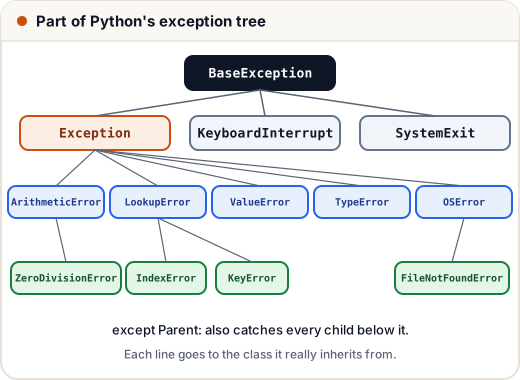
You can check the tree yourself:
print(ZeroDivisionError.__mro__)
print(issubclass(KeyError, LookupError))
print(issubclass(KeyboardInterrupt, Exception))
(<class 'ZeroDivisionError'>, <class 'ArithmeticError'>, <class 'Exception'>, <class 'BaseException'>, <class 'object'>)
True
False
__mro__ lists a class and all its parents in order. Notice that KeyboardInterrupt (pressing Ctrl+C) is not an Exception. That is deliberate: except Exception: should not stop a user from interrupting a program.
data = {"Asha": [90, 85]}
attempts = [lambda: data["Ravi"], lambda: data["Asha"][5]]
for attempt in attempts:
    try:
        attempt()
    except LookupError as e:          # catches KeyError AND IndexError
        print(type(e).__name__, "->", e)
KeyError -> 'Ravi'
IndexError -> list index out of range
2. try, except, else, finally: the full order
A try statement can have four parts:
| Part | When it runs |
|---|---|
try | always; the risky code |
except | only if try raised a matching exception |
else | only if try raised no exception |
finally | always, last, whatever happened |
def divide(a, b):
    try:
        result = a / b
    except ZeroDivisionError:
        print("  except: cannot divide by zero")
        return None
    else:
        print("  else: no error")
        return result
    finally:
        print("  finally: always runs")

print(divide(10, 4))
print(divide(10, 0))
  else: no error
  finally: always runs
2.5
  except: cannot divide by zero
  finally: always runs
None
Two lessons from this output:
finallyran even thoughreturnwas already reached. It runs just before the function actually returns.- Put only the risky line inside
try. Code that should run "only when it worked" belongs inelse. That way you do not catch errors from code you did not mean to protect.
3. Several except clauses: order matters
Python checks except clauses top to bottom and uses the first match. Put specific exceptions before general ones.
def read_age(text):
    try:
        age = int(text)
        return 100 // age
    except (ValueError, TypeError) as e:     # one clause, two types
        return f"bad input: {type(e).__name__}"
    except ZeroDivisionError:
        return "age cannot be zero"
    except Exception as e:                   # anything else, last
        return f"unexpected: {e}"

for value in ["25", "abc", None, "0"]:
    print(repr(value), "->", read_age(value))
'25' -> 4
'abc' -> bad input: ValueError
None -> bad input: TypeError
'0' -> age cannot be zero
If except Exception were first, it would catch everything and the specific clauses would never run.
4. Your own exception classes
Built-in exceptions describe general problems. For your program's own rules, define a class that inherits from Exception. It can carry extra data.
class BookingError(Exception):
    """Base class for all booking problems."""

class SeatNotAvailable(BookingError):
    def __init__(self, seat):
        super().__init__(f"seat {seat} is already booked")
        self.seat = seat

class PaymentFailed(BookingError):
    pass

booked = {"A1", "A2"}

def book(seat, paid):
    if seat in booked:
        raise SeatNotAvailable(seat)
    if not paid:
        raise PaymentFailed("payment was declined")
    booked.add(seat)
    return f"booked {seat}"

for seat, paid in [("A1", True), ("B4", False), ("B4", True)]:
    try:
        print(book(seat, paid))
    except BookingError as e:
        print(type(e).__name__ + ":", e)
SeatNotAvailable: seat A1 is already booked
PaymentFailed: payment was declined
booked B4
Because both errors inherit from BookingError, a caller can catch all booking problems with one clause, or a specific one when needed. Name your exception classes with an Error ending or a clear description, as the standard library does.
5. Re-raising and chaining with raise from
Sometimes you want to log an error and still let it continue upwards. A bare raise inside except re-raises the same exception:
def load_marks(text):
    try:
        return int(text)
    except ValueError:
        print("log: could not convert", repr(text))
        raise            # re-raise the same ValueError

try:
    load_marks("ninety")
except ValueError as e:
    print("caller got:", e)
log: could not convert 'ninety'
caller got: invalid literal for int() with base 10: 'ninety'
Other times you want to turn a low-level error into one that makes sense for your program, without losing the original. Use raise NewError(...) from original. The original is kept in the __cause__ attribute and Python shows both in the traceback.
class ConfigError(Exception):
    pass

def get_port(settings):
    try:
        return int(settings["port"])
    except (KeyError, ValueError) as e:
        raise ConfigError("port setting is missing or invalid") from e

try:
    get_port({"host": "localhost"})
except ConfigError as e:
    print(e)
    print("caused by:", repr(e.__cause__))
port setting is missing or invalid
caused by: KeyError('port')
6. EAFP vs LBYL
Two styles of handling possible problems:
- LBYL — "Look Before You Leap": check first (
if key in d:). - EAFP — "Easier to Ask Forgiveness than Permission": just try it and handle the exception.
Python code often prefers EAFP, especially when the check and the action could get out of step (for example, a file deleted between os.path.exists() and open()). For simple dictionary look-ups, d.get(key, default) is cleaner than both.
7. assert: checks for programmers
assert condition, message raises AssertionError if the condition is false. Use it to catch bugs in your own logic, not to validate user input: assertions are skipped entirely when Python runs with the -O (optimise) option.
def average(marks):
    assert len(marks) > 0, "marks list must not be empty"
    return sum(marks) / len(marks)

print(average([80, 90]))
try:
    average([])
except AssertionError as e:
    print("AssertionError:", e)
85.0
AssertionError: marks list must not be empty
Common mistakes
- Writing a bare
except:orexcept Exception: pass, which hides real bugs. - Putting a general
except Exceptionbefore specific clauses. - Wrapping many lines in
tryinstead of only the line that can fail. - Forgetting that
finallyruns even afterreturn. - Using
raise NewError(...)insideexceptwithoutfrom e, which makes the cause harder to read. - Using
assertto check user input.
Quick recap
- Exceptions are classes in a tree;
except Parentalso catches its children. - Order:
try→except(on error) orelse(no error) →finally(always). - List specific
exceptclauses first, general ones last. - Define your own errors by inheriting from
Exception; group them under a base class. - Bare
raisere-raises;raise X from echains and keeps the original. assertis for catching bugs during development, not for input checks.