AdvancedPython Programming · Lesson 22 of 30 · Updated ·
Magic Methods, @property, classmethod and staticmethod in Python
In the OOP lesson you wrote classes with __init__ and __str__. Python has many more magic methods (also called dunder methods, for "double underscore"). When you use an operator or a built-in function on an object, Python quietly calls one of these methods. If your class defines them, your objects can be compared, sorted, added, measured with len() and looped over, just like lists and numbers.
1. How operators become method calls
| You write | Python calls |
|---|---|
str(x), print(x) | x.__str__() |
repr(x), shown in lists and the shell | x.__repr__() |
a == b | a.__eq__(b) |
a < b, sorted(...) | a.__lt__(b) |
a + b | a.__add__(b) |
len(x) | x.__len__() |
x[i] | x.__getitem__(i) |
item in x | x.__contains__(item) |
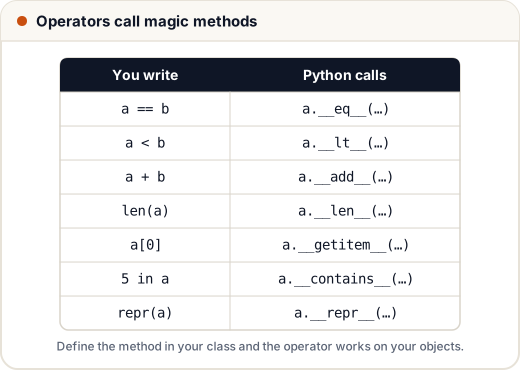
You never call these methods directly in normal code. You define them, and Python calls them.
2. repr vs str
__str__gives a friendly text for users (used byprint).__repr__gives an unambiguous text for programmers, ideally one that looks like the code to create the object. Lists show their items usingrepr.
If you write only one, write __repr__: Python falls back to it when __str__ is missing.
class Student:
    def __init__(self, name, marks):
        self.name, self.marks = name, marks

    def __repr__(self):
        return f"Student({self.name!r}, {self.marks})"

    def __str__(self):
        return f"{self.name} scored {self.marks}"

s = Student("Asha", 92)
print(s)
print(repr(s))
print([s, Student("Ravi", 74)])
Asha scored 92
Student('Asha', 92)
[Student('Asha', 92), Student('Ravi', 74)]
{self.name!r} inserts the name using repr, which adds the quotes.
3. Equality and sorting: eq and lt
By default, == on your objects checks identity (the same object), not values. Define __eq__ to compare values, and __lt__ (less than) to let sorted() and min() work.
from functools import total_ordering

@total_ordering
class Version:
    def __init__(self, text):
        self.parts = tuple(int(p) for p in text.split("."))

    def __eq__(self, other):
        return self.parts == other.parts

    def __lt__(self, other):
        return self.parts < other.parts

    def __repr__(self):
        return ".".join(map(str, self.parts))

versions = [Version("3.10"), Version("3.9"), Version("3.12.1")]
print(sorted(versions))
print(Version("3.9") == Version("3.9.0"), Version("3.10") >= Version("3.9"))
[3.9, 3.10, 3.12.1]
False True
Notice that as plain strings, "3.10" < "3.9" would be True (character by character), which is wrong for versions. Comparing tuples of numbers gives the correct order. The False is because (3, 9) and (3, 9, 0) are different tuples; a real version class would pad the shorter one with zeros. @total_ordering writes <=, > and >= for you from __eq__ and __lt__.
Note: when you define __eq__, Python sets __hash__ to None, so your objects can no longer be put in a set or used as dict keys. If you need that, also define __hash__ (for example, return hash(self.parts)), and only for objects whose values do not change.
4. Container behaviour: len, getitem, contains
class Playlist:
    def __init__(self, name, songs):
        self.name = name
        self.songs = list(songs)

    def __len__(self):
        return len(self.songs)

    def __getitem__(self, index):
        return self.songs[index]

    def __contains__(self, song):
        return song.lower() in (s.lower() for s in self.songs)

p = Playlist("Study", ["Raag Yaman", "Lo-fi Beats", "Rain Sounds"])
print(len(p), p[0], p[-1])
print(p[0:2])
print("rain sounds" in p)
for song in p:          # __getitem__ alone is enough for a for loop
    print("-", song)
3 Raag Yaman Rain Sounds
['Raag Yaman', 'Lo-fi Beats']
True
- Raag Yaman
- Lo-fi Beats
- Rain Sounds
Because __getitem__ passes the index straight to the list, slices and negative indexes work too. Python can loop over an object that has __getitem__, by calling it with 0, 1, 2, … until an IndexError.
5. Arithmetic: add and friends
class Money:
    def __init__(self, rupees):
        self.rupees = rupees

    def __add__(self, other):
        return Money(self.rupees + other.rupees)

    def __mul__(self, times):
        return Money(self.rupees * times)

    def __repr__(self):
        return f"₹{self.rupees}"

fee = Money(1500)
books = Money(400)
print(fee + books, books * 3)
print(sum([fee, books], Money(0)))
₹1900 ₹1200
₹1900
sum() starts from 0 by default, and 0 + Money would fail, so we pass Money(0) as the start value. Other operator methods follow the same pattern: __sub__ for -, __truediv__ for /, __neg__ for unary -.
6. @property: attributes with checks
Sometimes an attribute must follow a rule, such as "marks must be between 0 and 100". A property looks like a normal attribute from outside, but runs a method when it is read or set.
class Result:
    def __init__(self, marks):
        self.marks = marks            # goes through the setter below

    @property
    def marks(self):
        return self._marks

    @marks.setter
    def marks(self, value):
        if not 0 <= value <= 100:
            raise ValueError("marks must be 0-100")
        self._marks = value

    @property
    def grade(self):                  # read-only, computed each time
        return "A" if self._marks >= 80 else "B" if self._marks >= 60 else "C"

r = Result(85)
print(r.marks, r.grade)
r.marks = 55
print(r.marks, r.grade)
try:
    r.marks = 120
except ValueError as e:
    print("Error:", e)
85 A
55 C
Error: marks must be 0-100
The real value is stored in _marks. The single leading underscore is a convention meaning "internal; use the property instead". grade has no setter, so r.grade = "A" would raise an AttributeError.
7. classmethod vs staticmethod
| Regular method | @classmethod | @staticmethod | |
|---|---|---|---|
| First parameter | self (the object) | cls (the class) | none |
| Can use object data | yes | no | no |
| Typical use | normal behaviour | another way to create objects | helper that belongs with the class |
class Student:
    def __init__(self, name, roll):
        self.name, self.roll = name, roll

    @classmethod
    def from_csv(cls, line):          # alternative constructor
        name, roll = line.split(",")
        return cls(name.strip(), int(roll))

    @staticmethod
    def is_valid_roll(roll):          # just a helper; needs no self or cls
        return 1 <= roll <= 120

    def __repr__(self):
        return f"Student({self.name!r}, {self.roll})"

s = Student.from_csv("Neha, 42")
print(s, Student.is_valid_roll(42), Student.is_valid_roll(500))
Student('Neha', 42) True False
Using cls(...) instead of Student(...) matters with inheritance: if a subclass calls from_csv, it gets an object of the subclass.
Common mistakes
- Calling magic methods directly (
x.__len__()) instead oflen(x). - Returning a non-string from
__str__/__repr__, or a non-integer from__len__. - Defining
__eq__and then being surprised that the objects can no longer go in a set. - Inside a property, writing
self.marks = valuein the setter, which calls the setter again forever. Store inself._marks. - Forgetting
@classmethodand then wondering whyclsreceives a string.
Quick recap
- Operators and built-ins call magic methods:
==→__eq__,len()→__len__,+→__add__. - Write
__repr__always;__str__when you want a friendlier print. __eq__+__lt__(+@total_ordering) make objects comparable and sortable.__len__,__getitem__,__contains__make container-like classes.@propertyadds checks or computed values behind normal attribute syntax.@classmethodreceives the class (alternative constructors);@staticmethodreceives nothing.