AdvancedWeb Development · Lesson 16 of 19 · Updated ·
HTTP for Web Developers — Methods, Status Codes, Headers and Good API Design
Every click on a website, every fetch call and every API request is an HTTP message. When something breaks — "the form says error", "the data doesn't update" — the answer is usually in the HTTP request or response, visible in the DevTools Network tab. This lesson teaches you to read and design those messages. The Node.js examples start a real local server, call it, print what happened and stop.
1. The shape of a request and a response
HTTP (HyperText Transfer Protocol) is a request–response protocol: the client sends a request, the server sends back exactly one response.
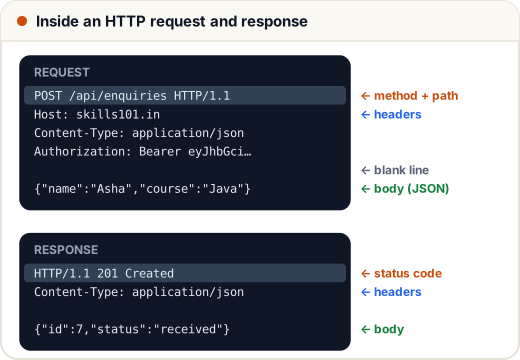
A request has:
- a method — what you want to do (
GET,POST, …) - a path (and optional query string) — which resource (
/api/courses?level=beginner) - headers — extra information as
Name: valuelines - an optional body — the data you send (usually JSON)
A response has a status code, headers and an optional body.
const http = require("http");

const server = http.createServer((req, res) => {
  let body = "";
  req.on("data", (chunk) => (body += chunk));
  req.on("end", () => {
    console.log("server got:", req.method, req.url, req.headers["content-type"], body);
    res.writeHead(201, { "Content-Type": "application/json" });
    res.end(JSON.stringify({ id: 7, status: "received" }));
  });
});

server.listen(0, async () => {
  const port = server.address().port;           // 0 = any free port
  const res = await fetch(`http://localhost:${port}/api/enquiries`, {
    method: "POST",
    headers: { "Content-Type": "application/json" },
    body: JSON.stringify({ name: "Asha", course: "Java" }),
  });
  console.log("client got:", res.status, res.statusText, res.headers.get("content-type"));
  console.log(await res.json());
  server.close();
});
server got: POST /api/enquiries application/json {"name":"Asha","course":"Java"}
client got: 201 Created application/json
{ id: 7, status: 'received' }
2. Methods and what they promise
| Method | Meaning | Body? | Safe | Idempotent |
|---|---|---|---|---|
GET | read a resource | no | yes | yes |
POST | create something / run an action | yes | no | no |
PUT | replace a resource completely | yes | no | yes |
PATCH | change part of a resource | yes | no | not guaranteed |
DELETE | remove a resource | usually no | no | yes |
Two words interviewers love:
- Safe — the request does not change data on the server.
GETmust be safe: browsers, crawlers and caches sendGETs freely. Never delete or update anything on aGET. - Idempotent — sending the same request once or ten times leaves the server in the same state.
Why idempotency matters: on a weak mobile network, a request can time out even though the server processed it. Clients and proxies may safely retry idempotent requests. Retrying a POST /orders could create two orders — which is why payment APIs ask you to send an idempotency key so the server can spot repeats.
// Simulate the server's state after repeating the same request 3 times
let course = { id: 7, title: "SQL", price: 499 };
const orders = [];

for (let i = 0; i < 3; i++) course = { id: 7, title: "SQL", price: 399 };   // PUT: replace
for (let i = 0; i < 3; i++) orders.push({ course: 7 });                     // POST: create

console.log("after 3 PUTs:", course.price);
console.log("after 3 POSTs:", orders.length, "orders");
after 3 PUTs: 399
after 3 POSTs: 3 orders
3. Status codes
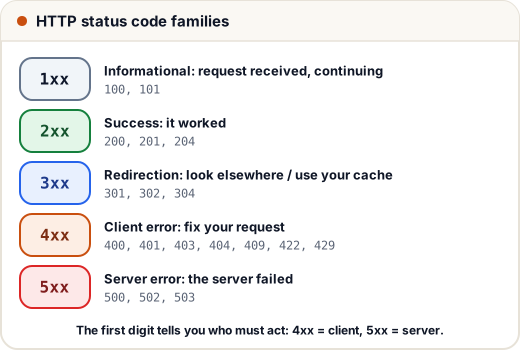
The first digit gives the family:
| Code | Name | Use it when |
|---|---|---|
| 200 | OK | a normal successful response with a body |
| 201 | Created | a POST created something (often with a Location header) |
| 204 | No Content | success, nothing to send back (typical for DELETE) |
| 301 / 302 | Moved Permanently / Found | redirect to another URL |
| 304 | Not Modified | the client's cached copy is still fresh (section 5) |
| 400 | Bad Request | the request is malformed (broken JSON, missing field) |
| 401 | Unauthorized | not logged in — no valid credentials |
| 403 | Forbidden | logged in, but not allowed |
| 404 | Not Found | the resource does not exist |
| 409 | Conflict | clashes with current state (email already registered) |
| 422 | Unprocessable Content | well-formed, but fails validation |
| 429 | Too Many Requests | rate limit reached |
| 500 | Internal Server Error | a bug or crash on the server |
| 502 / 503 | Bad Gateway / Service Unavailable | an upstream server failed, or the server is overloaded or down |
401 vs 403 is a classic question: 401 = "who are you?"; 403 = "I know who you are, and you can't do this".
Rule of thumb: 4xx means the client should change something; 5xx means the server has a problem. Returning 200 with { "error": "…" } breaks this and confuses every tool that reads status codes.
4. Headers worth knowing
| Header | Direction | Example | Purpose |
|---|---|---|---|
Content-Type | both | application/json | format of the body |
Accept | request | application/json | formats the client wants back |
Authorization | request | Bearer eyJhbGci… | credentials (tokens) |
Cookie / Set-Cookie | request / response | sid=abc123 | sessions (next lessons) |
Cache-Control | response | max-age=3600 | how long the response may be cached |
ETag / If-None-Match | response / request | "v42" | version check for caching |
Location | response | /api/orders/91 | URL of a new resource, or redirect target |
Access-Control-Allow-Origin | response | https://skills101.in | CORS: which other sites' pages may read the response |
Header names are case-insensitive: content-type and Content-Type are the same header.
5. Caching with ETag and 304
Downloading the same course list again and again wastes data — a real cost for users on mobile plans. With an ETag (a version label for the response), the browser can ask "has it changed?", and the server can reply 304 Not Modified with no body.
const http = require("http");
const courses = JSON.stringify([{ id: 1, title: "DSA" }, { id: 2, title: "SQL" }]);
const etag = '"v42"';

const server = http.createServer((req, res) => {
  if (req.headers["if-none-match"] === etag) {
    res.writeHead(304, { ETag: etag });
    return res.end();
  }
  res.writeHead(200, { "Content-Type": "application/json", ETag: etag });
  res.end(courses);
});

server.listen(0, async () => {
  const url = `http://localhost:${server.address().port}/api/courses`;
  const first = await fetch(url);
  const text = await first.text();
  console.log("first:", first.status, first.headers.get("etag"), text.length, "bytes");
  const second = await fetch(url, { headers: { "If-None-Match": first.headers.get("etag") } });
  console.log("second:", second.status, (await second.text()).length, "bytes");
  server.close();
});
first: 200 "v42" 47 bytes
second: 304 0 bytes
Browsers do this automatically for normal page loads; you only need to send the ETag (most frameworks can do it for you).
6. Designing a clean REST API
Building on the REST rules from the Express lesson:
| Good | Avoid |
|---|---|
GET /api/courses | GET /api/getCourses |
GET /api/courses/7/lessons | GET /api/lessonsOfCourse?id=7 |
POST /api/courses/7/enrolments | GET /api/enrol?course=7 (a GET that changes data!) |
GET /api/courses?level=beginner&page=2&limit=20 | returning 10,000 rows at once |
/api/v1/courses | changing response fields without warning |
Good habits:
- Nouns in paths, methods as verbs, plural collections.
- Filtering, sorting and pagination through the query string; always cap the page size.
- Consistent errors: the right status code plus a body like
{ "error": "phone is required", "field": "phone" }. - Version the API (
/v1/) once outside apps depend on it, so breaking changes go to/v2/. - HTTPS everywhere: HTTP sends everything, including passwords and tokens, as readable text.
Common mistakes
- Changing data in a
GEThandler (a crawler following links could delete records). - Returning
200for errors, or500for a user's typing mistake. - Mixing up 401 and 403.
- Forgetting
Content-Type: application/jsonwhen sending JSON, so the server cannot parse the body. - Retrying a non-idempotent
POSTautomatically and creating duplicates.
Quick recap
- Request = method + path + headers + optional body; response = status + headers + optional body.
- GET (safe), PUT and DELETE are idempotent; POST is not, so retries can duplicate.
- 2xx success · 3xx redirect/cache · 4xx client's fault · 5xx server's fault; 401 = not logged in, 403 = not allowed.
- Key headers: Content-Type, Authorization, Cookie, Cache-Control, ETag.
- ETag + If-None-Match → 304 saves bandwidth; design APIs with nouns, pagination, versioning and consistent errors.