Web Development · Lesson 4 of 12 · Updated ·
CSS Basics — Selectors, Colours, Units, Box Model and Specificity
CSS (Cascading Style Sheets) controls how HTML looks: colours, fonts, spacing and layout.
1. Adding CSS
<!-- 1. External file (best) -->
<link rel="stylesheet" href="styles.css">

<!-- 2. <style> in the head -->
<style> h1 { color: navy; } </style>

<!-- 3. Inline (avoid) -->
<h1 style="color: navy">Hello</h1>
A CSS rule = selector + declarations:
h1 {
  color: #c94f0f;
  font-size: 2rem;
  margin-bottom: 16px;
}
2. Selectors
| Selector | Matches | Example |
|---|---|---|
| element | all of that tag | p { } |
.class | elements with that class | .btn { } |
#id | the one element with that id | #hero { } |
| descendant | inside another | nav a { } |
| child | direct child | ul > li { } |
| group | several selectors | h1, h2 { } |
| pseudo-class | a state | a:hover, input:focus, li:first-child |
| attribute | by attribute | input[type="email"] |
Style with classes most of the time. They're reusable and keep specificity low.
3. Colours and units
- Colours:
red,#c94f0f(hex),rgb(201 79 15),rgb(0 0 0 / 50%)(transparent). - Units:
| Unit | Relative to | Use for |
|---|---|---|
px | fixed | borders, small details |
rem | root font size (usually 16px) | font sizes, spacing (respects user settings) |
em | the element's font size | spacing inside components |
% | the parent | widths |
vw / vh | the viewport | full-screen sections |
4. The box model
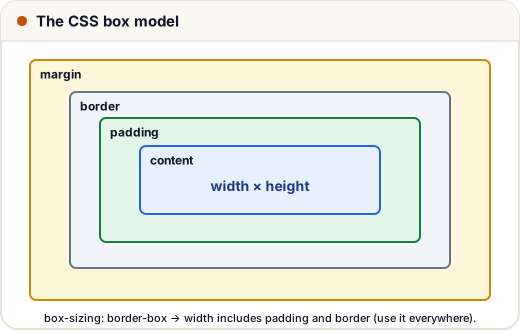
Every element is a box:
- content — the text or image
- padding — space inside the border (takes the background colour)
- border — the line around it
- margin — space outside, between boxes (transparent)
*, *::before, *::after { box-sizing: border-box; }
.card {
  width: 300px;
  padding: 16px;
  border: 1px solid #ddd;
  margin: 12px auto;   /* auto left/right margins centre a block */
  border-radius: 12px;
}
With box-sizing: border-box, the 300px includes padding and border — much easier to reason about. Almost every modern site sets it globally.
5. The cascade and specificity
When two rules target the same element, which wins?
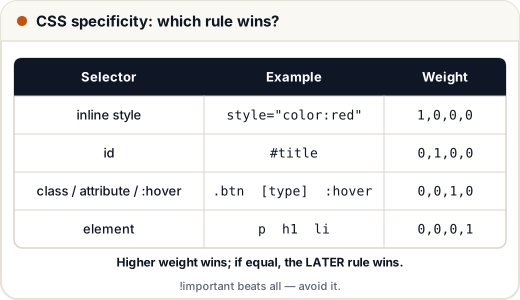
- Importance (
!important— avoid it). - Specificity — id > class > element.
- Order — if equal, the rule written later wins.
p { color: black; }        /* 0,0,0,1 */
.note { color: blue; }     /* 0,0,1,0  ← wins over p */
#tip { color: green; }     /* 0,1,0,0  ← wins over .note */
Some properties (like color and font-family) are inherited by children; others (like border, margin) are not.
6. Typography essentials
body {
  font-family: system-ui, sans-serif;
  font-size: 1rem;
  line-height: 1.6;
  color: #1f2937;
}
A comfortable line-height (1.5–1.7) and a limited line length (about 60–75 characters) make text much easier to read.
Common mistakes
- Fighting specificity with
!importantinstead of using a clearer class. - Confusing margin (outside) with padding (inside).
- Forgetting
box-sizing: border-box, so widths come out bigger than expected.
Quick recap
- Use an external stylesheet; selector + declarations.
- Prefer classes; know descendant, child, pseudo-class selectors.
- rem for type and spacing; % and vw for widths.
- Box model: content, padding, border, margin; use border-box.
- Conflicts: importance → specificity → order.