Web Development · Lesson 11 of 12 · Updated ·
React Basics — Components, JSX, Props, State and useEffect
React is a JavaScript library for building user interfaces from components. It's the most requested frontend skill in Indian startup job posts.
1. Setting up
npm create vite@latest my-app -- --template react
cd my-app
npm install
npm run dev
(Next.js — which Skills101 itself is built with — is a popular framework on top of React.)
2. Components and JSX
A component is a function that returns JSX (HTML-like syntax inside JavaScript):
function Welcome() {
  const name = "Asha";
  return (
    <div className="welcome">
      <h1>Hello, {name}!</h1>
      <p>You have {3 + 2} lessons left today.</p>
    </div>
  );
}
JSX rules:
- Return one parent element (or a fragment
<>…</>). - Use
classNameinstead ofclass,htmlForinstead offor. { }puts any JavaScript expression inside.- Component names start with a Capital letter.
3. Props: passing data down
function CourseCard({ title, price, free }) {
  return (
    <article className="card">
      <h3>{title}</h3>
      <p>{free ? "Free" : `₹${price}`}</p>
    </article>
  );
}

function CourseList() {
  return (
    <section>
      <CourseCard title="DSA in Java" price={4999} />
      <CourseCard title="SQL Basics" free />
    </section>
  );
}
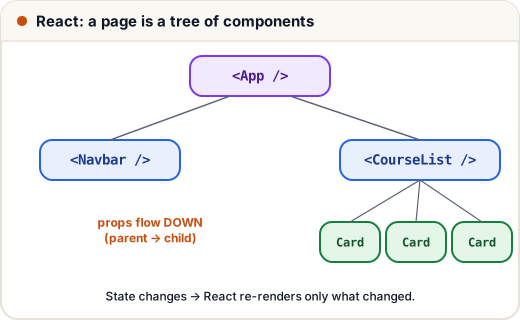
Props are read-only — a child never changes its props.
4. State with useState
State is data that changes over time; when it changes, React re-renders the component.
import { useState } from "react";

function LikeButton() {
  const [likes, setLikes] = useState(0);
  return <button onClick={() => setLikes(likes + 1)}>👍 {likes}</button>;
}
- Never change state directly (
likes++✗). Always use the setter. - For objects/arrays, create a new copy:
setTasks([...tasks, newTask]).
5. Lists and keys
function TaskList({ tasks }) {
  return (
    <ul>
      {tasks.map((t) => (
        <li key={t.id}>{t.text}</li>
      ))}
    </ul>
  );
}
key helps React track items between renders. Use a stable id, not the array index (indexes break when items are reordered or deleted).
6. Controlled forms
function SearchBox({ onSearch }) {
  const [query, setQuery] = useState("");
  return (
    <form onSubmit={(e) => { e.preventDefault(); onSearch(query); }}>
      <input value={query} onChange={(e) => setQuery(e.target.value)} placeholder="Search courses" />
      <button>Search</button>
    </form>
  );
}
The input's value always comes from state — React is the "single source of truth".
7. useEffect: side effects like fetching data
import { useEffect, useState } from "react";

function Courses() {
  const [courses, setCourses] = useState([]);
  const [loading, setLoading] = useState(true);

  useEffect(() => {
    fetch("/api/courses")
      .then((res) => res.json())
      .then((data) => setCourses(data))
      .finally(() => setLoading(false));
  }, []);   // [] = run once, after the first render

  if (loading) return <p>Loading…</p>;
  return <ul>{courses.map((c) => <li key={c.id}>{c.title}</li>)}</ul>;
}
The dependency array decides when the effect runs: [] once, [userId] whenever userId changes, no array = after every render (usually a bug).
8. Lifting state up
When two siblings need the same data, keep the state in their common parent and pass it down as props (plus a function to change it). For bigger apps, teams use Context or libraries like Redux/Zustand.
Common mistakes
- Mutating state (
tasks.push(x)) instead of creating a new array. - Missing or index-based
keys in lists. - useEffect without a dependency array → infinite fetch loops.
Quick recap
- Components are functions returning JSX; names start with a capital.
- Props flow down (read-only); state changes trigger re-renders.
useStatefor state, new copies for arrays/objects, keys for lists.useEffect(fn, deps)for fetching and other side effects.