Web Development · Lesson 1 of 12 · Updated ·
How the Web Works — Frontend, Backend, Database and Your Learning Path
Every website you use — Skills101, IRCTC, Instagram — is made of the same three parts.
1. Client and server
- Your browser is the client. It asks for things.
- A server is a computer (in a data centre) that answers.
- They talk using HTTP(S) — the browser sends a request, the server sends a response (HTML, JSON, images).
(See the Computer Networks lesson for the full journey.)
2. The three parts
| Part | Job | Technologies |
|---|---|---|
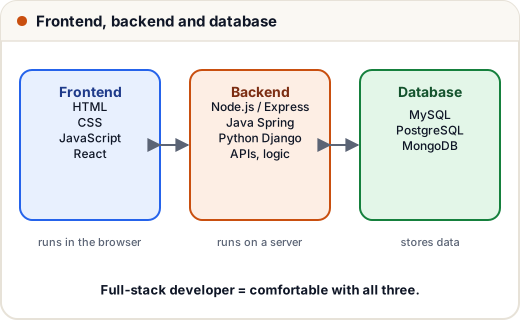
| Frontend | what users see and click | HTML (structure), CSS (style), JavaScript (behaviour), React/Angular/Vue |
| Backend | logic, security, talking to the database | Node.js + Express, Java + Spring Boot, Python + Django/Flask, PHP |
| Database | stores data permanently | MySQL, PostgreSQL, MongoDB |
A full-stack developer can work on all three. Most Indian startups hire "full-stack" or "MERN" (MongoDB, Express, React, Node) freshers.
3. Static vs dynamic websites
- Static — the same HTML for everyone (a portfolio, a landing page). Cheap and fast; can be hosted free (GitHub Pages, Netlify).
- Dynamic — content depends on the user and data (your dashboard, feeds, shopping cart). Needs a backend and database.
4. Tools to install
- VS Code — the code editor.
- A modern browser (Chrome / Edge) and its DevTools (press F12): inspect HTML, see CSS, read console errors, watch network requests.
- Node.js — runs JavaScript outside the browser, and gives you
npmto install packages. - Git + GitHub — save versions and show your work (see our Git subject).
5. A realistic learning path (about 4–6 months)
| Step | Learn | Build |
|---|---|---|
| 1 | HTML + CSS | a personal portfolio page |
| 2 | Responsive CSS (flexbox, grid) | make it look great on phones |
| 3 | JavaScript + DOM | a to-do list, a quiz app |
| 4 | Async JS + APIs | a weather app using a free API |
| 5 | React | a multi-page app with components |
| 6 | Node + Express + a database | a REST API with login |
| 7 | Deploy | put it online and on your résumé |
Projects matter more than certificates. Three working, deployed projects with clean GitHub code will get you more interviews than ten course certificates.
Common mistakes
- Jumping to React before understanding plain JavaScript.
- Only watching tutorials — build something every week.
- Never opening DevTools; it's your best debugging tool.
Quick recap
- Browser (client) ↔ HTTP ↔ server; responses are HTML or JSON.
- Frontend (HTML, CSS, JS) · backend (APIs, logic) · database (data).
- Install VS Code, Node.js, Git; live in DevTools.
- Learn by building: portfolio → JS apps → React → API → deploy.