Computer Networks · Lesson 6 of 7 · Updated ·
What Happens When You Type a URL and Press Enter — Step by Step
"What happens when you type skills101.in into the browser and press Enter?" is asked in almost every networking and web interview. It tests whether you can connect everything you've learned.
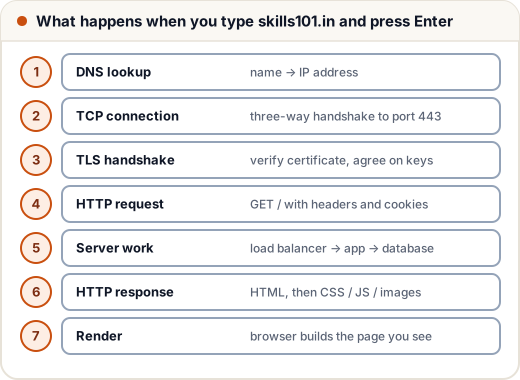
The 7 steps
1. Understand the input and find the IP (DNS)
- The browser decides it's a URL (not a search), and adds
https://. - It checks the browser cache, OS cache and hosts file; if needed, asks the DNS resolver, which walks root →
.in→ skills101's name server and returns an IP like 203.0.113.7.
2. Open a TCP connection
- The browser connects to that IP on port 443 with the three-way handshake (SYN, SYN-ACK, ACK).
- Under the hood: the OS finds the gateway (router) using its routing table, uses ARP to get the router's MAC address, and the packet hops router to router across the internet.
3. TLS handshake (because it's HTTPS)
- The server sends its certificate; the browser checks it's valid for skills101.in and signed by a trusted CA.
- They agree on session keys. From now on, everything is encrypted.
4. Send the HTTP request
GET / HTTP/2
Host: skills101.in
Cookie: session=…
Accept: text/html
5. The server side
- A CDN may answer static files from a nearby city.
- Otherwise a load balancer (e.g. nginx) forwards the request to an application server.
- The app checks the session cookie, maybe reads from a cache (Redis) or the database, and builds the HTML.
6. The response
HTTP/2 200 OK
Content-Type: text/html
Cache-Control: max-age=60
followed by the HTML. The browser then requests CSS, JavaScript, images and fonts (often in parallel, often from the CDN).
7. Render the page
- Parse HTML → DOM; parse CSS → CSSOM; combine → render tree.
- Layout (positions and sizes) → paint pixels → JavaScript runs and makes it interactive.
How to answer in an interview
- Start with the 7-step outline (30 seconds).
- Ask: "Which part would you like me to go deeper into?"
- Go deep where you're strong: DNS caching, the TLS handshake, load balancing, or browser rendering.
Extra details that impress
- HTTP keep-alive / HTTP/2 reuse one connection for many requests.
- HSTS tells the browser to always use HTTPS for a site.
- Caching at every level: browser, DNS, CDN, server, database.
- HTTP/3 runs over QUIC (UDP) to cut handshake delay.
Common mistakes
- Skipping DNS or the TLS handshake.
- Saying "the server sends the website" without mentioning the request/response structure.
- Going too deep in one area before giving the full outline.
Quick recap
- DNS → TCP → TLS → HTTP request → server (CDN, load balancer, app, cache, DB) → response → render.
- Give the outline first, then go deep where asked.