Computer Networks · Lesson 2 of 7 · Updated ·
OSI Model vs TCP/IP Model — All Layers Explained Simply
Networking is split into layers. Each layer does one job and talks only to the layers just above and below it. This makes networks easier to build and debug ("is it a cable problem or a DNS problem?").
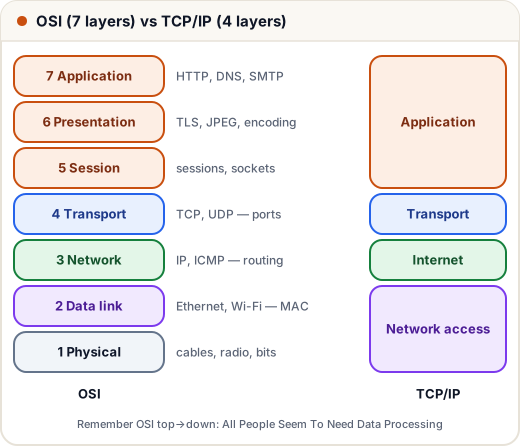
1. The OSI model (7 layers)
| # | Layer | Job | Protocols / examples | Unit | Device |
|---|---|---|---|---|---|
| 7 | Application | services for apps | HTTP, HTTPS, DNS, SMTP, FTP | data | — |
| 6 | Presentation | format, encrypt, compress | TLS/SSL, JPEG, UTF-8 | data | — |
| 5 | Session | open, manage, close sessions | sockets, RPC | data | — |
| 4 | Transport | process-to-process delivery, reliability, ports | TCP, UDP | segment | — |
| 3 | Network | logical addressing, routing | IP, ICMP | packet | router |
| 2 | Data link | node-to-node delivery, MAC, error detection | Ethernet, Wi-Fi (802.11), ARP | frame | switch |
| 1 | Physical | bits as signals | cables, fibre, radio | bit | hub, repeater |
Remember (top → down): All People Seem To Need Data Processing.
2. The TCP/IP model (4 layers) — what the internet really uses
| TCP/IP layer | Matches OSI layers | Protocols |
|---|---|---|
| Application | 7, 6, 5 | HTTP, DNS, SMTP, TLS |
| Transport | 4 | TCP, UDP |
| Internet | 3 | IP, ICMP |
| Network access (link) | 2, 1 | Ethernet, Wi-Fi |
OSI is a teaching/reference model; TCP/IP is the practical model the internet is built on.
3. Encapsulation: wrapping data layer by layer
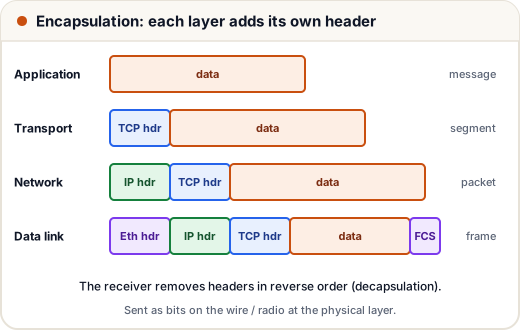
When you send a message:
- Application creates the data (an HTTP request).
- Transport adds a TCP header (source and destination ports) → segment.
- Network adds an IP header (source and destination IP addresses) → packet.
- Data link adds an Ethernet/Wi-Fi header (MAC addresses) and a trailer (error check) → frame.
- Physical sends the bits.
The receiver removes the headers in reverse order — decapsulation.
4. Three kinds of addresses (and which layer uses each)
| Address | Layer | Identifies | Example |
|---|---|---|---|
| Port | Transport | an application on a device | 443 (HTTPS), 22 (SSH), 3306 (MySQL) |
| IP address | Network | a device on the internet | 142.250.183.14 |
| MAC address | Data link | a network card on the local link | 3C:22:FB:1A:9E:07 |
IP addresses get you to the right network and device; MAC addresses get you across each local hop; ports get you to the right program.
Common mistakes
- Putting TCP at the network layer (it's transport) or IP at the transport layer (it's network).
- Saying "the internet uses the OSI model". It uses TCP/IP; OSI is the reference.
- Mixing up segment (transport), packet (network) and frame (data link).
Quick recap
- OSI 7 layers: Application, Presentation, Session, Transport, Network, Data link, Physical.
- TCP/IP 4 layers: Application, Transport, Internet, Network access.
- Units: data → segment → packet → frame → bits.
- Port (app) · IP (device across networks) · MAC (card on local link).