Computer Networks · Lesson 3 of 7 · Updated ·
IP Addressing and Subnetting — IPv4, Classes, CIDR and Subnet Masks
Every device on a network needs an IP address so data can find it. Subnetting questions appear in networking interviews and in TCS/Wipro technical rounds — and they're easy once you see the pattern.
1. An IPv4 address
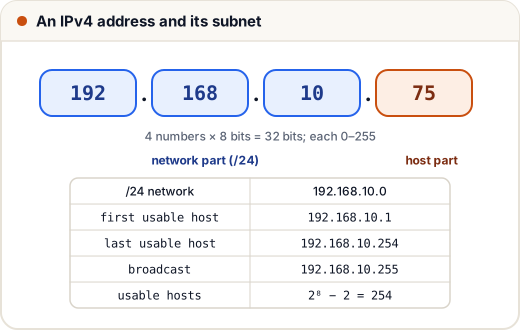
- 4 numbers (octets), each 0–255, separated by dots → 32 bits in total.
- Part of the address identifies the network, the rest the host (device).
2. CIDR and subnet masks
The /n (CIDR prefix) says how many bits belong to the network.
| CIDR | Subnet mask | Host bits | Usable hosts (2ʰ − 2) |
|---|---|---|---|
| /8 | 255.0.0.0 | 24 | 16,777,214 |
| /16 | 255.255.0.0 | 16 | 65,534 |
| /24 | 255.255.255.0 | 8 | 254 |
| /26 | 255.255.255.192 | 6 | 62 |
| /27 | 255.255.255.224 | 5 | 30 |
| /28 | 255.255.255.240 | 4 | 14 |
| /30 | 255.255.255.252 | 2 | 2 |
Why − 2? The first address is the network address and the last is the broadcast address; neither can be given to a device.
3. Solving a subnet question
Find the network, broadcast and usable range of 172.16.5.130/27.
- /27 → 5 host bits → block size = 2⁵ = 32.
- Blocks in the last octet: 0, 32, 64, 96, 128, 160… 130 falls in the 128 block.
- Network = 172.16.5.128, broadcast = 128 + 32 − 1 = 172.16.5.159.
- Usable hosts: 172.16.5.129 – 172.16.5.158 (30 hosts).
Shortcut: block size = 256 − (last non-255 number of the mask). For /27 the mask ends in 224 → 256 − 224 = 32.
Another one
192.168.10.64/26 → block 64 → network 192.168.10.64, broadcast 192.168.10.127, hosts .65 – .126 (62 hosts).
4. Splitting a network (subnetting)
Split 192.168.1.0/24 into 4 equal subnets.
4 = 2² → borrow 2 bits → /26 (block 64):
| Subnet | Range | Broadcast |
|---|---|---|
| 192.168.1.0/26 | .1 – .62 | .63 |
| 192.168.1.64/26 | .65 – .126 | .127 |
| 192.168.1.128/26 | .129 – .190 | .191 |
| 192.168.1.192/26 | .193 – .254 | .255 |
5. Classes (old system, still asked)
| Class | First octet | Default mask |
|---|---|---|
| A | 1 – 126 | /8 |
| B | 128 – 191 | /16 |
| C | 192 – 223 | /24 |
| D | 224 – 239 | multicast |
| E | 240 – 255 | experimental |
127.x.x.x is loopback (127.0.0.1 = this computer, "localhost").
6. Private vs public IPs
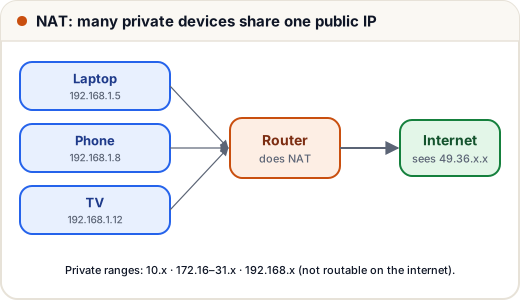
Private ranges (used inside homes and offices, not routed on the internet):
- 10.0.0.0/8
- 172.16.0.0/12 (172.16 – 172.31)
- 192.168.0.0/16
Your router uses NAT to share one public IP among all private devices.
7. IPv6 in one minute
IPv4 has only ~4.3 billion addresses — not enough. IPv6 uses 128 bits, written in hex: 2001:0db8:85a3::8a2e:0370:7334. It needs no NAT and is spreading fast (Jio and Airtel already use it widely).
Common mistakes
- Forgetting to subtract 2 for network and broadcast addresses.
- Treating 172.32.x.x as private (the private range ends at 172.31).
- Mixing up the subnet mask and the block size.
Quick recap
- IPv4 = 32 bits in 4 octets; /n = network bits.
- Usable hosts = 2^(32 − n) − 2.
- Block size = 256 − last mask octet; find the block the address falls in.
- Private: 10/8, 172.16/12, 192.168/16; 127.0.0.1 is loopback.