Computer Networks · Lesson 1 of 7 · Updated ·
Computer Networks Basics — Types, Topologies and Devices
A computer network is two or more devices connected so they can share data. Your phone on Wi-Fi, an office of laptops and the whole internet are all networks — just of different sizes.
1. Types by size
| Type | Covers | Example |
|---|---|---|
| PAN (Personal) | a few metres | phone ↔ earbuds over Bluetooth |
| LAN (Local) | a home, office, college building | college computer lab, home Wi-Fi |
| MAN (Metropolitan) | a city | a city-wide cable network |
| WAN (Wide) | countries, the world | the internet, a bank's branch network |
2. Topologies: how devices are connected
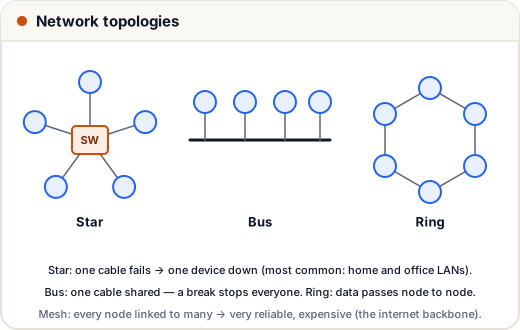
| Topology | Pros | Cons |
|---|---|---|
| Star | easy to add devices; one broken cable affects one device | the central switch is a single point of failure |
| Bus | cheap, little cable | one break stops the whole network; collisions |
| Ring | orderly data flow | one break can stop everything (unless dual ring) |
| Mesh | very reliable — many paths | expensive, lots of cabling |
| Tree / hybrid | scales well | more complex |
Most modern LANs are star (everything connects to a switch); the internet backbone is closer to a mesh.
3. Network devices
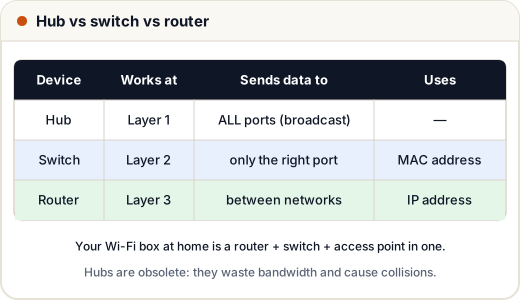
| Device | What it does |
|---|---|
| NIC (network card) | connects a device to the network; has a MAC address |
| Hub | repeats data to every port (dumb, obsolete) |
| Switch | learns which MAC address is on which port and sends frames only there |
| Router | connects different networks and picks the path using IP addresses |
| Modem | converts digital data to signals for the phone line / fibre / cable and back |
| Access point | gives Wi-Fi access to a wired network |
| Firewall | filters traffic using security rules |
Your home "Wi-Fi router" is usually a modem + router + switch + access point + firewall in one box.
4. Key words you'll hear
- Bandwidth — maximum data per second (e.g. 100 Mbps).
- Latency — delay for data to travel (ms). Gaming and video calls care about this.
- Throughput — what you actually get.
- Protocol — agreed rules for communication (HTTP, TCP, IP).
- Client–server — clients request, servers respond (websites). Peer-to-peer — every device can be both (torrents).
5. Transmission modes
- Simplex — one way only (TV broadcast).
- Half duplex — both ways, one at a time (walkie-talkie).
- Full duplex — both ways at once (phone call).
Common mistakes
- Saying "switch and router are the same". A switch connects devices in a network; a router connects networks.
- Confusing bandwidth (capacity) with speed experienced (throughput, latency).
Quick recap
- PAN < LAN < MAN < WAN by area.
- Topologies: star (most common), bus, ring, mesh, hybrid.
- Hub (all ports), switch (MAC, right port), router (IP, between networks).
- Bandwidth = capacity; latency = delay.