Computer Networks · Lesson 5 of 7 · Updated ·
HTTP, HTTPS and DNS — Methods, Status Codes, Cookies and Name Resolution
Every time you open a website or an app loads data, HTTP carries the request and response, DNS finds the server, and HTTPS keeps it private.
Part A — HTTP
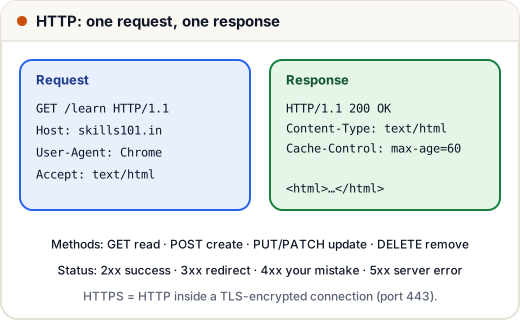
HTTP is a request–response protocol. The client (browser, app) sends a request; the server sends one response.
Methods
| Method | Meaning | Example |
|---|---|---|
| GET | read data | load a course page |
| POST | create / submit | sign up, submit code |
| PUT | replace | update a whole profile |
| PATCH | change part | update only the phone number |
| DELETE | remove | delete a comment |
GET vs POST (interview favourite): GET sends data in the URL (visible, cached, bookmarkable, should not change anything); POST sends data in the body (for creating/changing data, not cached).
Status codes
| Range | Meaning | Common ones |
|---|---|---|
| 2xx | success | 200 OK, 201 Created, 204 No Content |
| 3xx | redirect | 301 Moved Permanently, 302 Found, 304 Not Modified |
| 4xx | client error | 400 Bad Request, 401 Unauthorized (not logged in), 403 Forbidden (not allowed), 404 Not Found, 429 Too Many Requests |
| 5xx | server error | 500 Internal Server Error, 502 Bad Gateway, 503 Service Unavailable |
Stateless + cookies
HTTP is stateless — each request is independent. To remember you between requests, servers use cookies: the server sends Set-Cookie: session=abc123, and the browser sends Cookie: session=abc123 with every later request. That's how you stay logged in.
Part B — HTTPS
HTTPS = HTTP over TLS. TLS gives three things:
- Encryption — nobody on the Wi-Fi can read your password.
- Integrity — data can't be changed in transit.
- Authentication — the certificate proves you're really talking to skills101.in (signed by a trusted Certificate Authority).
During the TLS handshake, the browser checks the certificate, and both sides agree on a shared secret key using asymmetric (public-key) cryptography; the actual data is then encrypted with fast symmetric encryption.
Part C — DNS
People remember names; computers need IP addresses. DNS (Domain Name System) is the internet's phone book.
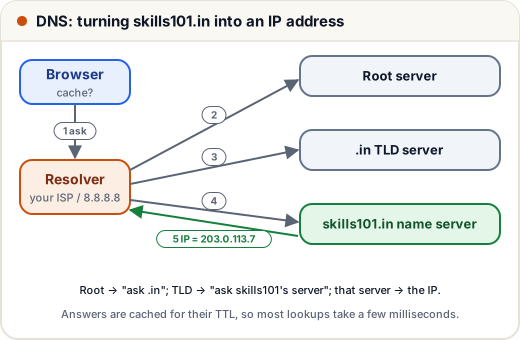
- The browser checks its cache (and the OS cache).
- If not found, it asks a recursive resolver (your ISP's or 8.8.8.8).
- The resolver asks a root server → "ask the .in servers".
- The TLD server → "ask skills101.in's authoritative name server".
- The authoritative server returns the IP address.
- The answer is cached for its TTL, so next time it's instant.
Common DNS records
| Record | Maps | Example |
|---|---|---|
| A | name → IPv4 | skills101.in → 203.0.113.7 |
| AAAA | name → IPv6 | |
| CNAME | name → another name | www → skills101.in |
| MX | domain → mail server | |
| TXT | text (verification, SPF) | Google site verification |
Common mistakes
- Saying 401 and 403 are the same: 401 = not logged in; 403 = logged in but not allowed.
- Thinking HTTPS hides which site you visit — it hides the content, but the domain is still visible to DNS/your ISP.
- Using GET for actions that change data.
Quick recap
- HTTP: request–response, stateless; methods GET/POST/PUT/PATCH/DELETE; status 2xx/3xx/4xx/5xx.
- Cookies keep sessions across stateless requests.
- HTTPS = HTTP + TLS: encryption, integrity, authentication via certificates.
- DNS: browser cache → resolver → root → TLD → authoritative → IP, cached by TTL.