Web Development · Lesson 9 of 12 · Updated ·
The DOM and Events — Make Web Pages Interactive with JavaScript
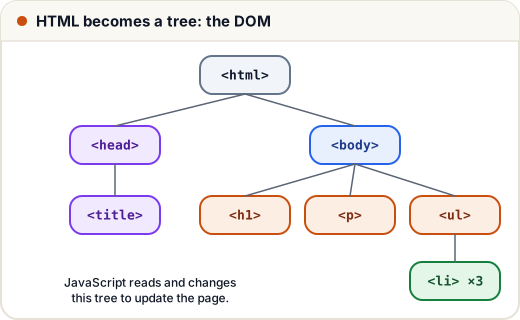
The DOM is the tree the browser builds from your HTML. JavaScript can read it, change it and react to user actions (events). That's how every interactive page works.
(These examples run in the browser — paste them into a page's <script> or the DevTools console.)
1. Selecting elements
const title = document.querySelector("h1");          // first match (CSS selector)
const cards = document.querySelectorAll(".card");     // all matches (a NodeList)
const form = document.getElementById("signup");       // by id
2. Changing content, classes and styles
title.textContent = "Welcome, Asha!";      // safe: plain text
title.classList.add("highlight");           // add a CSS class
title.classList.toggle("hidden");           // on/off
title.style.color = "#c94f0f";              // inline style (prefer classes)
document.querySelector("img").setAttribute("alt", "Course banner");
Use
textContentfor user-provided text.innerHTMLwith user input is dangerous — it can run injected scripts (an XSS attack).
3. Creating and removing elements
const li = document.createElement("li");
li.textContent = "Learn the DOM";
document.querySelector("ul").append(li);
li.remove();
4. Events
const button = document.querySelector("#like");
let likes = 0;
button.addEventListener("click", () => {
  likes++;
  button.textContent = `👍 ${likes}`;
});
Common events: click, input (every keystroke), change, submit, keydown, mouseover, scroll, DOMContentLoaded.
Forms: stop the page reload
document.querySelector("#signup").addEventListener("submit", (event) => {
  event.preventDefault();                       // don't reload the page
  const data = new FormData(event.target);
  const email = data.get("email");
  if (!email.includes("@")) {
    alert("Please enter a valid email");
    return;
  }
  console.log("Sending", Object.fromEntries(data));
});
5. Event delegation
Instead of adding a listener to every item, add one to the parent and check event.target. It also works for items added later.
document.querySelector("#todo-list").addEventListener("click", (event) => {
  if (event.target.matches(".delete")) {
    event.target.closest("li").remove();
  }
});
This works because events bubble up from the clicked element to its ancestors.
6. A tiny to-do app
<form id="add"><input name="task" required> <button>Add</button></form>
<ul id="todo-list"></ul>
<script>
  const list = document.querySelector("#todo-list");
  document.querySelector("#add").addEventListener("submit", (e) => {
    e.preventDefault();
    const text = e.target.task.value.trim();
    const li = document.createElement("li");
    li.textContent = text + " ";
    const del = document.createElement("button");
    del.textContent = "✕";
    del.className = "delete";
    li.append(del);
    list.append(li);
    e.target.reset();
  });
  list.addEventListener("click", (e) => {
    if (e.target.matches(".delete")) e.target.closest("li").remove();
  });
</script>
Add localStorage.setItem / getItem to remember tasks after a refresh — a great first portfolio project.
Common mistakes
- Running scripts before the HTML exists — put
<script>at the end of<body>or usedefer. - Forgetting
preventDefault()on form submit. - Using
innerHTMLwith user input.
Quick recap
querySelector/querySelectorAllselect elements.- Change with
textContent,classList,setAttribute; create withcreateElement+append. addEventListener("click" | "submit" | "input", handler);preventDefaultfor forms.- Event delegation: one listener on the parent +
event.target.matches(...).