Web Development · Lesson 12 of 12 · Updated ·
Node.js, Express and REST APIs — Build Your First Backend
Node.js runs JavaScript outside the browser — on servers. Express is a small framework that makes building web servers and REST APIs easy.
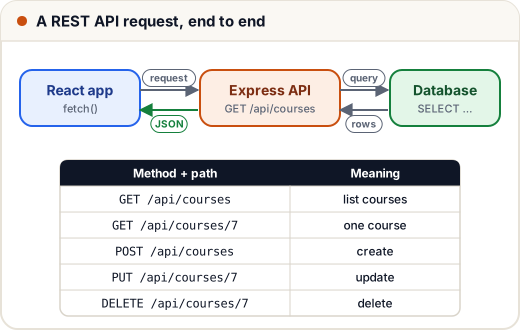
1. Node.js basics
const fs = require("fs");
const path = require("path");
const os = require("os");

const file = path.join(os.tmpdir(), "skills101-demo.txt");
fs.writeFileSync(file, "Hello from Node");
console.log(fs.readFileSync(file, "utf8").toUpperCase());
fs.unlinkSync(file);
console.log(typeof process.version === "string" ? "running on Node" : "?");
HELLO FROM NODE
running on Node
- npm installs packages:
npm init -y, thennpm install express. package.jsonlists your dependencies and scripts.
2. Your first Express API
// server.js
const express = require("express");
const app = express();
app.use(express.json());                     // parse JSON request bodies

let courses = [
  { id: 1, title: "DSA in Java", price: 4999 },
  { id: 2, title: "SQL Basics", price: 0 },
];

app.get("/api/courses", (req, res) => {
  const { maxPrice } = req.query;             // ?maxPrice=1000
  const list = maxPrice ? courses.filter((c) => c.price <= Number(maxPrice)) : courses;
  res.json(list);
});

app.get("/api/courses/:id", (req, res) => {
  const course = courses.find((c) => c.id === Number(req.params.id));
  if (!course) return res.status(404).json({ error: "Course not found" });
  res.json(course);
});

app.post("/api/courses", (req, res) => {
  const { title, price } = req.body;
  if (!title || typeof price !== "number") {
    return res.status(400).json({ error: "title and numeric price are required" });
  }
  const course = { id: courses.length + 1, title, price };
  courses.push(course);
  res.status(201).json(course);
});

app.delete("/api/courses/:id", (req, res) => {
  courses = courses.filter((c) => c.id !== Number(req.params.id));
  res.status(204).end();
});

app.listen(3000, () => console.log("API on http://localhost:3000"));
Run with node server.js, then open http://localhost:3000/api/courses.
| Part | Example | Read with |
|---|---|---|
| Route param | /api/courses/7 | req.params.id |
| Query string | /api/courses?maxPrice=1000 | req.query.maxPrice |
| JSON body | { "title": "React" } | req.body.title |
3. REST design rules
- Nouns in URLs, HTTP methods as verbs:
GET /courses, not/getCourses. - Plural resources:
/courses,/courses/7,/courses/7/lessons. - Correct status codes: 200 OK, 201 Created, 204 No Content, 400 Bad Request, 401 Unauthorized, 403 Forbidden, 404 Not Found, 500 Server Error.
- Return JSON consistently, including errors (
{ "error": "…" }).
4. Middleware
Middleware are functions that run before your route handler — for logging, authentication, parsing:
function logger(req, res, next) {
  console.log(req.method, req.url);
  next();                        // pass control to the next middleware/route
}

function requireLogin(req, res, next) {
  if (!req.headers.authorization) return res.status(401).json({ error: "Please log in" });
  next();
}

app.use(logger);
app.post("/api/enquiries", requireLogin, (req, res) => { /* … */ });
5. Connecting a database
In real apps, replace the in-memory array with a database using a library or ORM:
- PostgreSQL / MySQL →
pg,mysql2, or Prisma (what Skills101 uses) - MongoDB → Mongoose
// with Prisma (example)
app.get("/api/courses", async (req, res) => {
  const courses = await prisma.course.findMany({ where: { published: true } });
  res.json(courses);
});
6. Security and deployment checklist
- Validate every input on the server (types, lengths, formats).
- Never build SQL by joining strings — use parameterised queries / an ORM (prevents SQL injection).
- Store passwords hashed (bcrypt/argon2), never plain.
- Keep secrets in environment variables (
process.env.DATABASE_URL), not in code or GitHub. - Enable CORS only for your own frontend's domain.
- Deploy on Render, Railway, a VPS with nginx + PM2, or similar.
Common mistakes
- Forgetting
app.use(express.json()), soreq.bodyis undefined. - Sending a response twice (missing
returnbeforeres.status(...)). - Returning 200 for errors.
Quick recap
- Node runs JS on the server; npm manages packages.
- Express:
app.get/post/put/delete(path, handler),req.params,req.query,req.body,res.status().json(). - REST: nouns + HTTP verbs + correct status codes + JSON.
- Middleware with
next(); validate input, hash passwords, use env variables.