Web Development · Lesson 10 of 12 · Updated ·
Asynchronous JavaScript — Event Loop, Callbacks, Promises, async/await, fetch
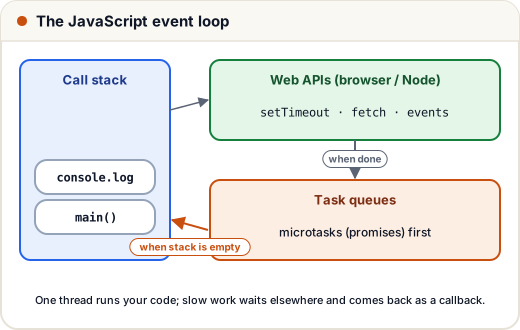
JavaScript runs on one thread. If it waited for a slow network call, the whole page would freeze. Instead, slow work happens in the background, and your code continues — this is asynchronous programming.
1. The event loop
console.log("1: start");
setTimeout(() => console.log("4: timeout"), 0);
Promise.resolve().then(() => console.log("3: promise"));
console.log("2: end");
1: start
2: end
3: promise
4: timeout
Even with a 0ms timer, the timeout runs last:
- Normal code runs first (start, end).
- Then microtasks (promise callbacks).
- Then macrotasks (timers, events).
This exact question is asked in many frontend interviews.
2. From callbacks to promises
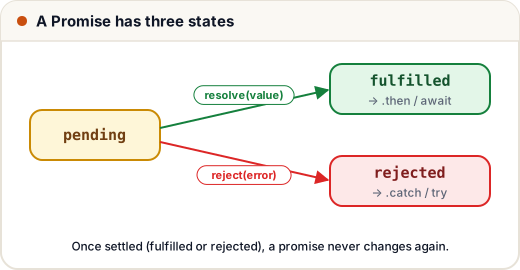
Old style — callbacks — get messy when nested ("callback hell"). Promises represent a value that will arrive later.
function wait(ms, value) {
  return new Promise((resolve) => setTimeout(() => resolve(value), ms));
}

wait(50, "data loaded")
  .then((msg) => {
    console.log(msg);
    return msg.length;
  })
  .then((len) => console.log("length", len))
  .catch((err) => console.log("error", err))
  .finally(() => console.log("done"));
data loaded
length 11
done
3. async / await: promises that read like normal code
const wait = (ms, v) => new Promise((res) => setTimeout(() => res(v), ms));
const failLater = () => new Promise((_, rej) => setTimeout(() => rej(new Error("server down")), 10));

async function loadDashboard() {
  const user = await wait(20, { name: "Asha" });
  console.log("user:", user.name);
  try {
    await failLater();
  } catch (err) {
    console.log("caught:", err.message);
  }
  return "dashboard ready";
}

loadDashboard().then(console.log);
user: Asha
caught: server down
dashboard ready
asyncfunctions always return a promise.awaitpauses that function (not the whole page) until the promise settles.- Use
try/catchfor errors.
4. Running things in parallel
const wait = (ms, v) => new Promise((res) => setTimeout(() => res(v), ms));

async function main() {
  const start = Date.now();
  const [a, b, c] = await Promise.all([wait(100, "courses"), wait(100, "profile"), wait(100, "streak")]);
  const took = Date.now() - start;
  console.log(a, b, c, took < 180 ? "in parallel" : "one by one");
}
main();
courses profile streak in parallel
Three 100ms jobs finish together in about 100ms. await-ing them one after another would take about 300ms.
| Behaviour | |
|---|---|
Promise.all | wait for all; fails if any fails |
Promise.allSettled | wait for all; gives each result or error |
Promise.race | the first to settle |
Promise.any | the first to succeed |
5. fetch: calling an API
async function getCourses() {
  try {
    const res = await fetch("https://api.example.com/courses?limit=5");
    if (!res.ok) throw new Error(`HTTP ${res.status}`);   // fetch doesn't throw on 404/500
    const courses = await res.json();
    console.log(courses.map((c) => c.title));
  } catch (err) {
    console.log("Could not load courses:", err.message);
  }
}

// Sending data
await fetch("/api/enquiry", {
  method: "POST",
  headers: { "Content-Type": "application/json" },
  body: JSON.stringify({ name: "Asha", phone: "9876543210" }),
});
fetchonly rejects on network failure. A 404 or 500 still "succeeds" — always checkres.ok.
Common mistakes
- Forgetting
awaitand getting a Promise object instead of data. - Awaiting independent requests one by one instead of
Promise.all. - Not checking
res.okwith fetch.
Quick recap
- One thread + event loop: sync code → microtasks (promises) → macrotasks (timers).
- Promises: pending → fulfilled / rejected;
.then,.catch,.finally. - async/await + try/catch for readable async code.
Promise.allfor parallel work;fetch+res.ok+res.json()for APIs.