AdvancedWeb Development · Lesson 13 of 13 · Updated ·
JavaScript Scope, Closures, Hoisting and this — Explained with Examples
Four ideas confuse more JavaScript learners than anything else: scope, closures, hoisting and this. They also appear in almost every frontend interview, usually as "what does this code print?". Once you understand the rules below, those questions become easy. Every example runs with node file.js.
1. Scope: where a variable can be used
Scope is the region of code where a variable is visible. JavaScript has three kinds:
| Scope | Created by | Who uses it |
|---|---|---|
| Global | code outside any function or block | everything |
| Function | every function | var, let, const declared inside it |
| Block | any { } — if, for, while | only let and const |
const college = "NIT Jaipur";          // global

function showStudent() {
  const name = "Asha";                 // function scope
  if (true) {
    let marks = 91;                    // block scope
    var city = "Jaipur";               // var ignores the block!
    console.log(name, marks, college);
  }
  console.log(city);                   // works: var is function-scoped
  console.log(typeof marks);           // marks does not exist here
}
showStudent();
Asha 91 NIT Jaipur
Jaipur
undefined
typeof is used on the last line because reading marks directly outside its block would throw a ReferenceError.
The scope chain
When code uses a variable, JavaScript looks in the current scope first. If it is not there, it looks in the enclosing scope, then the next one out, until it reaches the global scope. If the name is still not found, you get a ReferenceError. This lookup path is the scope chain.
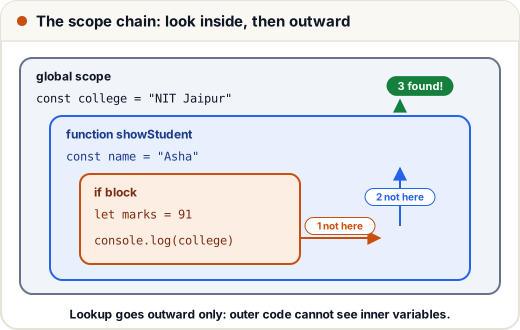
The lookup only goes outward, never inward: a function can read its parent's variables, but the parent cannot read the function's.
An inner variable with the same name shadows (hides) the outer one:
const level = "global";
function test() {
  const level = "function";
  console.log(level);
}
test();
console.log(level);
function
global
2. Closures: functions that remember
A closure is a function together with the variables from the scope where it was created. The function keeps those variables alive even after the outer function has finished.
function makeWallet(owner) {
  let balance = 0;                       // private: nothing outside can touch it directly
  return {
    add(amount) { balance += amount; return balance; },
    show() { return `${owner} has ₹${balance}`; },
  };
}

const asha = makeWallet("Asha");
const ravi = makeWallet("Ravi");
asha.add(500);
asha.add(250);
ravi.add(100);
console.log(asha.show());
console.log(ravi.show());
console.log(asha.balance);
Asha has ₹750
Ravi has ₹100
undefined
Two important points:
- Each call to
makeWalletcreates a newbalance. Asha's and Ravi's wallets do not share it. balanceis not a property of the returned object, soasha.balanceisundefined. The only way to change it is throughadd. Closures give JavaScript private data.
Closures are everywhere: event handlers remember variables, React hooks rely on them, and functions like debounce and once are built with them.
function once(fn) {
  let done = false;
  return (...args) => {
    if (done) return "already paid";
    done = true;
    return fn(...args);
  };
}
const pay = once((amount) => `paid ₹${amount}`);
console.log(pay(999));
console.log(pay(999));
paid ₹999
already paid
A "Pay" button that uses once cannot charge a customer twice, even if they double-click.
3. Hoisting and the temporal dead zone
Before running a scope, JavaScript first registers every declaration in it. This is called hoisting. What you get if you use a name before its line depends on how it was declared:
| Declaration | Before its line you get |
|---|---|
function f() {} | the whole function — you can call it |
var x = 5 | undefined (declared, not yet assigned) |
let / const | ReferenceError (the temporal dead zone) |
console.log(greet("Neha"));
function greet(name) { return `Hi ${name}`; }

console.log(score);
var score = 80;

try {
  console.log(total);
  let total = 100;
} catch (err) {
  console.log(err.name);
}
Hi Neha
undefined
ReferenceError
The temporal dead zone (TDZ) is the time between the start of the block and the line where a let or const is declared. The variable exists but cannot be touched. This is a feature: it turns a silent undefined bug into a clear error.
4. The classic interview question: var in a loop
for (var i = 0; i < 3; i++) {
  setTimeout(() => console.log("var:", i), 0);
}
for (let j = 0; j < 3; j++) {
  setTimeout(() => console.log("let:", j), 0);
}
var: 3
var: 3
var: 3
let: 0
let: 1
let: 2
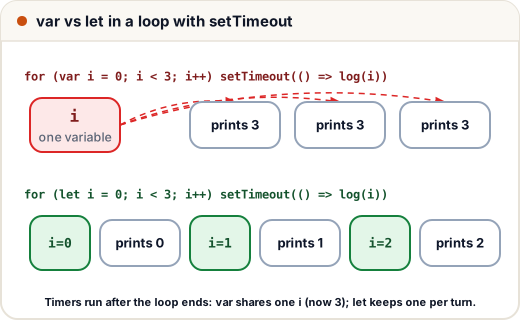
Why?
- The timers run after the loop has finished (remember the event loop).
var iis one variable for the whole function. By the time the callbacks run, it is3, and all three closures see that samei.let jcreates a new binding for each iteration. Each callback closes over its ownj.
The fix is simply to use let. This one example tests scope, closures and the event loop together — which is why interviewers love it.
5. The this keyword
this is not decided by where a function is written. For normal functions it is decided by how the function is called:
| How it is called | this is |
|---|---|
obj.method() | obj (the object before the dot) |
fn() on its own | undefined in strict mode (modules, classes); the global object otherwise |
new Fn() | the new object being created |
fn.call(x) / fn.apply(x) / fn.bind(x) | x |
| arrow function | no own this — it uses this from the surrounding code |
"use strict";
const course = {
  title: "React",
  normal() { return this?.title; },
  arrowInside() {
    const inner = () => this.title;      // arrow takes this from arrowInside
    return inner();
  },
};

console.log(course.normal());
const detached = course.normal;
console.log(detached());
console.log(course.arrowInside());
const bound = course.normal.bind({ title: "Node" });
console.log(bound());
React
undefined
React
Node
detached() is called on its own, with no object before the dot, so this is undefined. The same function behaves differently depending on the call. This is the source of "this is undefined" bugs when you pass a method as a callback; fix it with an arrow function or bind.
Common mistakes
- Using
varand expecting block scope. - Expecting
thisinside a method that you passed as a callback to still be the object. - Using an arrow function as an object method and then expecting
thisto be the object. - Thinking closures copy values. They keep a reference to the variable, so they see later changes.
Quick recap
- Scope = where a variable is visible: global, function, block (
let/constonly). - Lookup walks the scope chain outward; inner names shadow outer ones.
- A closure is a function plus the variables of the place it was created; use it for private state.
- Hoisting: functions are fully available,
varisundefined,let/constare in the TDZ. varin a loop shares one variable;letgives each iteration its own.thisdepends on the call (obj.method(),new,bind); arrow functions borrow it.