AdvancedWeb Development · Lesson 18 of 19 · Updated ·
Web Authentication Basics — Password Hashing, Sessions vs JWT
Almost every app you build needs a login. Getting it wrong leaks passwords or lets one student read another's data. This lesson explains the moving parts — password hashing, sessions and JWTs — and shows, with runnable Node.js code, why they are safe when used correctly. In real projects you will use a well-tested library (for example Passport, Auth.js or your framework's built-in auth), but you must understand what it does for you.
1. Authentication vs authorization
| Authentication (AuthN) | Authorization (AuthZ) | |
|---|---|---|
| Question | Who are you? | What are you allowed to do? |
| Example | logging in with email + password, OTP, "Sign in with Google" | only an admin can delete courses; a student sees only their own marks |
| Fails with | 401 Unauthorized | 403 Forbidden |
Authentication happens once at login; authorization is checked on every request.
2. Never store passwords: store hashes
If your database leaks (it happens to big companies too), plain-text passwords let attackers log in everywhere the user reused them. Instead, store a hash: the output of a one-way function. You can compute hash(password) easily, but you cannot turn the hash back into the password.
Two more ingredients make it strong:
- A salt — random bytes stored next to each hash, different for every user. Two users with the password
india@123get different hashes, so attackers cannot use precomputed tables. - A slow password-hashing function — bcrypt, scrypt or Argon2, not plain SHA-256. Slowness hardly matters for one login, but it makes guessing billions of passwords very expensive.
Node.js has scrypt built in:
const crypto = require("crypto");

function hashPassword(password) {
  const salt = crypto.randomBytes(16).toString("hex");
  const hash = crypto.scryptSync(password, salt, 32).toString("hex");
  return `${salt}:${hash}`;                       // store both in the database
}

function verifyPassword(password, stored) {
  const [salt, hash] = stored.split(":");
  const attempt = crypto.scryptSync(password, salt, 32);
  return crypto.timingSafeEqual(attempt, Buffer.from(hash, "hex"));
}

const asha = hashPassword("india@123");
const ravi = hashPassword("india@123");          // same password, different salt
console.log("stored length:", asha.length);
console.log("same password, same stored value?", asha === ravi);
console.log("correct password:", verifyPassword("india@123", asha));
console.log("wrong password:", verifyPassword("India@123", asha));
stored length: 97
same password, same stored value? false
correct password: true
wrong password: false
timingSafeEqual compares in constant time, so an attacker cannot learn anything from how long the comparison takes.
3. Option A: server-side sessions
After a successful login, the server creates a session: a record saying "session id 8f3a… belongs to Asha", stored in memory, a database or Redis. It sends only the random id to the browser in an HttpOnly cookie (previous lesson). On each request, the browser sends the cookie and the server looks up the session.
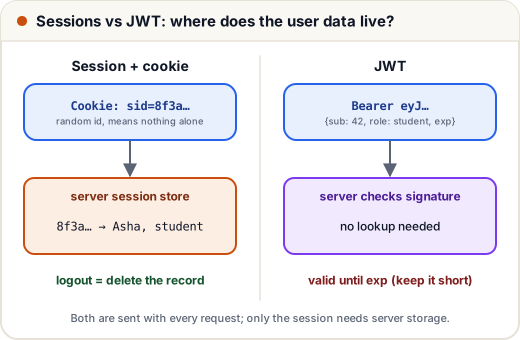
- Logout is easy and immediate: delete the session record.
- The server must store sessions, and with several servers they must share a store (such as Redis).
4. Option B: JWT (JSON Web Token)
A JWT puts the user information inside the token and signs it. The server does not need to store anything; it only checks the signature.
A JWT has three parts separated by dots: header.payload.signature.
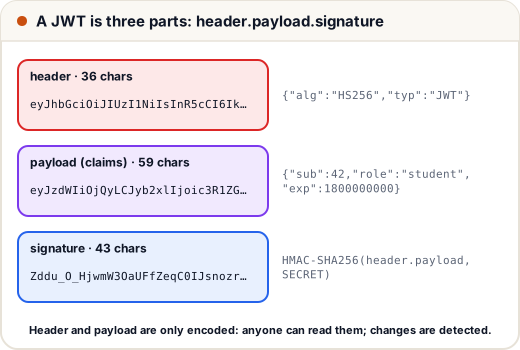
- header — the algorithm, e.g.
{"alg":"HS256","typ":"JWT"} - payload — the claims: user id (
sub), role, expiry time (exp) - signature — HMAC-SHA256 of
header.payloadusing a secret only the server knows
Header and payload are only Base64URL-encoded, not encrypted. Anyone can read them. The signature stops anyone from changing them. Let's build one by hand:
const crypto = require("crypto");
const SECRET = "keep-this-in-an-env-variable";

const b64url = (obj) => Buffer.from(JSON.stringify(obj)).toString("base64url");
const sign = (data) => crypto.createHmac("sha256", SECRET).update(data).digest("base64url");

function createToken(payload) {
  const head = b64url({ alg: "HS256", typ: "JWT" });
  const body = b64url(payload);
  return `${head}.${body}.${sign(`${head}.${body}`)}`;
}

function verifyToken(token, now) {
  const [head, body, sig] = token.split(".");
  const expected = sign(`${head}.${body}`);
  if (sig.length !== expected.length ||
      !crypto.timingSafeEqual(Buffer.from(sig), Buffer.from(expected))) return "invalid signature";
  const claims = JSON.parse(Buffer.from(body, "base64url").toString());
  if (claims.exp < now) return "expired";
  return claims;
}

const token = createToken({ sub: 42, role: "student", exp: 1800000000 });
console.log(token.split(".").map((p) => p.length));
console.log(verifyToken(token, 1700000000));

// An attacker decodes the payload, changes the role and re-encodes it
const [h, , s] = token.split(".");
const forged = `${h}.${b64url({ sub: 42, role: "admin", exp: 1800000000 })}.${s}`;
console.log(verifyToken(forged, 1700000000));
console.log(verifyToken(token, 1900000000));
[ 36, 59, 43 ]
{ sub: 42, role: 'student', exp: 1800000000 }
invalid signature
expired
The attacker could read and change the payload, but without the secret they cannot produce a matching signature, so the forged admin token is rejected. Once exp has passed, the real token is rejected too. (Real code should use a library such as jsonwebtoken or jose, which also checks the alg header and other details.)
The client sends the token in a header on each request:
Authorization: Bearer eyJhbGciOiJIUzI1NiIsInR5cCI6IkpXVCJ9.eyJzdWIiOjQyLCJyb2xlIjoic3R1ZGVudCIsImV4cCI6MTgwMDAwMDAwMH0.…
5. Sessions or JWT?
| Session + cookie | JWT | |
|---|---|---|
| Where the user data lives | on the server | inside the token |
| Server storage | needed (memory, DB, Redis) | not needed to verify |
| Logout / ban a user now | easy: delete the session | hard: the token stays valid until exp |
| Works across many services | needs a shared session store | easy: any service with the key can verify |
| Typical use | classic websites, server-rendered apps | APIs, mobile apps, microservices |
Because a JWT cannot easily be cancelled, keep access tokens short-lived (for example 15 minutes) and use a longer-lived refresh token, stored safely (for example in an HttpOnly cookie), to get new ones. The server can keep a list of refresh tokens and revoke them on logout.
Where to keep a JWT in the browser? In memory or an HttpOnly cookie is safer than localStorage, which any injected script can read. If you use cookies, protect against CSRF with SameSite (and CSRF tokens where needed).
6. Authorization: checking on every request
Logging in is not enough; every protected route must check what the user may do:
function requireRole(role) {
  return (user, action) => {
    if (!user) return `401: please log in to ${action}`;
    if (user.role !== role) return `403: ${user.name} cannot ${action}`;
    return `200: ${user.name} may ${action}`;
  };
}

const adminOnly = requireRole("admin");
console.log(adminOnly(null, "delete a course"));
console.log(adminOnly({ name: "Asha", role: "student" }, "delete a course"));
console.log(adminOnly({ name: "Neha", role: "admin" }, "delete a course"));
401: please log in to delete a course
403: Asha cannot delete a course
200: Neha may delete a course
Also check ownership: GET /api/results/1043 must confirm that result 1043 belongs to the logged-in student. Changing an id in a URL to see someone else's data is one of the most common real-world security bugs (called IDOR — insecure direct object reference).
7. Other login methods in brief
- OTP login (SMS or email): the server sends a short-lived code; limit attempts and expire codes quickly.
- "Sign in with Google" uses OAuth 2.0 / OpenID Connect: Google confirms who the user is, and your app receives a verified identity instead of handling a password.
- Two-factor authentication (2FA): something you know (password) plus something you have (an authenticator app or phone).
Common mistakes
- Storing plain passwords, or hashing with fast hashes like MD5 or SHA-256 without a slow algorithm and salt.
- Putting secrets (passwords, card data) inside a JWT payload — anyone can decode it.
- Hard-coding the JWT secret in code pushed to GitHub; use an environment variable.
- Long-lived JWTs with no way to revoke them.
- Checking login but not authorization or ownership on each route.
- Error messages like "this email is not registered" that tell attackers which accounts exist; say "invalid email or password".
Quick recap
- Authentication = who you are (401); authorization = what you may do (403), checked on every request.
- Store salted, slow hashes (bcrypt, scrypt, Argon2), never passwords.
- Sessions: random id in an HttpOnly cookie, user data on the server; easy logout.
- JWT:
header.payload.signature; readable by anyone, unforgeable without the secret; keep it short-lived. - Use tested libraries, keep secrets in environment variables, and check ownership of every resource.