AdvancedWeb Development · Lesson 14 of 19 · Updated ·
Modern JavaScript — Classes, Inheritance, Modules, Map and Set
Small scripts can live in one file with a few functions. Real projects — a React app, an Express API — have hundreds of files. Modern JavaScript (ES6 and later, often written "ES2015+") gives you three tools for organising them: classes to group data with behaviour, modules to split code into files, and the Map and Set collections. You will see all three in every codebase you join.
1. Classes: a blueprint for objects
A class describes what an object holds (its fields) and what it can do (its methods). new creates an object (an instance) from it, and runs the constructor.
class Student {
  constructor(name, marks) {
    this.name = name;
    this.marks = marks;
  }

  average() {
    const sum = this.marks.reduce((a, b) => a + b, 0);
    return sum / this.marks.length;
  }

  get grade() {                       // a getter: used like a property
    return this.average() >= 75 ? "Distinction" : "Pass";
  }
}

const asha = new Student("Asha", [88, 92, 79]);
console.log(asha.name, asha.average().toFixed(1), asha.grade);
console.log(typeof Student, asha instanceof Student);
Asha 86.3 Distinction
function true
- Methods are written without the word
function. - A getter (
get grade()) runs code but is read like a property:asha.grade, notasha.grade(). typeof Studentis"function": a class is special syntax over JavaScript's older prototype system (section 3).
2. Static and private members
class BankAccount {
  static bankName = "Skills Bank";      // belongs to the class, not each object
  #balance = 0;                         // private: only code inside the class can use it

  constructor(owner) {
    this.owner = owner;
  }

  deposit(amount) {
    if (amount <= 0) throw new Error("Amount must be positive");
    this.#balance += amount;
    return this;                        // returning this allows chaining
  }

  get balance() {
    return this.#balance;
  }

  static compare(a, b) {
    return a.balance - b.balance;
  }
}

const ravi = new BankAccount("Ravi").deposit(500).deposit(250);
const neha = new BankAccount("Neha").deposit(900);
console.log(BankAccount.bankName, ravi.balance, neha.balance);
console.log(BankAccount.compare(ravi, neha) < 0 ? "Neha has more" : "Ravi has more");
console.log(Object.keys(ravi));
Skills Bank 750 900
Neha has more
[ 'owner' ]
| Member | Written as | Accessed as | Use for |
|---|---|---|---|
| instance field | this.owner = … | ravi.owner | data each object has |
| private field | #balance | only inside the class | data that must not be changed from outside |
| static field/method | static bankName | BankAccount.bankName | shared constants, helper functions |
| getter | get balance() | ravi.balance | computed or read-only values |
Object.keys(ravi) lists only owner: private fields are truly hidden. Trying ravi.#balance outside the class is a syntax error — the program will not even start. This is encapsulation, the same OOP idea you meet in Java with private.
3. Inheritance with extends and super
A class can extend another, reusing its fields and methods and adding or changing some.
class Course {
  constructor(title, price) {
    this.title = title;
    this.price = price;
  }
  label() {
    return `${this.title} — ₹${this.price}`;
  }
}

class LiveCourse extends Course {
  constructor(title, price, startDate) {
    super(title, price);               // must call the parent constructor first
    this.startDate = startDate;
  }
  label() {                            // override, but reuse the parent's version
    return `${super.label()} (starts ${this.startDate})`;
  }
}

const items = [new Course("SQL Basics", 499), new LiveCourse("Java Bootcamp", 9999, "6 Dec")];
for (const c of items) console.log(c.label());
console.log(items[1] instanceof Course);
console.log(Object.getPrototypeOf(LiveCourse.prototype) === Course.prototype);
SQL Basics — ₹499
Java Bootcamp — ₹9999 (starts 6 Dec)
true
true
- In a child constructor you must call
super(...)before usingthis. - Calling
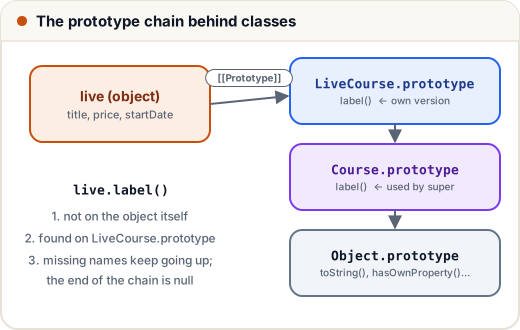
label()on each item runs the right version for that object — this is polymorphism. - Under the hood, objects are linked in a prototype chain. When a method is not found on the object, JavaScript looks at its prototype, then that prototype's prototype, and so on — the same "look outward" idea as the scope chain.
Tip: prefer composition (an object that has other objects) over deep inheritance chains. One or two levels of extends is common; five is a warning sign.
4. Modules: splitting code into files
A module is a file with its own scope. Nothing inside it is visible to other files unless you export it, and other files must import it.
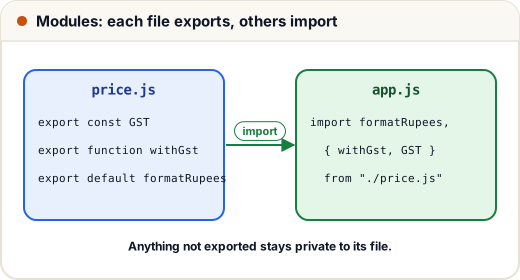
// price.js
export const GST = 0.18;
export function withGst(amount) {
  return Math.round(amount * (1 + GST));
}
export default function formatRupees(n) {
  return "₹" + n.toLocaleString("en-IN");
}
// app.js
import formatRupees, { withGst, GST } from "./price.js";
import * as price from "./price.js";

console.log(formatRupees(withGst(4999)));   // ₹5,899
console.log(GST === price.GST);              // true
| Export style | Export | Import |
|---|---|---|
| named (many per file) | export function withGst… | import { withGst } from "./price.js" |
| default (one per file) | export default function… | import anyName from "./price.js" |
| rename | import { withGst as addTax } from … | |
| everything | import * as price from … |
Named exports are usually preferred: the names are checked, and editors can auto-import them.
ES modules vs CommonJS
You will see two module systems in Node.js projects:
| ES modules (ESM) | CommonJS (CJS) | |
|---|---|---|
| Syntax | import / export | require() / module.exports |
| Where | browsers, React, modern Node | older Node code, many tutorials |
| Turn it on in Node | "type": "module" in package.json, or .mjs files | default for .js files |
// CommonJS: works in a plain .js file run with node
const path = require("path");
module.exports = { join: path.join };
console.log(typeof module.exports.join);
function
In the browser, load a module with <script type="module" src="app.js"></script>. Module scripts are deferred automatically and run in strict mode.
5. Map and Set
Plain objects and arrays can do a lot, but two built-in collections are often a better fit.
const attendance = ["Asha", "Ravi", "Asha", "Neha", "Ravi", "Asha"];

const unique = new Set(attendance);              // removes duplicates
console.log(unique.size, [...unique]);
console.log(unique.has("Neha"));

const count = new Map();
for (const name of attendance) {
  count.set(name, (count.get(name) ?? 0) + 1);
}
console.log(count);
console.log([...count].sort((a, b) => b[1] - a[1])[0]);
3 [ 'Asha', 'Ravi', 'Neha' ]
true
Map(3) { 'Asha' => 3, 'Ravi' => 2, 'Neha' => 1 }
[ 'Asha', 3 ]
| Use | When |
|---|---|
Set | a collection of unique values; fast has checks |
Map | key → value pairs where keys can be any type (numbers, objects); keeps insertion order; has size |
| plain object | fixed, known keys (a user record), and anything you send as JSON |
Map and Set do not convert to JSON directly — JSON.stringify(new Map()) gives "{}". Convert first, for example with Object.fromEntries(map).
Common mistakes
- Forgetting
newwhen creating an instance (Student("Asha")throws a TypeError for classes). - Using
thisin a child constructor before callingsuper(). - Mixing
requireandimportin the same file without understanding which system the project uses. - Forgetting the
.jsextension in browser and Node ESM imports ("./price"fails;"./price.js"works). - Using an object as a dictionary with user-supplied keys like
"__proto__"; aMapavoids that problem.
Quick recap
class+constructor+ methods;newcreates instances; getters look like properties.staticbelongs to the class;#privatefields cannot be touched from outside.extends+super()for inheritance; objects are linked by the prototype chain.- ES modules:
export/import(named and default); CommonJS:require/module.exports. Setfor unique values;Mapfor flexible key → value pairs.