AdvancedWeb Development · Lesson 15 of 19 · Updated ·
JavaScript Error Handling and Debugging — try/catch, Custom Errors, DevTools
Real programs fail: the network drops, a user types letters into a phone field, an API returns nothing. Good code does not pretend this never happens. It detects the problem, reports it clearly and recovers where it can. This lesson covers JavaScript's error tools and the debugging habits that save hours.
1. What happens when an error is thrown
When JavaScript hits a problem it cannot handle, it throws an error object. Normal execution stops at that line, and JavaScript looks for a catch that can handle it. If there is none anywhere, the program crashes (in Node) or the error appears in red in the browser console and that piece of code stops.
const student = null;
try {
  console.log(student.name);
} catch (err) {
  console.log(err.name);
  console.log(err.message);
}
console.log("program continues");
TypeError
Cannot read properties of null (reading 'name')
program continues
Every error object has:
name— the kind of error (TypeError)message— a human-readable descriptionstack— the list of function calls that led to it (very useful when debugging)
2. try, catch, finally
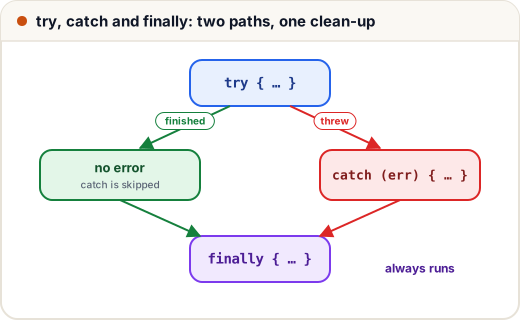
function parseMarks(text) {
  try {
    const data = JSON.parse(text);
    console.log("parsed", data.marks);
    return data.marks;
  } catch (err) {
    console.log("bad input:", err.name);
    return null;
  } finally {
    console.log("finally always runs");
  }
}

parseMarks('{"marks": 88}');
parseMarks("{marks: 88}");
parsed 88
finally always runs
bad input: SyntaxError
finally always runs
| Block | Runs when |
|---|---|
try | always first |
catch (err) | only if something in try threw |
finally | always — after try, or after catch — even if they return |
Use finally for clean-up: closing a file, hiding a loading spinner, re-enabling a "Submit" button.
3. Throwing your own errors
You can (and should) throw when your function gets input it cannot work with. Always throw an Error object, not a plain string, so you get a stack.
function withdraw(balance, amount) {
  if (typeof amount !== "number" || Number.isNaN(amount)) {
    throw new TypeError("amount must be a number");
  }
  if (amount > balance) {
    throw new RangeError(`cannot withdraw ₹${amount}; balance is ₹${balance}`);
  }
  return balance - amount;
}

for (const amt of [200, 5000, "abc"]) {
  try {
    console.log("left:", withdraw(1000, amt));
  } catch (err) {
    console.log(`${err.name}: ${err.message}`);
  }
}
left: 800
RangeError: cannot withdraw ₹5000; balance is ₹1000
TypeError: amount must be a number
Built-in error types
| Type | Typical cause |
|---|---|
ReferenceError | using a variable that does not exist (or is in the TDZ) |
TypeError | wrong type: calling something that is not a function, reading a property of null/undefined |
SyntaxError | invalid code, or invalid JSON passed to JSON.parse |
RangeError | a number outside the allowed range (new Array(-1), toFixed(200)) |
4. Custom error classes
In bigger apps, you want to tell kinds of failure apart: a validation problem should show a message to the user, while a database crash should be logged and reported. A custom class makes that easy.
class ValidationError extends Error {
  constructor(field, message) {
    super(message);
    this.name = "ValidationError";
    this.field = field;
  }
}

function register(user) {
  if (!/^[6-9]\d{9}$/.test(user.phone)) {
    throw new ValidationError("phone", "Enter a valid 10-digit mobile number");
  }
  return "registered";
}

try {
  register({ phone: "12345" });
} catch (err) {
  if (err instanceof ValidationError) {
    console.log(`Show under the ${err.field} field: ${err.message}`);
  } else {
    throw err;                           // not ours: let someone else handle it
  }
}
Show under the phone field: Enter a valid 10-digit mobile number
Notice the else { throw err; }. Re-throw what you cannot handle. Swallowing every error hides real bugs.
5. How errors travel up the call stack
An error thrown deep inside a function travels up through every caller until it reaches a try/catch. Functions in between stop immediately.
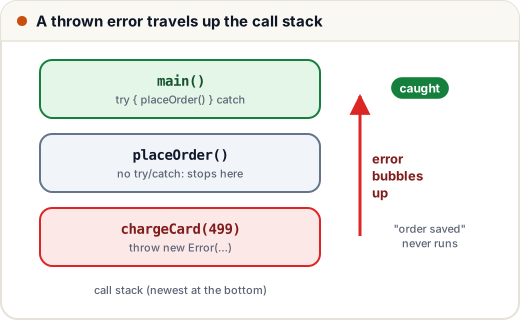
function chargeCard(amount) {
  throw new Error("payment gateway timeout");
}
function placeOrder() {
  chargeCard(499);
  console.log("order saved");            // never runs
}
function main() {
  try {
    placeOrder();
  } catch (err) {
    console.log("caught in main:", err.message);
  }
}
main();
caught in main: payment gateway timeout
This lets you handle errors in one sensible place (for example, the route handler of an API) instead of wrapping every line.
6. Errors in async code
With async/await, a rejected promise becomes a thrown error at the await, so normal try/catch works:
const fetchResult = (roll) =>
  new Promise((resolve, reject) =>
    setTimeout(() => (roll > 0 ? resolve({ roll, marks: 81 }) : reject(new Error("invalid roll number"))), 10));

async function show(roll) {
  try {
    const r = await fetchResult(roll);
    console.log(`roll ${r.roll}: ${r.marks}`);
  } catch (err) {
    console.log("could not load:", err.message);
  }
}

show(42).then(() => show(-1));
roll 42: 81
could not load: invalid roll number
Two traps:
- A
try/catcharound code that starts a promise but does notawaitit will not catch its rejection. - With
.then()chains, add a.catch()at the end. An unhandled rejection crashes modern Node and shows an error in the browser console.
In the browser, window.addEventListener("error", …) and "unhandledrejection" let you log anything you missed to a monitoring service.
7. Debugging: finding the bug
Read the error first. The message and the first line of the stack trace usually point to the exact file and line.
Console tools
const students = [{ name: "Asha", marks: 91 }, { name: "Ravi", marks: 67 }];
console.table(students);
console.error("shown in red in the browser");
console.time("loop");
let total = 0;
for (let i = 0; i < 1e6; i++) total += i;
console.timeEnd("loop");
console.table prints arrays of objects as a table, console.error and console.warn stand out, and console.time/timeEnd measure how long code takes. (The output of this block varies by machine, so it is not shown.)
Browser DevTools (F12)
| Tab | Use it to |
|---|---|
| Console | read errors, try expressions |
| Sources | set breakpoints: click a line number; the page pauses there and you can inspect every variable |
| Network | see each request, its status code and response — is the bug in the frontend or the API? |
| Elements | inspect and edit HTML and CSS live |
Writing debugger; in your code pauses at that line when DevTools is open. Breakpoints are faster than adding twenty console.log lines.
A debugging method that works
- Reproduce the bug reliably.
- Read the error and stack trace.
- Narrow it down: which input, which function, which line?
- Check assumptions with a breakpoint or a log — "I thought
markswas a number; it is the string"88"". - Fix, then test the original case and nearby cases.
Common mistakes
- An empty
catch {}that hides every error, including real bugs. - Throwing strings (
throw "failed") instead ofErrorobjects, which loses the stack trace. - Forgetting
awaitinsidetry, so the rejection escapes. - Showing raw technical error messages (or stack traces) to users; show a friendly message and log the details.
Quick recap
- A thrown error stops normal flow and travels up the call stack until a
catchhandles it. try→catch (err)on failure →finallyalways; errors havename,messageandstack.- Throw
Errorobjects (orTypeError,RangeError, custom classes); re-throw what you cannot handle. awaitinsidetry/catchhandles promise rejections;.catch()ends.then()chains.- Debug with the error message, the stack trace,
console.table, breakpoints and the Network tab.