AdvancedWeb Development · Lesson 17 of 19 · Updated ·
Browser Storage and Cookies — localStorage, sessionStorage, Cookies and IndexedDB
HTTP is stateless: each request is independent, and the server does not automatically remember you between requests. Yet websites remember your dark-mode choice, your cart and that you are logged in. They do it by storing small pieces of data in the browser. This lesson compares the four places to store it and explains cookies properly, because cookies are what make logins work.
1. The four options at a glance
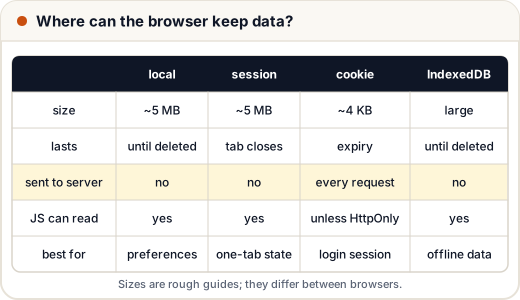
| localStorage | sessionStorage | Cookies | IndexedDB | |
|---|---|---|---|---|
| Typical size limit | about 5 MB per site | about 5 MB per site | about 4 KB per cookie | large (hundreds of MB or more, depends on the browser and disk) |
| Lasts until | deleted by code or the user | the tab is closed | its expiry date (or browser close) | deleted |
| Sent to the server automatically? | no | no | yes, with every request to that site | no |
| JavaScript can read it? | yes | yes | yes, unless HttpOnly | yes |
| API | simple, synchronous | simple, synchronous | document.cookie (awkward) | asynchronous, database-like |
| Good for | preferences, drafts | one-tab, temporary state | sessions / login | offline data, big lists |
Exact size limits differ between browsers, so treat the numbers as rough guides.
2. localStorage and sessionStorage
Both store strings as key–value pairs, separately for each origin (scheme + domain + port: https://skills101.in cannot read https://example.com's storage).
// Browser only — try it in the DevTools console
localStorage.setItem("theme", "dark");
console.log(localStorage.getItem("theme"));      // "dark"
localStorage.removeItem("theme");

sessionStorage.setItem("quizStep", "3");          // gone when this tab closes
Because values are always strings, store objects as JSON:
// Browser only
const draft = { title: "My first blog", words: 340 };
localStorage.setItem("draft", JSON.stringify(draft));
const saved = JSON.parse(localStorage.getItem("draft") ?? "null");
A common trap: if you save a number or a boolean, you get a string back. Here is the same behaviour with a tiny stand-in for localStorage, so you can run it in Node:
// A minimal fake with the same string-only behaviour as localStorage
const store = new Map();
const storage = {
  setItem: (k, v) => store.set(k, String(v)),
  getItem: (k) => (store.has(k) ? store.get(k) : null),
};

storage.setItem("visits", 5);
storage.setItem("premium", false);
storage.setItem("user", { name: "Asha" });

console.log(storage.getItem("visits") + 1);
console.log(storage.getItem("premium") ? "premium!" : "free");
console.log(storage.getItem("user"));
console.log(storage.getItem("missing"));
51
premium!
[object Object]
null
"5" + 1gives"51", not 6."false"is a non-empty string, so it is truthy — the free user looks premium!- An object becomes the useless text
[object Object]. AlwaysJSON.stringifyobjects andJSON.parsethem back.
Good uses: theme, language (EN/हिन्दी), a half-written form, "last opened lesson". The DOM lesson's to-do app can save its tasks here.
3. Cookies: storage that travels with requests
A cookie is a small name=value pair that the browser stores and sends back to the server automatically on every request to that site. That is exactly what a login session needs.
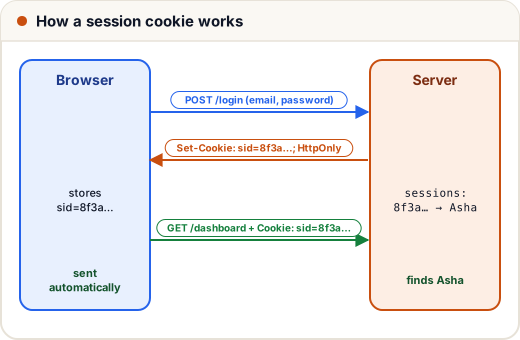
The server sets a cookie with a response header:
Set-Cookie: sid=8f3a91c2; Path=/; Max-Age=604800; HttpOnly; Secure; SameSite=Lax
The browser sends it back in a request header:
Cookie: sid=8f3a91c2; theme=dark
Here is a real round trip with a small Node server. fetch in Node does not keep cookies like a browser does, so the client copies the cookie by hand — the browser does this step for you.
const http = require("http");

function parseCookies(header = "") {
  return Object.fromEntries(
    header.split(";").filter(Boolean).map((part) => {
      const [name, ...rest] = part.trim().split("=");
      return [name, decodeURIComponent(rest.join("="))];
    })
  );
}

const server = http.createServer((req, res) => {
  if (req.url === "/login") {
    res.setHeader("Set-Cookie", "sid=8f3a91c2; Path=/; Max-Age=604800; HttpOnly; SameSite=Lax");
    return res.end("logged in");
  }
  const cookies = parseCookies(req.headers.cookie);
  res.end(cookies.sid ? `welcome back, session ${cookies.sid}` : "please log in");
});

server.listen(0, async () => {
  const base = `http://localhost:${server.address().port}`;
  console.log(await (await fetch(`${base}/dashboard`)).text());
  const login = await fetch(`${base}/login`);
  const setCookie = login.headers.get("set-cookie");
  console.log("server sent:", setCookie);
  const sid = setCookie.split(";")[0];                       // "sid=8f3a91c2"
  const dash = await fetch(`${base}/dashboard`, { headers: { Cookie: `${sid}; theme=dark` } });
  console.log(await dash.text());
  server.close();
});
please log in
server sent: sid=8f3a91c2; Path=/; Max-Age=604800; HttpOnly; SameSite=Lax
welcome back, session 8f3a91c2
Secure is left out in this demo only because it uses plain http://localhost; on a real site, always add it.
4. Cookie attributes you must know
| Attribute | What it does | Why it matters |
|---|---|---|
Expires= / Max-Age= | when the cookie expires (Max-Age in seconds) | without either, it is a session cookie, deleted when the browser closes |
Path=/ | which paths receive it | usually / for the whole site |
Domain= | which (sub)domains receive it | leave it out to restrict it to the exact host |
HttpOnly | JavaScript cannot read it (document.cookie hides it) | an injected script (XSS) cannot steal the session |
Secure | sent only over HTTPS | stops it leaking over plain HTTP |
SameSite=Lax (or Strict, None) | controls sending on requests started from other sites | main defence against CSRF; None requires Secure |
Max-Age=604800 is 7 × 24 × 60 × 60 seconds = 7 days.
For a login session cookie, use all three: HttpOnly; Secure; SameSite=Lax (or Strict). Most frameworks do this when configured correctly — check it in DevTools → Application → Cookies.
5. IndexedDB in one paragraph
IndexedDB is a real database inside the browser: it stores objects (not only strings), supports indexes and large amounts of data, and has an asynchronous API so it never freezes the page. Offline-capable apps (progressive web apps) use it to keep data available without a network. Its raw API is verbose, so most people use a small wrapper library such as idb.
6. What should go where?
| Data | Best place |
|---|---|
| Login session id | HttpOnly, Secure cookie set by the server |
| Theme, language, "seen the tour" | localStorage |
| Multi-step form progress in one tab | sessionStorage |
| Thousands of offline notes | IndexedDB |
| Passwords, card numbers, OTPs | nowhere in the browser |
Security rule: anything JavaScript can read (localStorage, sessionStorage, non-HttpOnly cookies) can also be read by a malicious script if your site ever has an XSS bug. That is why many teams keep login tokens in HttpOnly cookies rather than localStorage. The next lesson covers this choice in detail.
Privacy rule: in India, the Digital Personal Data Protection Act, 2023, and in Europe, the GDPR, regulate how personal data is collected and used. Store only what you need, and explain it in your privacy policy.
Common mistakes
- Saving objects without
JSON.stringifyand getting"[object Object]"back. - Treating stored
"false"or"0"as false (both are truthy strings). - Putting large data in cookies — it is uploaded with every request and slows the site.
- Storing login tokens in localStorage on a site with weak XSS protection.
- Forgetting
HttpOnlyandSecureon session cookies.
Quick recap
- HTTP is stateless; the browser stores data to remember users.
- localStorage (persists) and sessionStorage (per tab) store strings only; use JSON for objects.
- Cookies are sent automatically with every request: perfect for sessions, bad for big data.
- Session cookies need
HttpOnly,SecureandSameSite. - IndexedDB for large or offline data; never store passwords or card details in the browser.