AdvancedJava Programming · Lesson 17 of 29 · Updated ·
Wrapper Classes in Java — Autoboxing, Unboxing and the Integer Cache
Java has 8 primitive types (int, double, char…) that hold plain values, and for each one a wrapper class (Integer, Double, Character…) that holds the same value inside an object. Most of the time Java converts between them for you. That convenience hides three traps that placement tests love: == on wrappers, null unboxing, and mixed types in equals.
1. Why wrapper classes exist
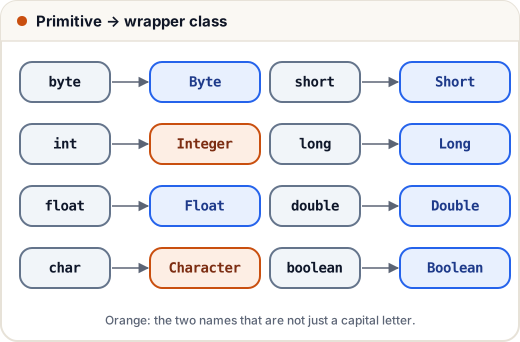
You need the wrapper when:
- Collections and generics need objects:
List<Integer>, neverList<int>. - A value may be missing: an
Integercan benull, anintcannot. A database column with no value usually arrives asnull. - You want helper methods:
Integer.parseInt,Integer.MAX_VALUE,Character.isDigit.
Only two names are not just the primitive with a capital letter: int → Integer and char → Character.
2. Autoboxing and unboxing
- Autoboxing: Java turns a primitive into its wrapper automatically.
Integer x = 85;is compiled asInteger x = Integer.valueOf(85); - Unboxing: Java turns a wrapper back into a primitive.
int y = x;is compiled asint y = x.intValue();
import java.util.*;

public class Main {
    public static void main(String[] args) {
        List<Integer> marks = new ArrayList<>();
        marks.add(85);                 // autoboxing: Integer.valueOf(85)
        marks.add(92);
        int first = marks.get(0);      // unboxing: marks.get(0).intValue()
        int total = 0;
        for (int m : marks) total += m;
        System.out.println(first + " " + total);

        Integer missing = null;        // a wrapper can be null; an int cannot
        System.out.println(missing == null);
    }
}
85 177
true
The code looks as if it works with plain numbers, but every add creates or reuses an Integer object, and every read calls intValue().
3. The Integer cache: why 127 == 127 but 128 != 128
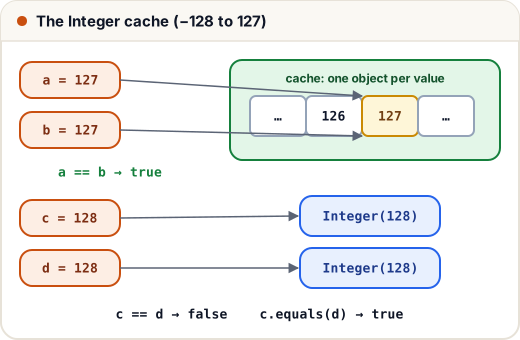
== on two objects asks "are these the same object?", not "are the values equal?". With wrappers the answer depends on the value.
Integer.valueOf(n) keeps a ready-made cache of Integer objects for −128 to 127. Autoboxing uses valueOf, so every boxed 127 is the same cached object. A boxed 128 is outside the cache, so each one is a new object.
public class Main {
    public static void main(String[] args) {
        Integer a = 127, b = 127;
        Integer c = 128, d = 128;
        System.out.println(a == b);
        System.out.println(c == d);
        System.out.println(c.equals(d));
        System.out.println(c.intValue() == d);   // one side is int, so d is unboxed: numbers compared

        Long big = 128L;
        System.out.println(big.equals(128));     // 128 is boxed to Integer, not Long
        System.out.println(big.equals(128L));
    }
}
true
false
true
true
false
true
What to take away:
| Comparison | Compares | Safe? |
|---|---|---|
Integer == Integer | object identity | no — works by luck for −128..127 |
Integer.equals(Integer) | values | yes |
Integer == int | values (the wrapper is unboxed) | yes, if the wrapper is not null |
Long.equals(Integer) | type first, then value | always false — types differ |
Byte, Short, Long and Character (0 to 127) have similar caches; Boolean.TRUE and Boolean.FALSE are always shared. Double and Float have no cache. The cache range is a JVM detail you should never depend on — just use equals() for wrappers.
4. The null unboxing trap
Unboxing calls a method (intValue()) on the wrapper. If the wrapper is null, that call throws NullPointerException. The classic place this happens is a Map lookup for a missing key:
import java.util.*;

public class Main {
    public static void main(String[] args) {
        Map<String, Integer> stock = new HashMap<>();
        stock.put("pen", 40);
        try {
            int notebooks = stock.get("notebook");   // get returns null, then unboxing fails
            System.out.println(notebooks);
        } catch (NullPointerException e) {
            System.out.println("NullPointerException while unboxing");
        }
        int safe = stock.getOrDefault("notebook", 0);
        System.out.println(safe);
    }
}
NullPointerException while unboxing
0
The line int notebooks = stock.get("notebook"); has no visible method call, so this bug is hard to spot. Use getOrDefault, or keep the value as Integer and check for null first.
5. Useful wrapper methods
public class Main {
    public static void main(String[] args) {
        int a = Integer.parseInt("250");          // String → int
        Integer b = Integer.valueOf("250");       // String → Integer
        System.out.println(a + b);
        System.out.println(Integer.toBinaryString(10) + " " + Integer.toHexString(255));
        System.out.println(Integer.parseInt("ff", 16) + " " + Integer.parseInt("1010", 2));
        System.out.println(Integer.MAX_VALUE + " " + Integer.MIN_VALUE);
        System.out.println(Integer.compare(3, 7) + " " + Character.isDigit('7') + " " + Character.toUpperCase('q'));
        System.out.println(Double.parseDouble("8.75") * 2);
    }
}
500
1010 ff
255 10
2147483647 -2147483648
-1 true Q
17.5
parseIntreturns a primitiveint;valueOfreturns anInteger(and uses the cache).- Both throw
NumberFormatExceptionfor text like"12a". Integer.compare(x, y)returns a negative number, zero or a positive number — handy in comparators.
A word on speed
Boxing creates objects. In a tight loop, Long sum = 0L; for (…) sum += i; unboxes, adds and boxes again on every round, creating millions of objects. Use the primitive long sum for counters and totals, and use wrappers only where an object is really needed.
Common mistakes
- Comparing two
Integervalues with==. It passes small tests (values under 128) and fails with real data. - Unboxing a
null— usually frommap.get(key)or a database field. - Calling
Long.equalswith anintliteral:longValue.equals(5)is always false; write5L. - Using
Integer/Longfor loop counters and sums, which is slow. list.remove(1)on aList<Integer>removes index 1;list.remove(Integer.valueOf(1))removes the value 1.
Quick recap
- Every primitive has a wrapper class;
int→Integer,char→Character. - Autoboxing calls
valueOf; unboxing callsintValue()(and friends). Integer.valueOfcaches −128..127, so==on wrappers gives surprising results. Useequals().- Unboxing
nullthrows NullPointerException. parseInt→int,valueOf→Integer; use primitives for heavy arithmetic.