AdvancedJava Programming · Lesson 27 of 29 · Updated ·
File Handling in Java — java.io Streams, BufferedReader and NIO Files and Path
Programs need to keep data after they stop: marks sheets, logs, settings, reports. Java has two families of file APIs. The old java.io package (Java 1.0) works with streams of bytes or characters. The newer java.nio.file package (Java 7, often called NIO.2) gives the simple Path and Files classes. Real code uses both, and university exams still ask about java.io, so this lesson covers each and shows when to use which.
Note: the word "stream" here means a flow of data to or from a file. It is not the same as the java.util.stream Streams from the streams lesson.
1. Byte streams vs character streams
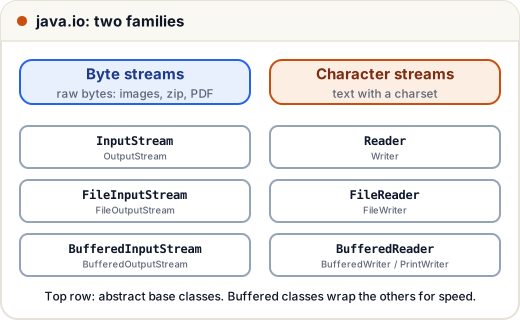
Everything in a file is bytes. Text is bytes that follow a character encoding (a rule for turning characters into bytes, such as UTF-8). Java therefore has two kinds of classes:
| Byte streams | Character streams | |
|---|---|---|
| Base classes | InputStream, OutputStream | Reader, Writer |
| Unit | 1 byte (int 0–255) | 1 character |
| Use for | images, PDFs, zip, any binary file | text: .txt, .csv, .java |
| Common classes | FileInputStream, BufferedInputStream | FileReader, BufferedReader, PrintWriter |
Rule: binary data → byte streams; text → character streams with a known charset (use UTF-8).
2. Path and Files: the easy way
A Path is the location of a file or folder. The Files class has static methods that do a whole job in one line: create, read, write, copy, delete. For small files, this is all you need.
import java.nio.file.*;
import java.util.*;

public class Main {
    public static void main(String[] args) throws Exception {
        Path file = Path.of("notes.txt");
        Files.writeString(file, "Java\nPython\nC\n");
        System.out.println(Files.exists(file) + " " + Files.size(file) + " bytes");

        List<String> lines = Files.readAllLines(file);
        System.out.println(lines.size() + " lines: " + lines);

        Files.writeString(file, "SQL\n", StandardOpenOption.APPEND);
        System.out.println(Files.readString(file).replace("\n", "|"));

        System.out.println(file.getFileName() + " ends with .txt? " + file.toString().endsWith(".txt"));
        Files.delete(file);
        System.out.println(Files.exists(file));
    }
}
true 14 bytes
3 lines: [Java, Python, C]
Java|Python|C|SQL|
notes.txt ends with .txt? true
false
writeString replaces the file by default. Pass StandardOpenOption.APPEND to add to the end instead. The Files methods use UTF-8 unless you give another charset. The size is 14 bytes because each \n is one byte (4 + 1 + 6 + 1 + 1 + 1).
3. Big files: read line by line
readAllLines loads the whole file into memory. For a 2 GB log file, that fails with OutOfMemoryError. Instead, read one line at a time with a BufferedReader, which uses null from readLine() to mean "end of file".
A buffer is a block of memory that holds a chunk of the file. Without one, every read() call may go to the operating system separately, which is slow. With the default buffer of 8,192 characters, the reader fetches a big chunk once and serves many reads from memory.
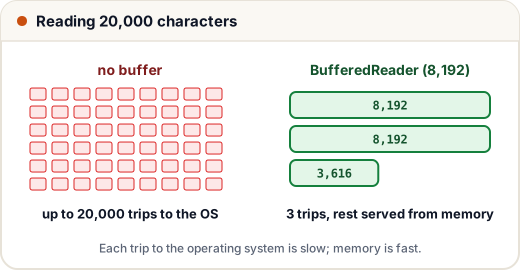
Always open readers and writers in try-with-resources (see the exceptions lesson), so the file is closed even if an exception happens.
import java.io.*;
import java.nio.file.*;

public class Main {
    public static void main(String[] args) throws IOException {
        Path csv = Path.of("marks.csv");
        Files.writeString(csv, "name,marks\nAsha,82\nRavi,67\nNeha,91\n");

        int total = 0, count = 0;
        String top = "";
        int best = -1;
        try (BufferedReader in = Files.newBufferedReader(csv)) {
            in.readLine();                                // skip the header
            String line;
            while ((line = in.readLine()) != null) {
                String[] parts = line.split(",");
                int m = Integer.parseInt(parts[1]);
                total += m;
                count++;
                if (m > best) { best = m; top = parts[0]; }
            }
        }
        System.out.printf("students=%d average=%.2f topper=%s%n", count, (double) total / count, top);
    }
}
students=3 average=80.00 topper=Neha
The stream way: Files.lines
Files.lines(path) gives a lazy Stream<String> that also reads one line at a time. It holds the file open, so it too must go in try-with-resources.
import java.nio.file.*;
import java.util.stream.*;

public class Main {
    public static void main(String[] args) throws Exception {
        Path log = Path.of("server.log");
        Files.writeString(log, "INFO start\nERROR disk full\nINFO request\nERROR timeout\n");
        try (Stream<String> lines = Files.lines(log)) {
            System.out.println(lines.filter(l -> l.startsWith("ERROR"))
                                    .map(l -> l.substring(6))
                                    .collect(Collectors.toList()));
        }
    }
}
[disk full, timeout]
4. Writing text: BufferedWriter and PrintWriter
To write many lines, use a buffered writer. PrintWriter adds the familiar println and printf methods.
import java.io.*;
import java.nio.file.*;

public class Main {
    public static void main(String[] args) throws IOException {
        Path report = Path.of("report.txt");
        String[] names = {"Asha", "Ravi"};
        int[] marks = {82, 67};
        try (PrintWriter out = new PrintWriter(Files.newBufferedWriter(report))) {
            for (int i = 0; i < names.length; i++) {
                out.printf("%-5s %3d %s%n", names[i], marks[i], marks[i] >= 70 ? "PASS" : "RETRY");
            }
        }
        Files.readAllLines(report).forEach(System.out::println);
    }
}
Asha   82 PASS
Ravi   67 RETRY
If you forget to close (or flush) a buffered writer, the last chunk may still be sitting in memory and never reach the file. Try-with-resources prevents this.
5. Folders: create, list, walk
import java.nio.file.*;
import java.util.stream.*;

public class Main {
    public static void main(String[] args) throws Exception {
        Path root = Path.of("project");
        Files.createDirectories(root.resolve("src/util"));     // creates missing parents too
        Files.writeString(root.resolve("README.md"), "hi");
        Files.writeString(root.resolve("src/Main.java"), "class Main {}");
        Files.writeString(root.resolve("src/util/Helper.java"), "class Helper {}");

        try (Stream<Path> top = Files.list(root)) {
            System.out.println(top.map(p -> p.getFileName().toString()).sorted().collect(Collectors.toList()));
        }
        try (Stream<Path> all = Files.walk(root)) {
            System.out.println(all.filter(p -> p.toString().endsWith(".java"))
                                  .map(p -> root.relativize(p).toString().replace('\\', '/'))
                                  .sorted().collect(Collectors.toList()));
        }
        Files.copy(root.resolve("README.md"), root.resolve("README.bak"));
        System.out.println(Files.readString(root.resolve("README.bak")));
    }
}
[README.md, src]
[src/Main.java, src/util/Helper.java]
hi
Files.list shows one level; Files.walk goes into every sub-folder. resolve joins paths safely, using the right separator on Windows and Linux. (The replace('\\', '/') only makes the printed result look the same on both.)
6. Errors you must handle
Almost every file method throws the checked exception IOException, so you must catch it or declare throws IOException. Useful subclasses:
| Exception | When |
|---|---|
NoSuchFileException | the file or folder does not exist |
FileAlreadyExistsException | Files.copy / createFile target already exists (pass StandardCopyOption.REPLACE_EXISTING) |
AccessDeniedException | no permission |
DirectoryNotEmptyException | Files.delete on a folder that still has files |
import java.io.*;
import java.nio.file.*;

public class Main {
    public static void main(String[] args) {
        try {
            Files.readString(Path.of("missing.txt"));
        } catch (NoSuchFileException e) {
            System.out.println("not found: " + e.getMessage());
        } catch (IOException e) {
            System.out.println("other I/O problem");
        }
    }
}
not found: missing.txt
Catch the specific exception before the general IOException, or the code does not compile.
Common mistakes
- Using
FileReader/FileWriterwithout thinking about the charset; older Java versions used the system default, which differs between computers. PreferFiles.newBufferedReader(UTF-8). - Reading a huge file with
readAllLinesorreadString. - Forgetting to close a writer, so the last lines never reach the disk.
- Not closing
Files.lines/Files.walkstreams; they keep the file or folder open. - Building paths by joining strings with
"\\"or"/"instead ofresolve. - Expecting
writeStringto append; it overwrites unless you passAPPEND.
Quick recap
- Byte streams (
InputStream/OutputStream) for binary data; character streams (Reader/Writer) for text. Path+Files:writeString,readString,readAllLines,exists,delete,copy— easy for small files.- Big files:
BufferedReader.readLine()loop orFiles.lines, both in try-with-resources. - Buffers cut slow disk trips; always close or flush writers.
- File methods throw checked
IOException; catch specific subclasses first.