AdvancedJava Programming · Lesson 24 of 29 · Updated ·
Java Streams in Depth — Collectors, groupingBy, flatMap and reduce
The Java 8 lesson showed the basic stream pipeline: filter, map, sorted, collect. Real projects and interviews go further: "group these orders by city and count them", "flatten this list of lists", "build a map from name to marks". This lesson covers the collectors and operations that do this, and explains how a stream actually runs, so its output never surprises you.
1. How a stream really runs
A stream does not run filter on the whole list, then map on the whole list. It takes one element at a time through the full pipeline. Also, intermediate operations (filter, map, peek) are lazy: nothing happens until a terminal operation (collect, count, findFirst …) asks for a result.
import java.util.*;

public class Main {
    public static void main(String[] args) {
        List<Integer> marks = List.of(45, 82, 67, 91, 30);
        Optional<Integer> firstPass = marks.stream()
            .peek(m -> System.out.println("check " + m))
            .filter(m -> m >= 60)
            .peek(m -> System.out.println("passed " + m))
            .findFirst();
        System.out.println("result " + firstPass.get());
    }
}
check 45
check 82
passed 82
result 82
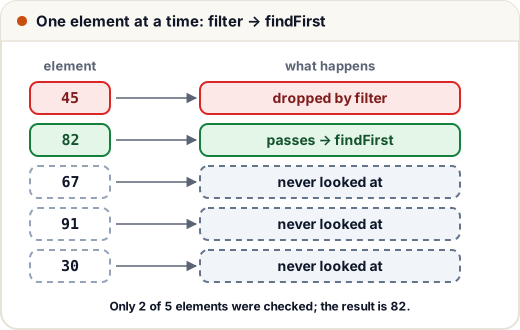
findFirst is short-circuiting: once it has one answer, the stream stops. Only 2 of the 5 marks were ever checked. This is why streams can work on very large (even infinite) sources, such as Stream.iterate(1, n -> n * 2).limit(10).
2. Collecting into a Map with toMap
Collectors.toMap(keyFunction, valueFunction) builds a map. The trap: if two elements produce the same key, it throws IllegalStateException. Pass a third argument, a merge function, to decide what to keep.
import java.util.*;
import java.util.stream.*;

record Sale(String city, int amount) { }

public class Main {
    public static void main(String[] args) {
        List<Sale> sales = List.of(new Sale("Pune", 500), new Sale("Agra", 300), new Sale("Pune", 200));
        try {
            Map<String, Integer> m = sales.stream().collect(Collectors.toMap(Sale::city, Sale::amount));
        } catch (IllegalStateException e) {
            System.out.println("duplicate key error");
        }
        Map<String, Integer> total = sales.stream()
            .collect(Collectors.toMap(Sale::city, Sale::amount, Integer::sum, TreeMap::new));
        System.out.println(total);
    }
}
duplicate key error
{Agra=300, Pune=700}
Integer::sum adds the two values when a key repeats. The fourth argument, TreeMap::new, chooses the map type (sorted keys) so the output order is fixed. A plain HashMap does not promise any order.
3. groupingBy and partitioningBy
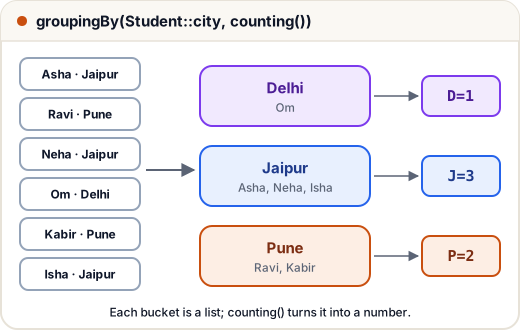
groupingBy(classifier) puts elements into buckets by a key, giving a Map<Key, List<T>>. A second argument, the downstream collector, decides what each bucket becomes instead of a list.
| Downstream collector | Each bucket becomes |
|---|---|
| (none) | List<T> |
counting() | Long — how many |
summingInt(f) / averagingInt(f) | total / average as Integer / Double |
mapping(f, toList()) | a list of some field |
maxBy(comparator) | Optional<T> — the largest |
import java.util.*;
import java.util.stream.*;

record Student(String name, String city, int marks) { }

public class Main {
    public static void main(String[] args) {
        List<Student> list = List.of(
            new Student("Asha", "Jaipur", 92), new Student("Ravi", "Pune", 74),
            new Student("Neha", "Jaipur", 58), new Student("Om", "Delhi", 66),
            new Student("Kabir", "Pune", 81), new Student("Isha", "Jaipur", 70));

        Map<String, Long> count = list.stream()
            .collect(Collectors.groupingBy(Student::city, TreeMap::new, Collectors.counting()));
        System.out.println(count);

        Map<String, Double> avg = list.stream()
            .collect(Collectors.groupingBy(Student::city, TreeMap::new, Collectors.averagingInt(Student::marks)));
        System.out.println(avg);

        Map<Boolean, List<String>> passFail = list.stream()
            .collect(Collectors.partitioningBy(s -> s.marks() >= 60,
                     Collectors.mapping(Student::name, Collectors.toList())));
        System.out.println(passFail);
    }
}
{Delhi=1, Jaipur=3, Pune=2}
{Delhi=66.0, Jaipur=73.33333333333333, Pune=77.5}
{false=[Neha], true=[Asha, Ravi, Om, Kabir, Isha]}
partitioningBy is a special groupingBy with a true/false key. It always has both keys, even if one list is empty.
4. flatMap: flattening nested data
map turns each element into exactly one element. flatMap turns each element into a stream of elements and joins all those streams into one. Use it for a list of lists, or to split sentences into words.
import java.util.*;
import java.util.stream.*;

public class Main {
    public static void main(String[] args) {
        List<List<String>> batches = List.of(List.of("Asha", "Ravi"), List.of("Neha"), List.of("Om", "Asha"));
        List<String> all = batches.stream().flatMap(List::stream).distinct().toList();
        System.out.println(all);

        List<String> lines = List.of("java is fun", "streams are java");
        Map<String, Long> freq = lines.stream()
            .flatMap(line -> Arrays.stream(line.split(" ")))
            .collect(Collectors.groupingBy(w -> w, TreeMap::new, Collectors.counting()));
        System.out.println(freq);
    }
}
[Asha, Ravi, Neha, Om]
{are=1, fun=1, is=1, java=2, streams=1}
The word-frequency program in the second half is a very common interview question.
5. reduce and primitive streams
reduce(identity, accumulator) combines all elements into one value. The identity is the starting value and must not change the result (0 for sum, 1 for product).
For numbers, prefer primitive streams — IntStream, LongStream, DoubleStream. They avoid boxing (wrapping every int in an Integer object) and give ready-made sum, average, max and summaryStatistics.
import java.util.*;
import java.util.stream.*;

public class Main {
    public static void main(String[] args) {
        List<Integer> marks = List.of(72, 85, 64, 90);
        int total = marks.stream().reduce(0, Integer::sum);
        int best = marks.stream().reduce(Integer.MIN_VALUE, Integer::max);
        System.out.println(total + " " + best);

        IntSummaryStatistics st = marks.stream().mapToInt(Integer::intValue).summaryStatistics();
        System.out.println(st.getMin() + " " + st.getMax() + " " + st.getAverage());

        System.out.println(IntStream.rangeClosed(1, 5).map(i -> i * i).sum());
        System.out.println(IntStream.range(0, 4).boxed().collect(Collectors.toList()));
        System.out.println(Stream.of("b", "c", "a").collect(Collectors.joining(", ", "[", "]")));
    }
}
311 90
64 90 77.75
55
[0, 1, 2, 3]
[b, c, a]
range(0, 4) excludes 4; rangeClosed(1, 5) includes 5. boxed() turns an IntStream back into a Stream<Integer> when you need a List<Integer>.
6. Rules that prevent bugs
A stream can be used only once. After a terminal operation it is closed, and using it again throws IllegalStateException.
import java.util.*;
import java.util.stream.*;

public class Main {
    public static void main(String[] args) {
        Stream<String> s = Stream.of("x", "y");
        System.out.println(s.count());
        try {
            System.out.println(s.count());
        } catch (IllegalStateException e) {
            System.out.println("stream already used");
        }
    }
}
2
stream already used
Other rules:
- Don't change the source (add to or remove from the list) inside a stream. Collect into a new list instead.
- Avoid side effects in
mapandfilter, such as adding to an outside list. Use a collector. - Parallel streams (
parallelStream()) split work across CPU cores. They help only for large, CPU-heavy work, and code with side effects can give wrong results. For normal lists, sequential streams are fine.
Common mistakes
- Using
toMapwithout a merge function when keys can repeat — it throwsIllegalStateException. - Expecting
peekormapto run without a terminal operation. Streams are lazy. - Reusing a stream variable after
count()orcollect(). - Using
mapwhen each element gives a list, and gettingStream<List<T>>instead of a flat stream. UseflatMap. - Relying on
HashMaporder in output. PassTreeMap::newwhen order matters. - Choosing a wrong identity in
reduce(for example 1 for a sum).
Quick recap
- Streams are lazy and process one element at a time;
findFirst,anyMatchandlimitcan stop early. toMap(key, value, merge)handles duplicate keys.groupingBy(key, downstream)buckets data;counting,averagingIntandmappingshape each bucket.partitioningBysplits into true/false groups.flatMapflattens nested data;reducecombines everything into one value.- Use
IntStreamfor numbers; a stream can be used only once.