AdvancedJava Programming · Lesson 28 of 29 · Updated ·
Date and Time in Java — LocalDate, LocalDateTime, Period, Duration and Time Zones
Exam schedules, fee due dates, train timings, "your free trial ends in 3 days" — almost every application handles dates. Java's original java.util.Date and Calendar classes were confusing: months started from 0 (January = 0), objects could be changed by anyone holding them, and they were not safe to share between threads. Java 8 added the java.time package, which fixes all of this. Use it in all new code.
1. The main classes
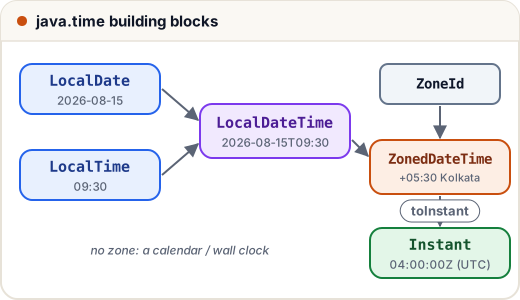
| Class | Holds | Example |
|---|---|---|
LocalDate | a date, no time, no zone | 2026-08-15 |
LocalTime | a time of day | 09:30 |
LocalDateTime | date + time, no zone | 2026-08-15T09:30 |
ZonedDateTime | date + time + time zone | 2026-08-15T09:30+05:30[Asia/Kolkata] |
Instant | one exact moment in UTC (a timestamp) | 2026-08-15T04:00:00Z |
Period | a date-based amount: years, months, days | P1Y2M3D |
Duration | a time-based amount: hours, minutes, seconds | PT2H30M |
"Local" means "as written on a calendar or wall clock, with no time zone attached". A birthday or an exam date is a LocalDate; a log timestamp is an Instant.
2. Creating and changing dates
All java.time objects are immutable: methods like plusDays return a new object and leave the original unchanged — just like String.
import java.time.*;

public class Main {
    public static void main(String[] args) {
        LocalDate exam = LocalDate.of(2026, 3, 14);          // month 3 = March (no 0-based months)
        LocalDate result = exam.plusDays(45);
        exam.plusWeeks(1);                                   // result thrown away: exam does not change
        System.out.println(exam + " -> " + result);
        System.out.println(exam.getDayOfWeek() + " " + exam.getMonth() + " day " + exam.getDayOfYear());
        System.out.println(exam.isLeapYear() + " " + exam.lengthOfMonth() + " " + LocalDate.of(2028, 2, 1).lengthOfMonth());

        LocalDate jan31 = LocalDate.of(2026, 1, 31);
        System.out.println(jan31.plusMonths(1));             // no Feb 31, so the last valid day
        System.out.println(LocalDate.parse("2026-12-25").isAfter(exam));

        LocalDateTime train = LocalDateTime.of(2026, 3, 14, 22, 45);
        System.out.println(train.plusHours(3));              // crosses midnight correctly
    }
}
2026-03-14 -> 2026-04-28
SATURDAY MARCH day 73
false 31 29
2026-02-28
true
2026-03-15T01:45
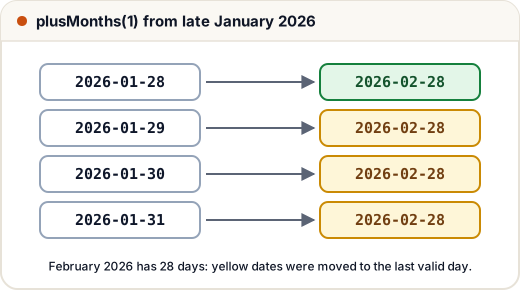
Notice the month-end rule: if the target day does not exist, plusMonths uses the last valid day of that month. This matters for monthly fee due dates.
3. Period, Duration and ChronoUnit
| Need | Use |
|---|---|
| Years/months/days between two dates (age) | Period.between(start, end) |
| Hours/minutes/seconds between two times | Duration.between(start, end) |
| Total count in ONE unit (total days, total minutes) | ChronoUnit.DAYS.between(start, end) |
A Period of "1 month 3 days" is not a total number of days — its getDays() returns only the days part (3). For "how many days until the exam", use ChronoUnit.DAYS.between.
import java.time.*;
import java.time.temporal.ChronoUnit;

public class Main {
    public static void main(String[] args) {
        LocalDate born = LocalDate.of(2004, 9, 20);
        LocalDate today = LocalDate.of(2026, 11, 21);
        Period age = Period.between(born, today);
        System.out.println(age + " -> " + age.getYears() + " years, " + age.getMonths() + " months, " + age.getDays() + " days");

        LocalDate exam = LocalDate.of(2026, 12, 24);
        Period p = Period.between(today, exam);
        System.out.println("Period: " + p + ", getDays() = " + p.getDays());
        System.out.println("Total days: " + ChronoUnit.DAYS.between(today, exam));

        LocalTime departs = LocalTime.of(16, 55), arrives = LocalTime.of(23, 30);
        Duration journey = Duration.between(departs, arrives);
        System.out.println(journey + " = " + journey.toHours() + "h " + journey.toMinutesPart() + "m = " + journey.toMinutes() + " min");
    }
}
P22Y2M1D -> 22 years, 2 months, 1 days
Period: P1M3D, getDays() = 3
Total days: 33
PT6H35M = 6h 35m = 395 min
between(a, b) is positive when b is later. If you swap the arguments, the answer becomes negative.
4. Formatting and parsing
toString() always gives the ISO format (2026-03-14). For Indian-style output such as 14-03-2026, build a DateTimeFormatter from a pattern:
| Letter | Meaning | Example |
|---|---|---|
dd | day of month, 2 digits | 05 |
MM / MMM / MMMM | month: number / short name / full name | 03 / Mar / March |
yyyy | year | 2026 |
HH / hh | hour 0–23 / hour 1–12 | 17 / 05 |
mm | minutes (not months!) | 30 |
a | AM/PM | PM |
EEEE | day name | Saturday |
import java.time.*;
import java.time.format.DateTimeFormatter;
import java.util.Locale;

public class Main {
    public static void main(String[] args) {
        LocalDateTime t = LocalDateTime.of(2026, 3, 14, 17, 5);
        DateTimeFormatter indian = DateTimeFormatter.ofPattern("dd-MM-yyyy");
        DateTimeFormatter nice = DateTimeFormatter.ofPattern("EEEE, d MMMM yyyy, hh:mm a", Locale.ENGLISH);
        System.out.println(t.format(indian));
        System.out.println(t.format(nice));

        LocalDate parsed = LocalDate.parse("05-08-2026", indian);
        System.out.println(parsed + " " + parsed.getMonth());

        DateTimeFormatter wrong = DateTimeFormatter.ofPattern("dd-mm-yyyy");
        System.out.println("mm by mistake: " + t.format(wrong));

        LocalDate dec30 = LocalDate.of(2024, 12, 30);
        System.out.println(dec30.format(DateTimeFormatter.ofPattern("yyyy")) + " vs "
            + dec30.format(DateTimeFormatter.ofPattern("YYYY", Locale.UK)));
    }
}
14-03-2026
Saturday, 14 March 2026, 05:05 PM
2026-08-05 AUGUST
mm by mistake: 14-05-2026
2024 vs 2025
Two classic bugs are shown at the end. mm printed the minutes (05) instead of the month. And YYYY is the week-based year: 30 December 2024 belongs to the first week of 2025 in this week system, so it printed 2025. Always use lowercase yyyy. Passing a Locale (here English) fixes the language of month and day names, so the output is the same on every computer.
If the text does not match the pattern, parse throws DateTimeParseException.
5. Time zones and Instant
A LocalDateTime like "10:00" is ambiguous until you say where. ZonedDateTime attaches a ZoneId such as Asia/Kolkata (India, UTC+05:30). Use region IDs, not fixed offsets, because countries with daylight saving change their offset during the year.
import java.time.*;

public class Main {
    public static void main(String[] args) {
        ZonedDateTime callInIndia = ZonedDateTime.of(
            LocalDateTime.of(2026, 1, 15, 10, 0), ZoneId.of("Asia/Kolkata"));
        ZonedDateTime inLondon = callInIndia.withZoneSameInstant(ZoneId.of("Europe/London"));
        ZonedDateTime inNewYork = callInIndia.withZoneSameInstant(ZoneId.of("America/New_York"));
        System.out.println(inLondon.toLocalTime() + " London, " + inNewYork.toLocalDateTime() + " New York");

        Instant moment = callInIndia.toInstant();
        System.out.println(moment);
        System.out.println(moment.equals(inNewYork.toInstant()));
    }
}
04:30 London, 2026-01-14T23:30 New York
2026-01-15T04:30:00Z
true
All three are the same instant, shown on different wall clocks. Store moments as Instant (or UTC) in databases and logs, and convert to the user's zone only when displaying. To get the current moment, use Instant.now(), LocalDate.now() or LocalDateTime.now() — they depend on the system clock, so they were not used in the examples above.
Common mistakes
- Calling
date.plusDays(1);and ignoring the result. The objects are immutable; writedate = date.plusDays(1);. - Using
Period.getDays()as the total number of days. UseChronoUnit.DAYS.between. - Writing
mmfor months orYYYYfor years in a pattern. - Using
LocalDateTimefor events that happen in different countries; useZonedDateTimeorInstant. - Using fixed offsets like
+05:30for zones with daylight saving. - Using the old
Date/Calendar/SimpleDateFormatin new code (SimpleDateFormatis also not thread-safe).
Quick recap
LocalDate,LocalTime,LocalDateTime: no zone;ZonedDateTime: with zone;Instant: UTC timestamp.- All are immutable;
plus…/minus…/with…return new objects; months start at 1. Period= years/months/days,Duration= hours/minutes/seconds,ChronoUnit.X.between= total in one unit.DateTimeFormatter.ofPattern("dd-MM-yyyy")for format and parse; bewaremmandYYYY.- Convert zones with
withZoneSameInstant; storeInstant, display in the local zone.