Java Programming · Lesson 10 of 15 · Updated ·
Exception Handling in Java — try, catch, finally, throw, throws
An exception is an event that breaks the normal flow of a program — dividing by zero, a missing file, a null reference. Handling exceptions lets the program respond sensibly instead of crashing.
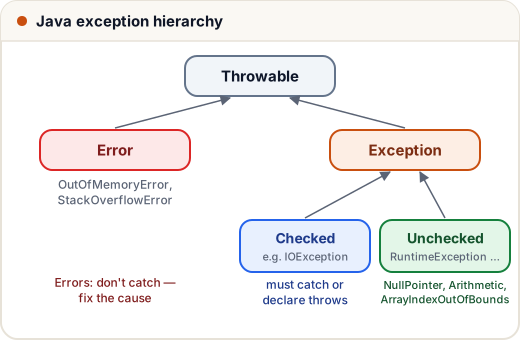
1. Checked vs unchecked
| Checked | Unchecked | |
|---|---|---|
| Examples | IOException, SQLException | NullPointerException, ArithmeticException, ArrayIndexOutOfBoundsException |
| Parent | Exception | RuntimeException |
| Compiler forces handling? | yes — catch it or declare throws | no |
| Usually caused by | the outside world (files, network) | bugs in your code |
Errors (OutOfMemoryError, StackOverflowError) are serious JVM problems — you don't catch them; you fix the cause.
2. try, catch, finally
public class Main {
    public static void main(String[] args) {
        int[] marks = {80, 90};
        try {
            System.out.println("Start");
            System.out.println(marks[5]);          // throws
            System.out.println("not printed");
        } catch (ArrayIndexOutOfBoundsException e) {
            System.out.println("Caught: " + e.getMessage());
        } finally {
            System.out.println("finally always runs");
        }
        System.out.println("Program continues");
    }
}
Start
Caught: Index 5 out of bounds for length 2
finally always runs
Program continues
Multiple catches and multi-catch
public class Main {
    static String parse(String s) {
        try {
            int n = Integer.parseInt(s);
            return "100 / " + n + " = " + (100 / n);
        } catch (NumberFormatException | ArithmeticException e) {
            return "Bad input: " + e.getClass().getSimpleName();
        }
    }
    public static void main(String[] args) {
        System.out.println(parse("4"));
        System.out.println(parse("abc"));
        System.out.println(parse("0"));
    }
}
100 / 4 = 25
Bad input: NumberFormatException
Bad input: ArithmeticException
When using separate catch blocks, put specific exceptions before general ones (
Exceptionlast), or the code won't compile.
3. throw vs throws
throwactually throws an exception object:throw new IllegalArgumentException("…").throwsin a method signature declares that the method may throw a checked exception.
class InsufficientBalanceException extends Exception {     // custom checked exception
    InsufficientBalanceException(String msg) { super(msg); }
}

class Account {
    private double balance = 500;
    void withdraw(double amt) throws InsufficientBalanceException {
        if (amt > balance) throw new InsufficientBalanceException("Need ₹" + (amt - balance) + " more");
        balance -= amt;
    }
}

public class Main {
    public static void main(String[] args) {
        Account acc = new Account();
        try {
            acc.withdraw(200);
            acc.withdraw(800);
        } catch (InsufficientBalanceException e) {
            System.out.println(e.getMessage());
        }
    }
}
Need ₹500.0 more
4. try-with-resources
Resources like files and database connections must be closed. Declare them in try (...) and Java closes them automatically:
import java.io.*;

public class Main {
    public static void main(String[] args) throws IOException {
        File f = File.createTempFile("notes", ".txt");
        try (PrintWriter out = new PrintWriter(new FileWriter(f))) {
            out.println("line one");
            out.println("line two");
        }
        try (BufferedReader in = new BufferedReader(new FileReader(f))) {
            String line;
            while ((line = in.readLine()) != null) System.out.println(line.toUpperCase());
        }
        f.delete();
    }
}
LINE ONE
LINE TWO
5. final vs finally vs finalize (interview favourite)
- final — keyword: constant variable, non-overridable method, non-extendable class.
- finally — block that always runs after try/catch.
- finalize() — an old method the garbage collector might call before destroying an object; deprecated — don't use it.
Common mistakes
- Catching
Exceptioneverywhere and hiding real bugs. - Empty catch blocks (
catch (Exception e) {}) — at least log the error. - Using exceptions for normal flow control.
Quick recap
- Throwable → Error / Exception → checked vs RuntimeException (unchecked).
- try / catch (specific first) / finally (always).
throwan object;throwsdeclares; custom exceptions extend Exception or RuntimeException.- try-with-resources closes files and connections automatically.