Java Programming · Lesson 12 of 15 · Updated ·
HashMap in Java — How It Works, equals/hashCode, TreeMap and Sorting
A Map stores key → value pairs. HashMap is one of the most used classes in Java — and "how does HashMap work internally?" is one of the most asked interview questions.
1. Using a HashMap
import java.util.*;

public class Main {
    public static void main(String[] args) {
        Map<String, Integer> marks = new HashMap<>();
        marks.put("Asha", 92);
        marks.put("Ravi", 74);
        marks.put("Asha", 95);                  // same key → value replaced
        System.out.println(marks.get("Asha") + " " + marks.get("Neha"));
        System.out.println(marks.getOrDefault("Neha", 0) + " " + marks.containsKey("Ravi") + " " + marks.size());
        for (Map.Entry<String, Integer> e : new TreeMap<>(marks).entrySet()) {
            System.out.println(e.getKey() + " -> " + e.getValue());
        }
    }
}
95 null
0 true 2
Asha -> 95
Ravi -> 74
- Keys are unique; putting the same key again replaces the value.
getreturnsnullfor a missing key —getOrDefaultis safer.- HashMap has no order.
LinkedHashMapkeeps insertion order;TreeMapkeeps keys sorted.
Counting frequencies (very common)
import java.util.*;

public class Main {
    public static void main(String[] args) {
        String text = "to be or not to be";
        Map<String, Integer> count = new TreeMap<>();
        for (String w : text.split(" ")) {
            count.merge(w, 1, Integer::sum);     // add 1, or start at 1
        }
        System.out.println(count);
    }
}
{be=2, not=1, or=1, to=2}
2. How HashMap works inside
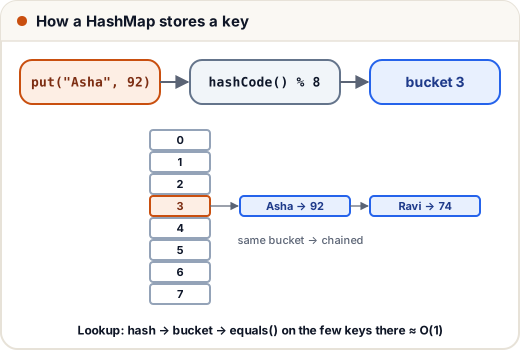
- HashMap keeps an array of buckets (16 by default).
put(key, value)callskey.hashCode(), mixes the bits, and picks a bucket index.- If the bucket is empty, the entry goes there. If not (a collision), entries are chained in a list; when a chain grows past 8, Java 8+ turns it into a balanced tree (O(log n)).
get(key)finds the bucket by hash, then usesequals()to find the exact key.- When the map is 75% full (load factor 0.75), it resizes (doubles) and redistributes entries.
Average put/get is O(1).
3. The equals() / hashCode() contract
If you use your own class as a key (or in a HashSet), override both methods:
If
a.equals(b)is true, thena.hashCode() == b.hashCode()must be true.
import java.util.*;

class Point {
    final int x, y;
    Point(int x, int y) { this.x = x; this.y = y; }
    @Override public boolean equals(Object o) {
        if (!(o instanceof Point p)) return false;
        return x == p.x && y == p.y;
    }
    @Override public int hashCode() { return Objects.hash(x, y); }
}

public class Main {
    public static void main(String[] args) {
        Set<Point> visited = new HashSet<>();
        visited.add(new Point(1, 2));
        System.out.println(visited.contains(new Point(1, 2)));
    }
}
true
Without hashCode(), the second Point(1, 2) would land in a different bucket and contains would return false — a classic bug.
4. Sorting objects: Comparable vs Comparator
import java.util.*;

class Student implements Comparable<Student> {
    String name; int marks;
    Student(String n, int m) { name = n; marks = m; }
    public int compareTo(Student o) { return name.compareTo(o.name); }   // natural order: by name
    public String toString() { return name + ":" + marks; }
}

public class Main {
    public static void main(String[] args) {
        List<Student> list = new ArrayList<>(List.of(new Student("Ravi", 74), new Student("Asha", 92), new Student("Neha", 85)));
        Collections.sort(list);                                   // uses compareTo
        System.out.println(list);
        list.sort(Comparator.comparingInt((Student s) -> s.marks).reversed());   // custom order
        System.out.println(list);
    }
}
[Asha:92, Neha:85, Ravi:74]
[Asha:92, Neha:85, Ravi:74]
| Comparable | Comparator | |
|---|---|---|
| Method | compareTo(other) | compare(a, b) |
| Defined | inside the class | outside, many possible |
| Use for | the natural order | any custom order |
5. HashMap vs Hashtable vs ConcurrentHashMap
- HashMap — not thread-safe, allows one null key. The default.
- Hashtable — old, synchronized, no nulls. Avoid.
- ConcurrentHashMap — thread-safe and fast; use when many threads share a map.
Common mistakes
- Overriding
equalsbut nothashCode. - Using mutable objects as keys and changing them after inserting.
- Expecting a HashMap to keep insertion order.
Quick recap
- Map = unique keys → values; HashMap (no order), LinkedHashMap (insertion), TreeMap (sorted).
- HashMap: hashCode → bucket → equals; chains become trees; load factor 0.75; O(1) average.
- Override equals and hashCode together.
- Comparable = natural order inside the class; Comparator = custom orders.