Java Programming · Lesson 1 of 15 · Updated ·
Introduction to Java — JDK, JVM and Your First Program
Java runs banking systems, Android apps and enterprise software around the world. Most service companies (TCS, Infosys, Wipro, Cognizant) hire for Java roles, which is why it is the most common language in fresher interviews.
1. How Java runs: compile once, run anywhere
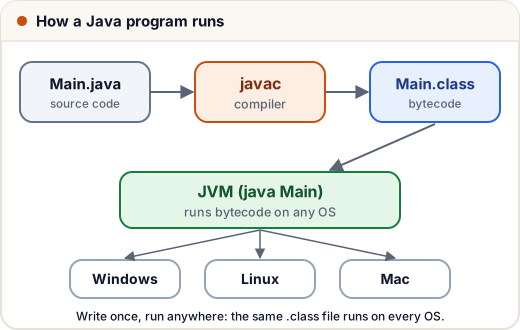
- You write
Main.java(source code). - The compiler
javacturns it into bytecode (Main.class). - The JVM (Java Virtual Machine) runs the bytecode.
Because every operating system has a JVM, the same .class file runs everywhere: "Write Once, Run Anywhere".
2. JDK vs JRE vs JVM (a classic interview question)
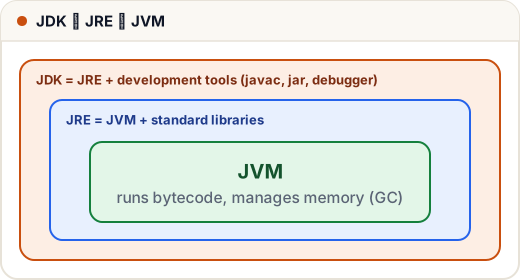
| What it is | Who needs it | |
|---|---|---|
| JVM | runs bytecode, manages memory (garbage collection) | part of the JRE |
| JRE | JVM + standard libraries | anyone who only runs Java programs |
| JDK | JRE + tools (javac, jar, debugger) | developers — install this |
3. Install the JDK
- Download JDK 21 (LTS) from adoptium.net or oracle.com.
- Install it, then open a terminal and check:
java -versionandjavac -version.
4. Your first program
public class Main {
    public static void main(String[] args) {
        System.out.println("Hello, Skills101!");
    }
}
Hello, Skills101!
Save it as Main.java (the file name must match the public class name), then:
javac Main.java     ← compile: creates Main.class
java Main           ← run
Line by line
| Code | Meaning |
|---|---|
public class Main | every Java program lives inside a class |
public static void main(String[] args) | the entry point — the JVM starts here |
public | the JVM can call it from outside |
static | runs without creating an object |
void | returns nothing |
String[] args | command-line arguments |
System.out.println(…) | print a line |
Every statement ends with a semicolon ;, and blocks use curly braces { }.
5. print vs println
public class Main {
    public static void main(String[] args) {
        System.out.print("Learn ");
        System.out.print("Java");
        System.out.println();
        System.out.println("Sum: " + (10 + 5));
        System.out.println("Sum: " + 10 + 5);
    }
}
Learn Java
Sum: 15
Sum: 105
print stays on the same line; println moves to a new line. Notice the last line: "Sum: " + 10 makes text first, then + 5 joins "5" — use brackets for maths.
6. Comments
// single-line comment
/* multi-line
   comment */
/** documentation comment (used by the javadoc tool) */
Common mistakes
- File name doesn't match the class name (
public class Mainmust be inMain.java). - Missing semicolons.
- Writing
system.out.println— Java is case-sensitive:Systemhas a capital S.
Quick recap
- javac compiles .java → .class (bytecode); the JVM runs it on any OS.
- JDK ⊃ JRE ⊃ JVM. Developers install the JDK.
public static void main(String[] args)is where execution starts.- Statements end with
;; blocks use{ }; Java is case-sensitive.