Java Programming · Lesson 3 of 15 · Updated ·
Java Operators, Scanner Input, if-else, switch and Loops
This lesson covers everything you need to write small programs: operators, reading input, decisions and loops. The ideas are the same as in other languages, so the focus is on Java syntax and traps.
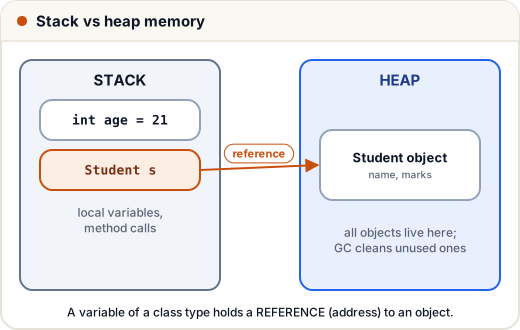
(Keep this picture in mind: every int you create in main lives on the stack; objects like Scanner live on the heap.)
1. Operators you'll use
- Arithmetic:
+ - * / % - Increment:
i++(use then add),++i(add then use) - Comparison:
== != > < >= <= - Logical:
&&(and),||(or),!(not) — they short-circuit - Ternary:
condition ? a : b
public class Main {
    public static void main(String[] args) {
        int i = 5;
        int a = i++;   // a = 5, then i = 6
        int b = ++i;   // i = 7, then b = 7
        System.out.println(a + " " + b + " " + i);
        int marks = 72;
        String result = marks >= 40 ? "Pass" : "Fail";
        System.out.println(result);
    }
}
5 7 7
Pass
2. Reading input with Scanner
import java.util.Scanner;

public class Main {
    public static void main(String[] args) {
        // Input: Asha
        // Input: 20 30
        Scanner sc = new Scanner(System.in);
        String name = sc.nextLine();
        int x = sc.nextInt();
        int y = sc.nextInt();
        System.out.println("Hi " + name + ", sum = " + (x + y));
    }
}
Hi Asha, sum = 50
nextInt(), nextDouble(), next() (one word), nextLine() (whole line).
Trap: after
nextInt(), the Enter key is still waiting. A followingnextLine()reads that empty line. Call an extrasc.nextLine()to skip it.
3. if, else if, else
public class Main {
    public static void main(String[] args) {
        int marks = 86;
        if (marks >= 90) {
            System.out.println("A");
        } else if (marks >= 75) {
            System.out.println("B");
        } else {
            System.out.println("C");
        }
    }
}
B
4. switch
public class Main {
    public static void main(String[] args) {
        int day = 3;
        switch (day) {
            case 1:
                System.out.println("Monday");
                break;
            case 3:
                System.out.println("Wednesday");
                // no break → falls through!
            case 4:
                System.out.println("Thursday");
                break;
            default:
                System.out.println("Other");
        }
        String type = switch (day) {          // Java 14+ arrow form: no fall-through
            case 6, 7 -> "Weekend";
            default -> "Weekday";
        };
        System.out.println(type);
    }
}
Wednesday
Thursday
Weekday
Forgetting
breakmakes execution fall through into the next case. The arrow form (->) avoids this.
5. Loops
public class Main {
    public static void main(String[] args) {
        for (int i = 1; i <= 5; i++) {
            System.out.print(i + " ");
        }
        System.out.println();

        int n = 1234, sum = 0;
        while (n > 0) {
            sum += n % 10;
            n /= 10;
        }
        System.out.println("digit sum " + sum);

        int k = 10;
        do {
            System.out.println("runs once even though k > 5");
        } while (k < 5);

        int[] marks = {70, 85, 92};
        for (int m : marks) {          // for-each
            System.out.print(m + " ");
        }
        System.out.println();
    }
}
1 2 3 4 5
digit sum 10
runs once even though k > 5
70 85 92
do-whileruns the body at least once (the check is at the end).breakexits a loop;continueskips to the next round.
6. A pattern with nested loops
public class Main {
    public static void main(String[] args) {
        for (int i = 1; i <= 4; i++) {
            for (int j = 1; j <= i; j++) {
                System.out.print(j);
            }
            System.out.println();
        }
    }
}
1
12
123
1234
Common mistakes
- Using
=instead of==in conditions. - Forgetting
breakin a classic switch. - Comparing Strings with
==(next lessons explain why to use.equals()). - The
nextInt()+nextLine()trap with Scanner.
Quick recap
i++uses then increments;++iincrements then uses.- Scanner:
nextInt,nextLine; mind the leftover newline. - if / else if / else; switch with
breakor the arrow form. - for, while, do-while (at least once), for-each for arrays and collections.