Java Programming · Lesson 4 of 15 · Updated ·
Arrays in Java — 1D, 2D, the Arrays Class and Common Programs
An array stores a fixed number of values of the same type in a row. Its size is set when it is created and can't change.
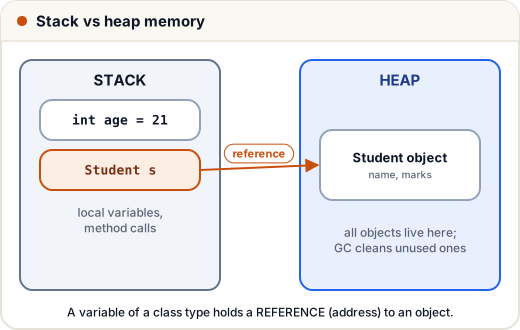
(An array is an object: the variable holds a reference to it on the heap. That's why copying the variable doesn't copy the array.)
1. Create and use
public class Main {
    public static void main(String[] args) {
        int[] marks = {78, 92, 65, 88};       // values known
        int[] scores = new int[3];            // size 3, filled with 0
        scores[0] = 50;
        System.out.println(marks[1] + " " + marks.length + " " + scores[2]);
        for (int i = 0; i < marks.length; i++) {
            System.out.print(marks[i] + " ");
        }
        System.out.println();
    }
}
92 4 0
78 92 65 88
- Indexes run from 0 to length − 1.
marks[4]here throws ArrayIndexOutOfBoundsException.- Default values: 0 for numbers,
falsefor boolean,nullfor objects.
2. The Arrays helper class
import java.util.Arrays;

public class Main {
    public static void main(String[] args) {
        int[] nums = {42, 7, 19, 3};
        Arrays.sort(nums);
        System.out.println(Arrays.toString(nums));
        System.out.println(Arrays.binarySearch(nums, 19));
        int[] copy = Arrays.copyOf(nums, 6);
        System.out.println(Arrays.toString(copy));
        int[] filled = new int[3];
        Arrays.fill(filled, 9);
        System.out.println(Arrays.toString(filled));
    }
}
[3, 7, 19, 42]
2
[3, 7, 19, 42, 0, 0]
[9, 9, 9]
System.out.println(nums)prints something like[I@1b6d3586(a reference), not the values. UseArrays.toString(nums).
3. Copying: reference vs real copy
import java.util.Arrays;

public class Main {
    public static void main(String[] args) {
        int[] a = {1, 2, 3};
        int[] b = a;                 // same array
        int[] c = a.clone();         // real copy
        a[0] = 100;
        System.out.println(Arrays.toString(b) + " " + Arrays.toString(c));
    }
}
[100, 2, 3] [1, 2, 3]
4. 2D arrays
public class Main {
    public static void main(String[] args) {
        int[][] grid = {
            {1, 2, 3},
            {4, 5, 6}
        };
        System.out.println(grid[1][2] + " rows=" + grid.length + " cols=" + grid[0].length);
        for (int[] row : grid) {
            int sum = 0;
            for (int v : row) sum += v;
            System.out.println(sum);
        }
    }
}
6 rows=2 cols=3
6
15
5. Interview programs
Largest, smallest and average
public class Main {
    public static void main(String[] args) {
        int[] a = {12, 45, 7, 30};
        int max = a[0], min = a[0], sum = 0;
        for (int x : a) {
            max = Math.max(max, x);
            min = Math.min(min, x);
            sum += x;
        }
        System.out.println(max + " " + min + " " + (double) sum / a.length);
    }
}
45 7 23.5
Reverse in place (two pointers)
import java.util.Arrays;

public class Main {
    public static void main(String[] args) {
        int[] a = {1, 2, 3, 4, 5};
        for (int l = 0, r = a.length - 1; l < r; l++, r--) {
            int t = a[l]; a[l] = a[r]; a[r] = t;
        }
        System.out.println(Arrays.toString(a));
    }
}
[5, 4, 3, 2, 1]
Second largest (one pass)
public class Main {
    public static void main(String[] args) {
        int[] a = {10, 45, 45, 30, 7};
        int first = Integer.MIN_VALUE, second = Integer.MIN_VALUE;
        for (int x : a) {
            if (x > first) { second = first; first = x; }
            else if (x > second && x != first) second = x;
        }
        System.out.println(second);
    }
}
30
More array patterns are in our DSA arrays tutorial.
Common mistakes
- Looping with
i <= a.length(one too far). - Printing an array directly instead of
Arrays.toString. - Thinking
b = acopies an array.
Quick recap
- Fixed size, same type, index 0 … length − 1.
Arrays.sort,toString,fill,copyOf,binarySearch.b = ashares;a.clone()copies.- 2D arrays are arrays of arrays.