AdvancedJava Programming · Lesson 22 of 29 · Updated ·
Optional in Java — Handling Missing Values Without NullPointerException
NullPointerException is the most common crash in Java programs. It usually happens because a method returned null to mean "nothing found", and the caller forgot to check. Optional<T> (Java 8) is a small box that either holds one value or is empty. When a method returns Optional<Student> instead of Student, the missing case is written right in the method's type, and the caller has to deal with it.
1. The problem with returning null
import java.util.*;

public class Main {
    static Map<Integer, String> names = Map.of(1, "Asha", 2, "Ravi");

    static String findName(int roll) {              // returns null if not found
        return names.get(roll);
    }

    static Optional<String> findNameSafe(int roll) { // says "may be empty" in its type
        return Optional.ofNullable(names.get(roll));
    }

    public static void main(String[] args) {
        try {
            System.out.println(findName(7).toUpperCase());
        } catch (NullPointerException e) {
            System.out.println("Crash: NullPointerException");
        }
        System.out.println(findNameSafe(7).map(String::toUpperCase).orElse("NOT FOUND"));
        System.out.println(findNameSafe(1).map(String::toUpperCase).orElse("NOT FOUND"));
    }
}
Crash: NullPointerException
NOT FOUND
ASHA
Nothing in String findName(int) warns you that it can return null. With Optional<String>, you cannot call toUpperCase() on the box directly; you must say what happens when it is empty.
2. Creating an Optional
| Method | Use when | If the value is null |
|---|---|---|
Optional.of(v) | you are sure v is not null | throws NullPointerException |
Optional.ofNullable(v) | v might be null | gives an empty Optional |
Optional.empty() | you have nothing to return | — |
Streams also return Optionals: findFirst(), findAny(), max(), min() and reduce(op) all give an Optional, because the stream might be empty.
3. Getting the value out
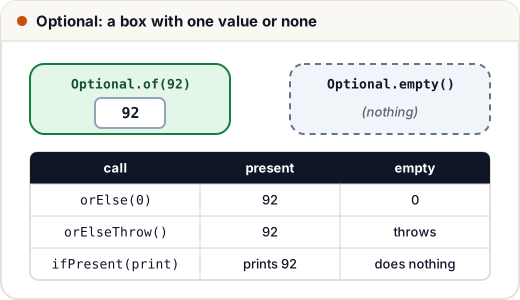
import java.util.*;

public class Main {
    public static void main(String[] args) {
        Optional<Integer> present = Optional.of(92);
        Optional<Integer> empty = Optional.empty();

        System.out.println(present.isPresent() + " " + empty.isEmpty());
        System.out.println(present.orElse(0) + " " + empty.orElse(0));

        present.ifPresent(m -> System.out.println("Marks: " + m));
        empty.ifPresent(m -> System.out.println("never printed"));
        empty.ifPresentOrElse(
            m -> System.out.println("Marks: " + m),
            () -> System.out.println("Result not declared yet"));

        try {
            empty.orElseThrow(() -> new IllegalStateException("no marks for this roll number"));
        } catch (IllegalStateException e) {
            System.out.println("Error: " + e.getMessage());
        }
    }
}
true true
92 0
Marks: 92
Result not declared yet
Error: no marks for this roll number
orElse(x)— value, orx.orElseGet(supplier)— value, or call the supplier to make one.orElseThrow()— value, or throwNoSuchElementException; pass a supplier to throw your own exception.ifPresent(action)/ifPresentOrElse(action, emptyAction)— run code instead of returning something.get()— value, or throw. It is the same asorElseThrow()but its name hides the danger; avoid it.
orElse vs orElseGet (a favourite interview question)
The argument of orElse is always evaluated, even when the Optional has a value. orElseGet calls its supplier only when empty. This matters when the fallback is expensive, such as a database call.
import java.util.*;

public class Main {
    static String loadDefault() {
        System.out.println("  (loading default from database...)");
        return "Guest";
    }

    public static void main(String[] args) {
        Optional<String> user = Optional.of("Asha");
        System.out.println("orElse:");
        System.out.println(user.orElse(loadDefault()));
        System.out.println("orElseGet:");
        System.out.println(user.orElseGet(Main::loadDefault));
    }
}
orElse:
  (loading default from database...)
Asha
orElseGet:
Asha
Even though user holds "Asha", orElse still ran loadDefault(). Use orElse for constants, orElseGet for anything that does work.
4. Transforming: map, filter, flatMap
You do not need to open the box to work with what is inside. These methods return a new Optional, and an empty Optional just passes through, so you never write a null check.
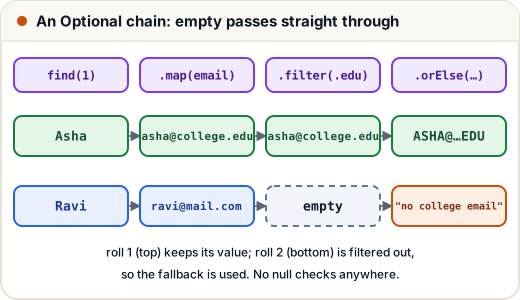
import java.util.*;

record Student(String name, String email) { }

public class Main {
    static Map<Integer, Student> db = Map.of(
        1, new Student("Asha", "asha@college.edu"),
        2, new Student("Ravi", "ravi@mail.com"));

    static Optional<Student> find(int roll) { return Optional.ofNullable(db.get(roll)); }

    static String collegeEmail(int roll) {
        return find(roll)
            .map(Student::email)                      // Optional<String>
            .filter(e -> e.endsWith(".edu"))          // keep only college emails
            .map(String::toUpperCase)
            .orElse("no college email");
    }

    public static void main(String[] args) {
        System.out.println(collegeEmail(1));
        System.out.println(collegeEmail(2));
        System.out.println(collegeEmail(9));
    }
}
ASHA@COLLEGE.EDU
no college email
no college email
map(f)— applyfto the value if present.filter(p)— keep the value only ifpis true; otherwise become empty.flatMap(f)— use it whenfitself returns an Optional.mapwould give youOptional<Optional<T>>;flatMapflattens it.
import java.util.*;

public class Main {
    static Optional<Integer> parse(String s) {
        try {
            return Optional.of(Integer.parseInt(s));
        } catch (NumberFormatException e) {
            return Optional.empty();
        }
    }

    public static void main(String[] args) {
        Optional<String> input = Optional.of("85");
        Optional<Optional<Integer>> nested = input.map(Main::parse);
        Optional<Integer> flat = input.flatMap(Main::parse);
        System.out.println(nested);
        System.out.println(flat);
        System.out.println(Optional.of("8x5").flatMap(Main::parse).orElse(-1));
    }
}
Optional[Optional[85]]
Optional[85]
-1
5. Where to use Optional — and where not
| Do | Don't |
|---|---|
Return Optional<T> from a method that may find nothing | Use Optional as a field in a class |
Chain map / filter / orElse | Take Optional as a method parameter |
Use OptionalInt / OptionalDouble for primitives | Return Optional<List<T>> — return an empty list instead |
Use orElseThrow when absence is a bug | Write if (opt.isPresent()) opt.get() everywhere — that is just a null check with extra steps |
Optional was designed as a return type. It is not serializable and adds an object per value, so it does not belong in fields or collections.
Common mistakes
Optional.of(maybeNull)— throws if the value is null. UseofNullable.- Calling
get()without checking; useorElse,orElseGetororElseThrow. - Using
orElse(expensiveCall())— the call always runs. UseorElseGet. - Returning
nullfrom a method whose return type isOptional— returnOptional.empty(). - Using
mapwith a function that returns an Optional, ending up withOptional<Optional<T>>. UseflatMap.
Quick recap
Optional<T>is a box with one value or none; it makes "may be missing" part of the type.- Create with
of(never null),ofNullable(maybe null),empty(). - Read with
orElse,orElseGet(lazy),orElseThrow,ifPresent,ifPresentOrElse. - Transform with
map,filter,flatMap; an empty box passes through. - Use Optional for return values, not for fields, parameters or collections.