AdvancedJava Programming · Lesson 23 of 29 · Updated ·
Comparable vs Comparator in Java — Sorting Objects by One or Many Fields
Java can sort numbers and Strings on its own, because it knows their order. For your own class — a Student, a Train, a Product — Java has no idea whether to sort by name, by marks or by price. You tell it with Comparable (one built-in "natural" order) or Comparator (any number of orders, written outside the class). The HashMap lesson introduced both; this lesson covers multi-field sorting and the bugs that appear in real code and tricky interview questions.
1. The compare contract
Both interfaces come down to one rule. A compare method returns an int:
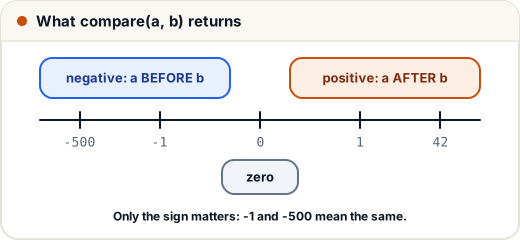
Result of compare(a, b) | Meaning |
|---|---|
| negative (any value below 0) | a comes before b |
| zero | same position (equal for this order) |
| positive (any value above 0) | a comes after b |
Only the sign matters, not the size. -1 and -500 mean the same thing.
2. Comparable: the natural order
A class implements Comparable<T> and its compareTo method when it has one obvious order. String (alphabetical), Integer (numeric) and LocalDate (calendar) all do. Collections.sort(list), list.sort(null), TreeSet and TreeMap use it automatically.
import java.util.*;

class Train implements Comparable<Train> {
    final String name;
    final int departs;          // time as hhmm, e.g. 1430

    Train(String name, int departs) { this.name = name; this.departs = departs; }

    @Override
    public int compareTo(Train other) {
        return Integer.compare(this.departs, other.departs);   // earlier train first
    }

    @Override
    public String toString() { return name + "@" + departs; }
}

public class Main {
    public static void main(String[] args) {
        List<Train> trains = new ArrayList<>(List.of(
            new Train("Shatabdi", 1430), new Train("Rajdhani", 615), new Train("Duronto", 2210)));
        Collections.sort(trains);                  // uses compareTo
        System.out.println(trains);
        System.out.println(Collections.min(trains) + " leaves first");
    }
}
[Rajdhani@615, Shatabdi@1430, Duronto@2210]
Rajdhani@615 leaves first
3. Comparator: any order you need
A Comparator<T> is a separate object, so you can have as many as you like, and you can sort classes you cannot change (library classes, records from someone else). Since Java 8 you rarely write compare by hand — you build comparators from small pieces:
| Builder | Meaning |
|---|---|
Comparator.comparing(Student::name) | by a key that is Comparable |
Comparator.comparingInt(Student::marks) | by an int key (no boxing) |
.reversed() | flip the whole order so far |
.thenComparing(…) | tie-breaker when the earlier keys are equal |
Comparator.naturalOrder() / reverseOrder() | use or flip Comparable |
Comparator.nullsFirst(c) / nullsLast(c) | put null values at one end instead of crashing |
Sorting by several fields
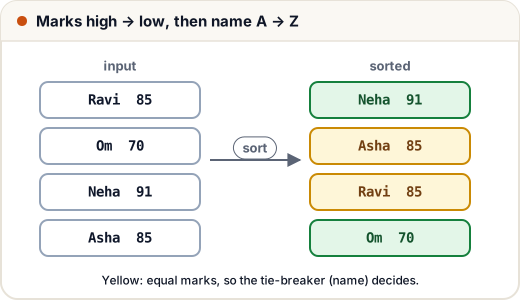
A placement cell wants a merit list: marks high to low, and for equal marks, name A to Z.
import java.util.*;

record Student(String name, int marks, String city) { }

public class Main {
    public static void main(String[] args) {
        List<Student> list = new ArrayList<>(List.of(
            new Student("Ravi", 85, "Pune"), new Student("Om", 70, "Jaipur"),
            new Student("Neha", 91, "Pune"), new Student("Asha", 85, "Delhi")));

        list.sort(Comparator.comparingInt(Student::marks).reversed()
                            .thenComparing(Student::name));
        list.forEach(s -> System.out.println(s.marks() + " " + s.name()));

        list.sort(Comparator.comparing(Student::city).thenComparing(Student::marks, Comparator.reverseOrder()));
        System.out.println(list.stream().map(s -> s.city() + ":" + s.name()).toList());
    }
}
91 Neha
85 Asha
85 Ravi
70 Om
[Delhi:Asha, Jaipur:Om, Pune:Neha, Pune:Ravi]
Watch where reversed() goes. It reverses everything built so far. comparing(name).thenComparing(marks).reversed() reverses both keys. To reverse only one key, pass Comparator.reverseOrder() to that thenComparing, as in the second sort above.
Handling null values
import java.util.*;

public class Main {
    public static void main(String[] args) {
        List<String> cities = new ArrayList<>(Arrays.asList("Pune", null, "Agra", "Delhi"));
        try {
            cities.sort(Comparator.naturalOrder());
        } catch (NullPointerException e) {
            System.out.println("natural order crashes on null");
        }
        cities.sort(Comparator.nullsLast(Comparator.naturalOrder()));
        System.out.println(cities);
        cities.sort(Comparator.nullsFirst(Comparator.<String>reverseOrder()));
        System.out.println(cities);
    }
}
natural order crashes on null
[Agra, Delhi, Pune, null]
[null, Pune, Delhi, Agra]
4. The subtraction bug
Many tutorials write return a.marks - b.marks;. It works for small numbers, but for large values the subtraction overflows (goes past the int range and wraps around), and the sign comes out wrong.
import java.util.*;

public class Main {
    public static void main(String[] args) {
        Comparator<Integer> bySubtraction = (a, b) -> a - b;          // buggy
        Comparator<Integer> byCompare = (a, b) -> Integer.compare(a, b); // correct

        List<Integer> nums = new ArrayList<>(List.of(5, Integer.MIN_VALUE, Integer.MAX_VALUE, -3));
        nums.sort(bySubtraction);
        System.out.println(nums);
        nums.sort(byCompare);
        System.out.println(nums);
        System.out.println(Integer.MAX_VALUE - (-3));                  // overflow: should be positive
    }
}
[5, 2147483647, -2147483648, -3]
[-2147483648, -3, 5, 2147483647]
-2147483646
Always use Integer.compare, Long.compare, Double.compare, or Comparator.comparingInt(…).
5. TreeSet and TreeMap trust compare, not equals
A TreeSet decides that two objects are duplicates when compare returns 0 — it never calls equals. If two different students have the same marks and you sort only by marks, the tree keeps just one of them.
import java.util.*;

record Student(String name, int marks) { }

public class Main {
    public static void main(String[] args) {
        Set<Student> byMarks = new TreeSet<>(Comparator.comparingInt(Student::marks));
        byMarks.add(new Student("Asha", 85));
        byMarks.add(new Student("Ravi", 85));       // compare gives 0 → treated as duplicate!
        byMarks.add(new Student("Om", 70));
        System.out.println(byMarks.size() + " " + byMarks);

        Set<Student> fixed = new TreeSet<>(Comparator.comparingInt(Student::marks).thenComparing(Student::name));
        fixed.addAll(List.of(new Student("Asha", 85), new Student("Ravi", 85), new Student("Om", 70)));
        System.out.println(fixed.size());
    }
}
2 [Student[name=Om, marks=70], Student[name=Asha, marks=85]]
3
Rule: an order used in a TreeSet or TreeMap should be consistent with equals — return 0 only for objects that really are the same. Add tie-breakers until it does.
6. Quick comparison
| Comparable | Comparator | |
|---|---|---|
| Package | java.lang | java.util |
| Method | compareTo(T other) | compare(T a, T b) |
| Where | inside the class | separate object (often a lambda) |
| How many | one natural order | as many as you need |
| Changes the class? | yes | no |
| Used by | Collections.sort(list), TreeSet<>() | list.sort(c), new TreeSet<>(c), stream.sorted(c) |
List.sort and Collections.sort are stable: elements that compare equal keep their original relative order.
Common mistakes
- Returning
a - bfrom a compare method (overflow for large or negative values). - Calling
.reversed()at the end and reversing every key instead of one. - Sorting a list that contains
nullwithoutnullsFirst/nullsLast. - Using a comparator that returns 0 for different objects in a
TreeSet, silently losing data. - Expecting
compareToto return exactly -1, 0 or 1 — check the sign only.
Quick recap
- compare returns negative (before), zero (same), positive (after); only the sign matters.
- Comparable = one natural order inside the class; Comparator = any order, outside.
- Build comparators:
comparing,comparingInt,thenComparing,reversed,nullsLast. - Never subtract to compare; use
Integer.compare. - TreeSet/TreeMap treat compare == 0 as a duplicate, so include tie-breakers.