AdvancedJava Programming · Lesson 26 of 29 · Updated ·
Java Concurrency Utilities — AtomicInteger, ConcurrentHashMap, CountDownLatch and CompletableFuture
The multithreading lesson showed threads, synchronized and a basic thread pool. In real projects you rarely write synchronized blocks by hand. The package java.util.concurrent (added in Java 5 and extended in Java 8) gives ready-made, well-tested tools for the common jobs: counting safely, sharing a map, waiting for other threads, and chaining background tasks. This lesson covers the ones that interviewers and real code use most.
1. Why not just synchronized?
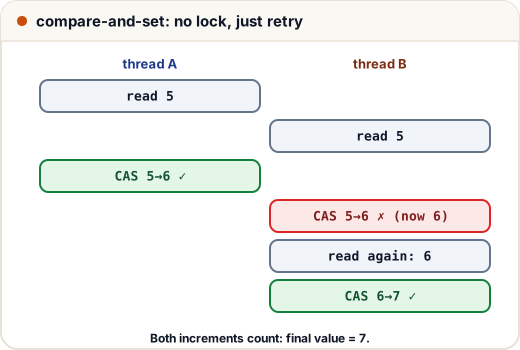
Recall the problem: count++ looks like one step but is really three — read the value, add 1, write it back. If two threads read 5 at the same time, both write 6, and one increment is lost. This is a race condition.
synchronized fixes it by letting only one thread at a time into the block. That is correct, but every other thread must wait (block), even for a tiny operation. The concurrent utilities are usually faster and, more importantly, much harder to get wrong.
2. Atomic variables and compare-and-set
AtomicInteger, AtomicLong and AtomicBoolean (package java.util.concurrent.atomic) make single-variable updates atomic — they happen as one indivisible step, with no lock.
They use a CPU instruction called compare-and-set (CAS): "set the value to 6 only if it is still 5". If another thread changed it first, CAS fails and the method simply tries again with the new value.
import java.util.*;
import java.util.concurrent.*;
import java.util.concurrent.atomic.*;

public class Main {
    public static void main(String[] args) throws Exception {
        AtomicInteger visits = new AtomicInteger();
        ExecutorService pool = Executors.newFixedThreadPool(4);
        for (int t = 0; t < 4; t++) {
            pool.submit(() -> {
                for (int i = 0; i < 10_000; i++) visits.incrementAndGet();
            });
        }
        pool.shutdown();
        pool.awaitTermination(10, TimeUnit.SECONDS);
        System.out.println("visits = " + visits.get());

        AtomicInteger seats = new AtomicInteger(2);
        System.out.println(seats.compareAndSet(2, 1) + " " + seats.get());
        System.out.println(seats.compareAndSet(2, 0) + " " + seats.get());
        System.out.println(seats.getAndAdd(5) + " -> " + seats.get());
    }
}
visits = 40000
true 1
false 1
1 -> 6
With a plain int and count++, the total would often come out below 40000, and differently on each run. getAndAdd returns the old value; addAndGet and incrementAndGet return the new one.
3. ConcurrentHashMap: a map many threads can share
A normal HashMap can be corrupted when several threads write to it at once. ConcurrentHashMap is safe, and it does not lock the whole map for every operation, so threads working on different keys rarely wait for each other.
But safe single calls are not enough. This "check-then-act" code is still a race, because another thread can run between the two lines:
if (!map.containsKey(word)) map.put(word, 0);   // two separate steps
map.put(word, map.get(word) + 1);               // read, then write: not atomic
Use the atomic methods instead: merge, compute, putIfAbsent, computeIfAbsent.
import java.util.*;
import java.util.concurrent.*;

public class Main {
    public static void main(String[] args) throws Exception {
        List<String> orders = List.of("tea", "coffee", "tea", "samosa", "tea", "coffee");
        ConcurrentHashMap<String, Integer> count = new ConcurrentHashMap<>();
        ExecutorService pool = Executors.newFixedThreadPool(3);
        for (int round = 0; round < 100; round++) {
            for (String item : orders) {
                pool.submit(() -> count.merge(item, 1, Integer::sum));
            }
        }
        pool.shutdown();
        pool.awaitTermination(10, TimeUnit.SECONDS);
        System.out.println(new TreeMap<>(count));
    }
}
{coffee=200, samosa=100, tea=300}
merge(key, 1, Integer::sum) means: put 1 if the key is new, otherwise add 1 to the old value — as one atomic step. Note: ConcurrentHashMap does not allow null keys or values.
4. Waiting for tasks: invokeAll and CountDownLatch
Often a main thread hands out work and must wait until all of it is done. invokeAll submits a list of Callable tasks and waits for all of them, returning their Futures in the same order as the tasks.
A CountDownLatch is a counter that threads count down; await() blocks until it reaches zero. A typical use: start serving only after all services have loaded.
import java.util.*;
import java.util.concurrent.*;

public class Main {
    public static void main(String[] args) throws Exception {
        ExecutorService pool = Executors.newFixedThreadPool(3);

        List<Callable<Integer>> jobs = List.of(() -> 10 * 10, () -> 20 * 20, () -> 30 * 30);
        int total = 0;
        for (Future<Integer> f : pool.invokeAll(jobs)) total += f.get();
        System.out.println("total = " + total);

        CountDownLatch ready = new CountDownLatch(3);
        for (String svc : List.of("database", "cache", "payments")) {
            pool.submit(() -> {
                // ... load the service ...
                ready.countDown();
            });
        }
        ready.await();                        // blocks until the count is 0
        System.out.println("all 3 services ready, count = " + ready.getCount());
        pool.shutdown();
    }
}
total = 1400
all 3 services ready, count = 0
A latch is one-time: once it reaches zero it cannot be reset. (CyclicBarrier is the reusable cousin.)
5. CompletableFuture: chaining async work
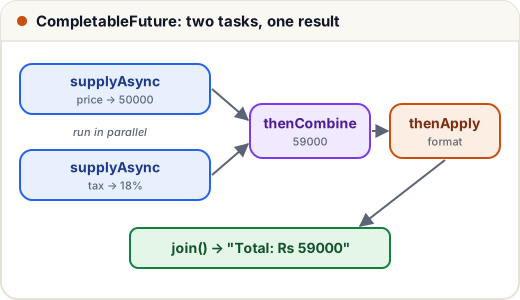
Future.get() blocks the thread that calls it. CompletableFuture (Java 8) lets you describe what to do when the result arrives, and combine several background tasks without blocking in between.
| Method | Meaning |
|---|---|
supplyAsync(() -> …) | run a task in the background, producing a value |
thenApply(f) | transform the result when it is ready (like map) |
thenCombine(other, f) | wait for two results and combine them |
thenCompose(f) | chain a task that itself returns a CompletableFuture (like flatMap) |
exceptionally(f) | give a fallback value if anything failed |
join() / get() | wait for the final result |
import java.util.concurrent.*;

public class Main {
    static int price(String item) { return item.equals("laptop") ? 50000 : 800; }

    public static void main(String[] args) {
        CompletableFuture<Integer> priceF = CompletableFuture.supplyAsync(() -> price("laptop"));
        CompletableFuture<Integer> taxF = CompletableFuture.supplyAsync(() -> 18);

        String bill = priceF
            .thenCombine(taxF, (p, t) -> p + p * t / 100)
            .thenApply(total -> "Total: Rs " + total)
            .join();
        System.out.println(bill);

        String safe = CompletableFuture.supplyAsync(() -> 10 / 0)
            .thenApply(x -> "result " + x)
            .exceptionally(ex -> "failed: " + ex.getCause().getClass().getSimpleName())
            .join();
        System.out.println(safe);
    }
}
Total: Rs 59000
failed: ArithmeticException
When a stage throws, the later thenApply steps are skipped and exceptionally receives the error (wrapped in a CompletionException, so getCause() gives the original). By default supplyAsync runs on the shared ForkJoinPool.commonPool(); for slow I/O tasks, pass your own executor as a second argument.
6. Which tool for which job?
| Job | Tool |
|---|---|
| A shared counter or flag | AtomicInteger, AtomicLong, AtomicBoolean |
| A shared map | ConcurrentHashMap with merge / compute |
| A list read often, changed rarely | CopyOnWriteArrayList |
| Producer–consumer hand-off | BlockingQueue (put waits when full, take waits when empty) |
| Wait until N things finish | CountDownLatch, or invokeAll |
| Allow only N threads at once (e.g. 3 DB connections) | Semaphore(3) with acquire / release |
Lock with tryLock and timeouts | ReentrantLock (always unlock() in finally) |
| Chain background tasks | CompletableFuture |
Common mistakes
- Using
count++on a sharedintorInteger; useAtomicInteger. - Doing
getthenputon aConcurrentHashMapand believing it is atomic; usemergeorcompute. - Forgetting
shutdown()on anExecutorService, so the program never exits. - Calling
get()on eachFutureimmediately after submitting it, which makes the work run one by one. - Putting
nullinto aConcurrentHashMap(it throwsNullPointerException). - Ignoring exceptions in
CompletableFuturechains; addexceptionallyorhandle.
Quick recap
java.util.concurrentreplaces most hand-written locking.- Atomic classes use compare-and-set: update only if the value is unchanged, else retry.
ConcurrentHashMap.merge/computedo read-modify-write as one step.invokeAllandCountDownLatchwait for a group of tasks.CompletableFuture:supplyAsync→thenApply/thenCombine→exceptionally→join.