AdvancedCloud & DevOps · Lesson 11 of 14 · Updated ·
Secrets and Configuration — Environment Variables, .env Files, Secret Managers and Leak Response
Every app needs settings: the database address, the payment gateway key, the email password, the port to listen on. Some of these are harmless (the port). Some are secrets: anyone who sees them can steal data or spend your money. A large share of real security incidents start with a secret that was committed to Git, pasted in a chat or printed in a log. This lesson shows where configuration and secrets should live, and what to do when one leaks.
1. Config is not code
The Twelve-Factor App guidelines (a widely used set of rules for building cloud apps) say: store configuration in the environment, not in the code. The idea is simple:
- You build the app once (one Docker image, one jar).
- The same build runs on your laptop, on staging and in production.
- Only the configuration changes between them.
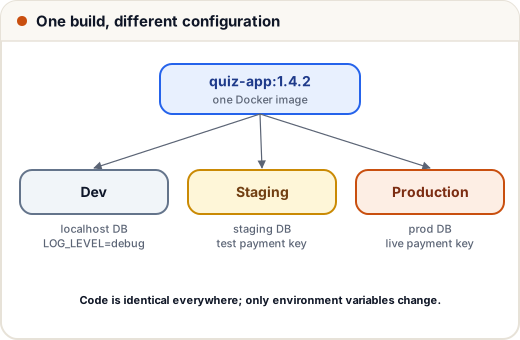
| Setting | Dev (laptop) | Staging | Production |
|---|---|---|---|
DATABASE_URL | local Postgres | staging DB | production DB |
LOG_LEVEL | debug | info | info |
PAYMENT_KEY | test key | test key | live key |
If the database address were written inside the code, you would need a different build for each place, and the production password would sit in Git for every developer and every laptop to see.
2. Environment variables and .env files
An environment variable is a named value given to a process when it starts. Your code reads it with os.environ (Python), process.env (Node.js) or System.getenv (Java). On a laptop, people keep these in a .env file that tools load at startup:
DATABASE_URL=postgres://app:devpass@localhost:5432/quiz
JWT_SECRET=dev-only-not-a-real-secret
LOG_LEVEL=debug
Two rules: add .env to .gitignore so it is never committed, and commit a .env.example with the names but fake values, so new teammates know what to fill in.
A good app fails fast: it checks its configuration at startup and refuses to start if something required is missing, instead of crashing later in the middle of a student's exam.
def load_config(env):
    required = ["DATABASE_URL", "JWT_SECRET"]
    missing = [name for name in required if not env.get(name)]
    if missing:
        return None, "cannot start, missing: " + ", ".join(missing)
    config = {
        "database_url": env["DATABASE_URL"],
        "jwt_secret": env["JWT_SECRET"],
        "log_level": env.get("LOG_LEVEL", "info"),        # optional, with a default
        "port": int(env.get("PORT", "3000")),
    }
    return config, "ok"

staging = {"DATABASE_URL": "postgres://db.staging:5432/quiz", "JWT_SECRET": "s3cr3t", "PORT": "8080"}
broken = {"DATABASE_URL": "postgres://db.prod:5432/quiz"}

config, status = load_config(staging)
print(status, config["log_level"], config["port"])
config, status = load_config(broken)
print(status)
ok info 8080
cannot start, missing: JWT_SECRET
Notice what the code does not do: it never prints the secret's value. Logging a password "for debugging" puts it into log files that many people and tools can read.
3. Where secrets should live
.env files are fine on a laptop. On servers and in pipelines, use a tool built to store secrets:
| Where | Tool | Notes |
|---|---|---|
| CI/CD | GitHub Actions secrets | masked in logs; given to the job as env vars |
| AWS | Secrets Manager, SSM Parameter Store | encrypted with KMS; access controlled by IAM |
| Any cloud / on-prem | HashiCorp Vault | can also create short-lived database passwords |
| Kubernetes | Secret objects | see the warning below |
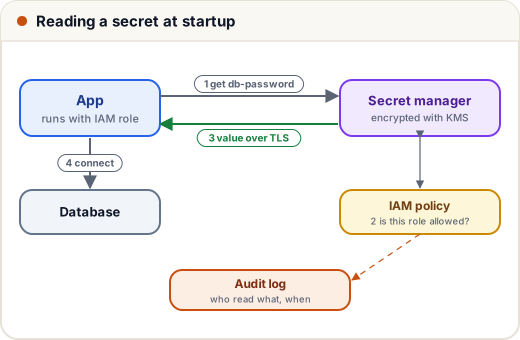
What a secret manager gives you over a file on the server:
- Encryption at rest and access over TLS.
- Access control: only the payment service's role can read the payment key.
- Audit logs: you can see who or what read a secret, and when.
- Rotation: change the value on a schedule without editing code.
Warning about Kubernetes Secrets. The value in a Secret is only base64-encoded. Base64 is a way to write bytes as text; it is not encryption. Anyone who can read the Secret object can decode it in one line:
import base64

stored = "c3VwZXItc2VjcmV0LXBhc3N3b3Jk"      # as it appears in the Secret YAML
print(base64.b64decode(stored).decode())
super-secret-password
So restrict who can read Secrets with RBAC (role-based access control), turn on encryption at rest for the cluster's data store, and many teams sync values from a real secret manager into the cluster.
4. Least privilege and rotation
- Least privilege: each app gets its own credentials with only the permissions it needs. The reporting service gets a read-only database user, not the admin password.
- Short-lived credentials beat long-lived ones. Cloud roles (an EC2 instance role, a Kubernetes service account linked to a cloud role) hand out temporary keys that expire within hours, so there is no permanent key to leak.
- Rotate long-lived secrets regularly and immediately when someone with access leaves the team.
5. Catching leaks before they happen
Secret scanners look for text that matches known key formats. GitHub runs secret scanning on repositories, and tools like gitleaks can run as a pre-commit hook or a CI step. The idea, in a few lines:
import re

PATTERNS = {
    "AWS access key id": r"AKIA[0-9A-Z]{16}",
    "private key": r"-----BEGIN [A-Z ]*PRIVATE KEY-----",
    "password in URL": r"://[^:/\s]+:[^@\s]+@",
}

changed_lines = [
    'region = "ap-south-1"',
    'aws_key = "AKIAABCDEFGHIJKLMNOP"',
    'db = "postgres://app:Pa55word@db.internal:5432/quiz"',
    'timeout_seconds = 30',
]

for number, line in enumerate(changed_lines, start=1):
    for name, pattern in PATTERNS.items():
        if re.search(pattern, line):
            print(f"line {number}: possible {name}")
line 2: possible AWS access key id
line 3: possible password in URL
(The key above is made up and only has the right shape.) Real scanners know hundreds of formats and also check for random-looking strings.
6. Case study: a key pushed to a public repository
Kabir, a final-year student, pushes his project to a public GitHub repository. The .env file with his cloud access key goes along with it. Automated bots scan public repositories continuously, and leaked cloud keys are often abused within minutes, for example to start expensive servers for crypto mining.
What to do, in this order:
- Revoke or rotate the key immediately. Deleting the file is not enough: the key is in Git history, and bots may already have copied it.
- Check what the key was used for. Look at the cloud's audit log (AWS CloudTrail) and the billing page; shut down anything you did not create.
- Remove the secret from history with a tool such as
git filter-repo, then force-push. Treat the old key as public forever anyway. - Prevent a repeat:
.envin.gitignore, a pre-commit secret scanner, and short-lived role credentials instead of personal keys.
The order matters: rewriting history first and rotating later leaves a working key in attackers' hands while you clean up.
Common mistakes
- Hard-coding passwords or API keys in source code or Dockerfiles.
- Committing
.env; or deleting it in a later commit and thinking it is gone from history. - Printing secrets in logs or error messages.
- Believing Kubernetes Secrets are encrypted because they look unreadable.
- One shared admin password for every service, never rotated.
Quick recap
- Build once; change only configuration per environment, through environment variables.
.envfor laptops (in.gitignore, with a.env.example); fail fast when config is missing.- On servers and in CI, use secret managers: encrypted, access-controlled, audited, rotatable.
- Base64 is not encryption; protect Kubernetes Secrets with RBAC and encryption at rest.
- Least privilege, short-lived credentials, scanners in CI; after a leak, rotate first, then investigate and clean up.